
Sub-Agents, Coordinators, and Skills: Multi-Agent Orchestration (Part 9)

Series: The Agent Harness — Part 9 of 12
A single agent hits two kinds of ceilings: capability ceilings (it doesn’t have the right tools for a sub-problem) and context ceilings (the task is too large to fit in one conversation). Multi-agent architectures solve both — but introduce coordination problems that are worse than the original problem if you don’t design them carefully.
This post covers the full multi-agent stack: spawning sub-agents that share context efficiently (Fork pattern), orchestrating specialist workers via a dedicated coordinator (Coordinator pattern), packaging reusable behaviors as skills, and connecting to external tool ecosystems via MCP.
Part 8 covered the hook system. This post covers multi-agent orchestration built on top of it.
Four Built-In Agent Types: Specialist Design
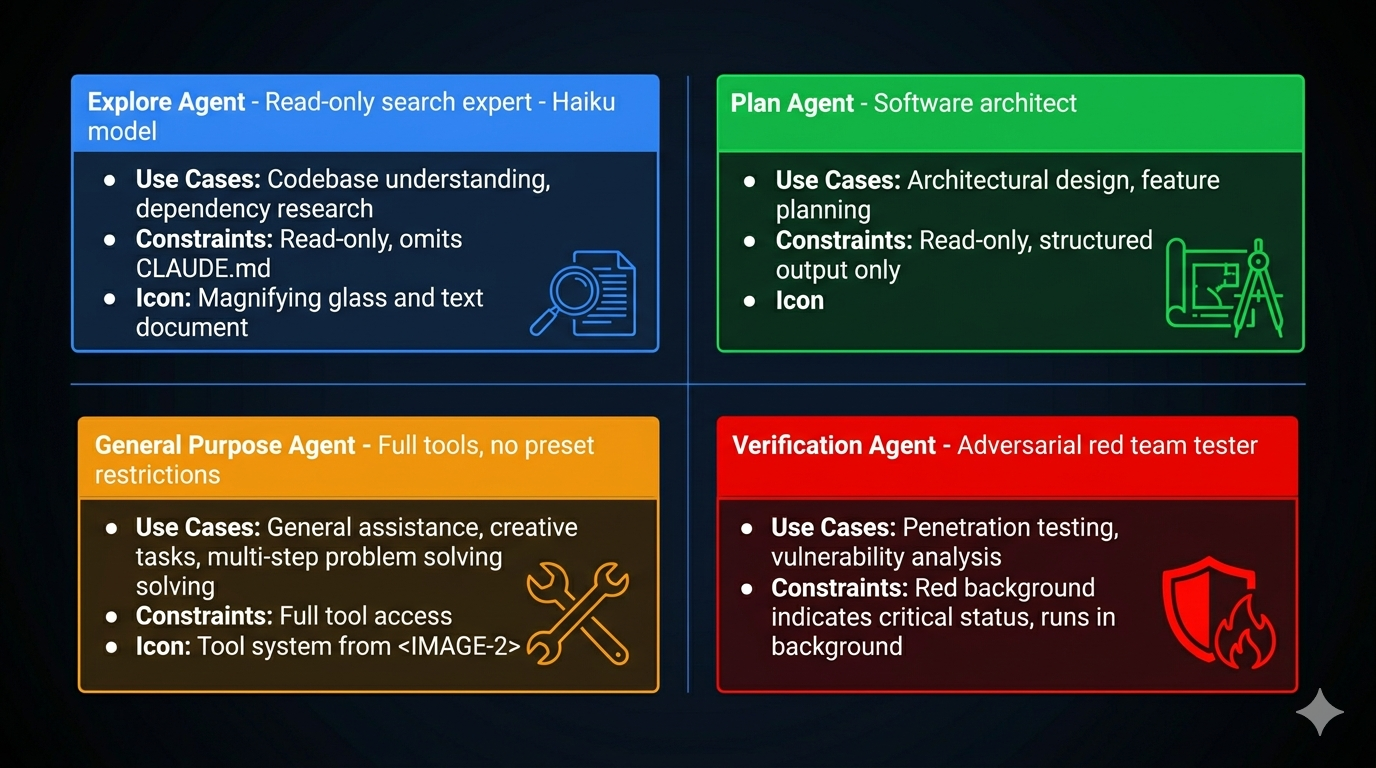
Before discussing orchestration patterns, understand what you’re orchestrating. Claude Code ships four built-in agent types — each a specialist with specific capability constraints.
Explore: Read-Only Code Archaeology
The Explore agent is built for speed and safety. Two design decisions define it:
Dual-lock read-only enforcement: The system prompt prohibits file modifications and the tool list physically excludes Edit, Write, and similar tools. Soft constraint (prompt) plus hard constraint (tool unavailability). Even if the model hallucinates a desire to modify a file, it can’t — the tool doesn’t exist in its tool set.
Token optimization: Explore omits CLAUDE.md. CLAUDE.md typically contains coding conventions, commit message formats, PR templates — completely useless to a search agent. Omitting it reduces token consumption and noise, letting the model focus on search. Estimated savings: 5–15 billion tokens per week across the user base.
Best for: finding where something is defined, tracing call chains, understanding dependencies, mapping project structure.
Plan: Software Architect
Plan reuses Explore’s read-only toolset but plays a different role. Its output is structured: implementation steps in priority order, key files needing modification, risk assessment, dependency mapping between steps.
The architectural insight: Plan omits CLAUDE.md not because it’s irrelevant, but because it shouldn’t influence planning. Planning is about structure; implementation conventions are execution details. Let the planner focus on “what to do,” not “how to name things.”
General Purpose: Default Executor
Full tool access. No preset restrictions. The security boundary is entirely the global permission layer. The design philosophy: “trust by default, push the boundary to the perimeter.” Maximum flexibility for the agent, maximum responsibility for the harness.
Anti-pattern: using General Purpose for read-only tasks. Use Explore instead — cheaper model, no CLAUDE.md noise, no accidental-modification risk.
Verification: Adversarial Tester
The Verification agent is explicitly designed to break the code being verified. Red background in the UI emphasizes its adversarial role. It always runs in the background (doesn’t block the main agent), cannot modify project files, and is prohibited from verbal confirmation — it must actually run tests.
The system prompt explicitly warns against two failure modes:
- Verification avoidance: “The code looks correct” without running tests
- Surface correctness trap: Passing happy-path tests while missing boundary conditions, concurrency issues, or error paths
This is red team methodology applied to agent verification: don’t confirm it works, try to make it fail.
Why background? Three reasons: users don’t need real-time visibility into the verification process; background mode frees the main thread; isolation prevents verification from being interrupted by user input.
The Fork Pattern: Cache-Safe Parallel Execution
When the main agent needs to delegate multiple independent sub-tasks, the naive approach sends each sub-agent a full copy of the conversation history. At 50,000 tokens of history, three sub-agents cost 150,000 tokens just for the prefix. That’s expensive and slow.
The Fork pattern eliminates this redundancy by leveraging the API’s prompt cache.
How Cache Sharing Works
The API’s prompt cache is byte-prefix matching. Two requests share a cache when their inputs are identical up to a prefix. The Fork pattern exploits this: all Fork sub-agents share the same conversation history prefix.
The message structure for a forked sub-agent:
[...conversation history]           ← shared prefix (hits cache)
[assistant turn with tool_use blocks]  ← shared (same for all forks)
[user turn with placeholder results]   ← shared fixed string: "Fork started -- processing in background"
[sub-task directive]                ← unique per fork
Only the final directive differs between sub-agents. Everything else is identical byte-for-byte, maximizing cache hits.
The token math:
Traditional sub-agents (no cache):
  3 sub-agents × 62,000 tokens each = 186,000 input tokens

Fork sub-agents (with cache):
  Shared prefix:    62,000 tokens (established by first request)
  3 × directive:    3 × 200 tokens = 600 new tokens
  Total:            62,600 tokens

Savings: ~66%
At scale (dozens of fork calls per session), the savings compound significantly.
The Byte-Level Cache Requirement
Cache matching is byte-precise, not semantic. One extra space invalidates the match. This is why the Fork pattern passes the raw rendered bytes of the parent agent’s system prompt to sub-agents rather than reconstructing it. Reconstruction could produce byte-level differences (whitespace, attribute ordering) that break cache matching even when the content is logically identical.
Five dimensions must match exactly:
- System prompt (rendered bytes)
- User context (CLAUDE.md content)
- System context
- Tool definitions + model selection
- Conversation history prefix
This also explains why the Fork pattern uses useExactTools — it reuses the parent’s tool pool directly rather than re-resolving, maintaining byte-level tool definition consistency.
Recursive Fork Protection
Fork sub-agents retain the Agent tool to keep tool definitions cache-consistent. This creates a risk: sub-agents forking their own subagents, causing exponential resource growth.
Protection is dual-layer:
- querySource marker (primary): A runtime marker in the fork context that identifies “I was forked.” It’s outside the conversation history and survives context compression.
- Message scanning (fallback): Detects fork directive tags in edge cases where the querySource marker wasn’t preserved.
The fork directive also explicitly states behavioral norms: “You are a Fork worker, not the main agent. You are prohibited from generating sub-agents.”
The Coordinator Pattern: Centralized Orchestration
The Fork pattern is peer parallelism: equal agents sharing context, each running independently. The Coordinator pattern is centralized orchestration: one agent manages all the others.
Think of it as construction: the Fork pattern is a crew where everyone knows the blueprint and works independently. The Coordinator pattern is a project manager who assigns tasks, tracks dependencies, handles blocked workers, and manages shared resources.
The Coordinator’s Tool Set
The coordinator has exactly four tools: Agent (spawn a worker), TaskStop (stop a worker), SendMessage (communicate with a worker), and a structured output tool. It has no Read, Write, Edit, or Bash — it cannot do work itself.
Coordinator tools:   Agent, TaskStop, SendMessage, StructuredOutput
Worker tools:        Read, Write, Edit, Bash, Grep, Glob, WebSearch, Skill, MCP
This separation is strict. The coordinator manages. Workers execute. The coordinator never inspects a worker’s results through another worker (information chain decay) — it receives results directly.
Coordinator vs. Fork: When to Use Each
| Dimension | Fork | Coordinator |
|---|---|---|
| Structure | Centerless, peer agents | Centralized, hierarchical |
| Use case | Same context, independent parallel tasks | Complex task decomposition, dependencies |
| State management | Each fork independent | Coordinator tracks global state |
| Communication | None between forks | Coordinator mediates all communication |
| Overhead | Low (lightweight) | Higher (dedicated coordinator process) |
| Debugging | Simple | More complex |
Fork when: you need to run the same type of task against multiple targets in parallel. Coordinator when: you have a complex pipeline where workers have dependencies, shared resources, or require dynamic task reassignment.
Skills: Packaged Reusable Behaviors
Beyond tools (single operations) and agents (full conversations), the harness needs a middle layer: reusable prompt templates that can be invoked like commands. That’s the skill system.
Skills are Markdown files with YAML frontmatter:
---
name: security-audit
description: Analyze security vulnerabilities in code
tools: [Bash, Read, Grep, Glob]
disallowedTools: [Write]
model: haiku
background: true
---

You are a code security audit expert. Analyze the provided code for:
1. Common attack vectors (XSS, SQL injection, CSRF)
2. Insecure dependencies
3. Credential handling issues
The frontmatter declares what tools the skill uses, which model, whether it runs in background, and what lifecycle hooks it attaches. The body is the system prompt.
Four-Level Skill Hierarchy
Skills load from five sources, in priority order:
managedSkillsDir    (enterprise policy — highest priority)
userSkillsDir       (~/.claude/skills/ — personal global)
projectSkillsDirs   (.claude/skills/ — team-shared)
additionalDirs      (--add-dir paths)
legacyCommands      (/commands/ directory)
Deduplication uses realpath to resolve symlinks — the same physical file accessed via different paths is not loaded twice.
Built-in Skills
Claude Code ships core built-in skills compiled into the binary: verify, debug, simplify, remember, batch, stuck, update-config. Feature-gated skills (loop, schedule, claude-api) are only registered when the corresponding feature flag is enabled.
Built-in skills that need reference files (like verify) use a lazy singleton extraction pattern: files are compiled into the binary and extracted to a secure temporary directory on first invocation. File writes use O_NOFOLLOW | O_EXCL flags to prevent symlink attacks, with 0o700 directory permissions and 0o600 file permissions.
MCP: The External Capability Protocol
Skills and agents handle packaged behaviors within the harness. MCP (Model Context Protocol) handles connections to external tool ecosystems: databases, filesystems, APIs, IDE integrations, cloud services.
Why a Standard Matters
Without MCP, every AI application needs custom integrations for every external tool. A database vendor would need separate adapters for Claude, ChatGPT, Cursor, and every other AI tool. MCP is the USB-C standard for AI tool connectivity: implement an MCP server once, work with every MCP-compatible client.
MCP follows three design principles:
- Protocol as contract: Servers declare capabilities; clients discover them via standardized requests
- Transport agnostic: Same server protocol over stdio, HTTP, WebSocket, or in-process calls
- Security by design: Default distrust, permission checks at every layer
Eight Transport Protocols
| Protocol | Best For |
|---|---|
stdio |
Local development tools, filesystem access, CLI wrappers — lowest latency, natural process isolation |
sse |
Remote HTTP services, cloud-deployed MCP servers |
http |
Streaming HTTP responses (new MCP spec) |
ws |
Real-time bidirectional communication |
sse-ide / ws-ide |
IDE extension integration |
sdk |
In-process calls, near-zero overhead |
claudeai-proxy |
Claude.ai platform |
For local tools: stdio. For remote services: sse or http. For IDE extensions: sse-ide or ws-ide. For SDK embedding: sdk.
MCP Tools Are First-Class Citizens
Once an MCP server connects, its tools are mapped to native Claude Code tool objects. They enter the same four-stage permission pipeline, participate in the same concurrency scheduling, and can be intercepted by PreToolUse hooks — identical to built-in tools.
This is the power of the tool abstraction (Part 3): new capabilities can be added without changing the core execution engine. MCP tools are registered, not special-cased.
Seven Configuration Scopes
MCP servers can be configured at seven levels, following the same priority hierarchy as the rest of the configuration system (Part 5): managed policy → local → user → project → command-line → agent-specific → programmatic. Higher scopes override lower ones for the same server name.
The security implication: projectSettings is excluded from write access to the memory path (same as general config), preventing a malicious repository from redirecting MCP operations to sensitive locations.
The Capability Hierarchy
Put it together: four layers of capability, each building on the last.
Tool         → Single operation (Read, Bash, Grep)
Skill        → Reusable prompt template (security-audit, verify)
Agent        → Specialized autonomous sub-agent (Explore, Verify)
MCP Server   → External ecosystem connection (GitHub, databases, cloud services)
The harness architect’s job is to know which layer to use for each capability requirement. Tools for granular operations. Skills for repeatable workflows. Agents for specialized autonomous tasks. MCP for external ecosystem integration.
Key Takeaways
- Four built-in agents cover the software engineering workflow: Explore (read-only search), Plan (architecture), General (execution), Verify (adversarial testing). Constraints are enforced at both prompt and tool levels.
- Fork pattern shares conversation context via byte-level API cache matching. All forks share a common prefix; only the final directive differs. ~66% token savings at typical conversation lengths.
- Cache requires byte consistency. Pass rendered bytes, not reconstructed content. Use
useExactToolsto maintain tool definition consistency across forks. - Coordinator pattern uses a dedicated orchestrator with only management tools (Agent, TaskStop, SendMessage). Workers have execution tools. The coordinator receives results directly — no worker-inspecting-worker chains.
- Skills are reusable Markdown prompt templates, loadable from five sources with priority ordering. Built-ins are compiled into the binary with secure lazy extraction.
- MCP is the external capability protocol — implement once, work with all MCP clients. MCP tools are first-class: same permission pipeline, same concurrency scheduling, same hook interception as built-in tools.
What’s Next
In Part 10: Streaming Architecture — Building Agents That Feel Fast, we cover the performance layer:
- QueryEngine as the session state owner: why a class beats function parameters
- How the StreamingToolExecutor executes tools as parameter tokens arrive
- Concurrency safety: the rules governing which tools can run in parallel
- Startup performance: parallel prefetching and lazy loading
- Prompt caching strategy: how to build requests that reliably hit the cache
References
Multi-agent systems
- Building Effective Agents — Anthropic Research
- Harness Design for Long-Running Applications — Anthropic Engineering
- Claude Code Overview — Official docs
MCP and protocols
- Model Context Protocol — MCP Specification
Architecture analysis
- Inside Claude Code: Architecture Behind Tools, Memory, Hooks, and MCP — Penligent
- Dive into Claude Code: Design Space of AI Agent Systems — arxiv
- 12 Agentic Harness Patterns from Claude Code — Generative Programmer
Have thoughts on this?
I read every email. If something resonated, felt wrong, or made you think — I'd love to hear from you.
Comments