
The Tool System: How Agents Act on the World (Part 3)

Series: The Agent Harness — Part 3 of 12
Without tools, an LLM is a very sophisticated text generator. It can reason about code, but it can’t read a file. It can plan a fix, but it can’t apply one. It can write a test, but it can’t run it.
Tools are what close the gap between reasoning and action. But a tool system for an agent isn’t a list of functions. It’s a protocol — one that enforces type safety, permissions, concurrency rules, and UI rendering through the same unified contract.
In this post we’ll examine what a production-grade tool system actually needs, then look at how Claude Code implements it across 45+ tools in 12 categories.
Part 2 covered the dialog loop — the engine. This post covers the tool system — the hands.
The Problem With “Just Add Functions”
The naive approach to tool integration: define a function, give it a name, and tell the model about it. The model calls it with JSON, you execute it, return the result.
This works for demos. In production, you immediately need answers to questions that the naive approach ignores:
Validation: The model will hallucinate parameter names, pass wrong types, omit required fields. Who validates inputs before execution? At what layer?
Permissions: rm -rf node_modules is safe. rm -rf /etc is not. The difference isn’t the tool — it’s the parameters and context. How do you express this?
Concurrency: The model often requests multiple tools at once. Which can run in parallel? Which must serialize? Executing file reads in parallel is fine. Running two bash commands that modify the same file in parallel is a data race.
Progress: Some tools take seconds or minutes. Users need to see what’s happening. How does the tool communicate progress without coupling to a specific UI?
UI rendering: When a tool starts, runs, succeeds, fails, gets rejected, or runs in parallel with others — the terminal needs different displays for each state. How does the tool control its own presentation?
Backward compatibility: Tool names change as the codebase evolves. Old configurations, scripts, and user habits reference the old names. How do you handle renames without breaking things?
A production tool system has to answer all of these. The answer is to model tools not as functions but as contracts.
The Five-Element Tool Protocol
Every tool in Claude Code implements a unified type contract: Tool<Input, Output, Progress>. This contract defines five elements that every tool must provide.
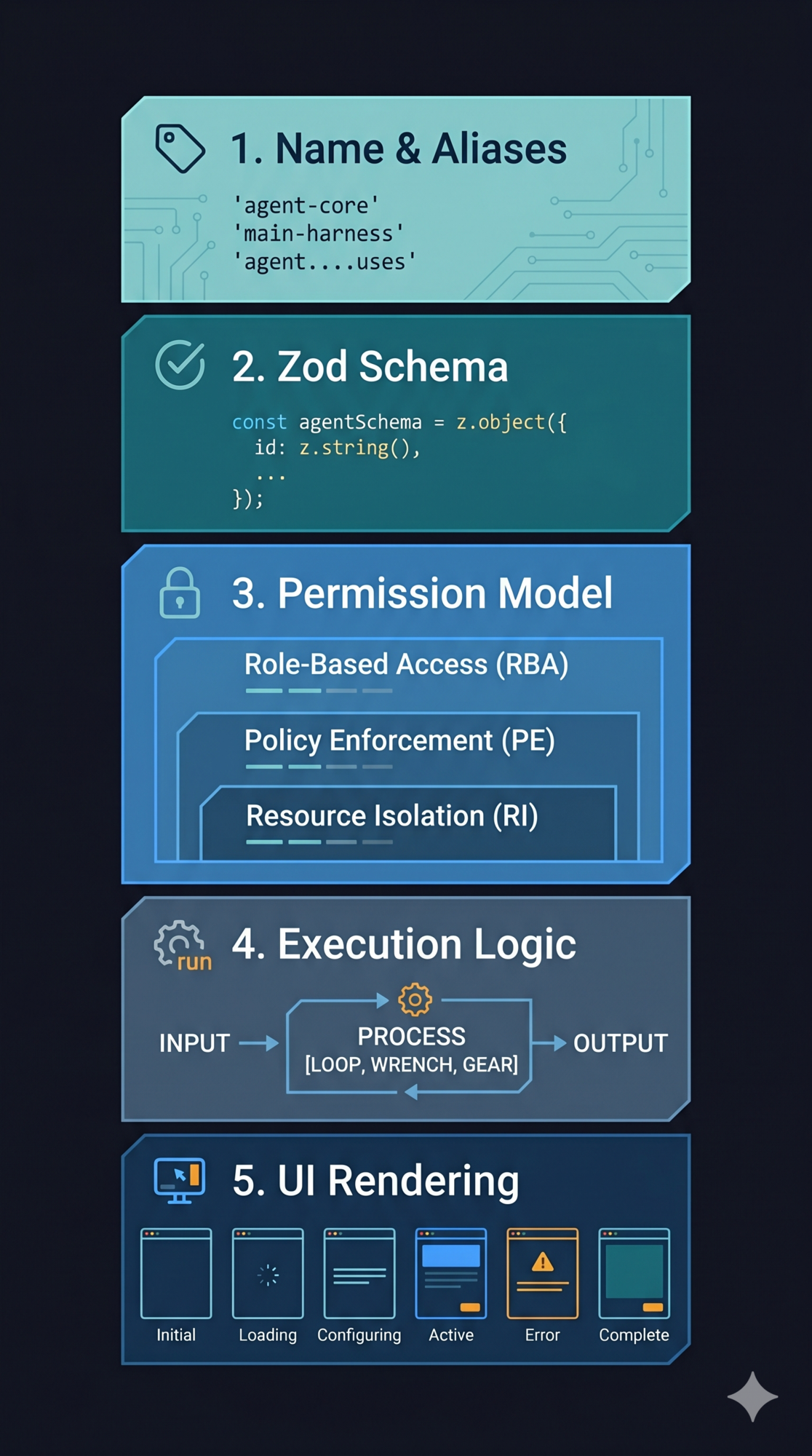
Element 1: Name and Aliases
Each tool has a unique primary name and optional backward-compatibility aliases. When a tool is renamed, the old name remains valid through an alias.
The principle: renaming in a public API is add-only. Never remove the old name. Add an alias. This is why configurations, scripts, and habits don’t break when the tool system evolves.
Element 2: Zod Schema
Each tool defines its input parameters using a Zod schema. This single definition serves dual purpose:
-
Runtime validation — before execution, LLM-generated parameters are parsed through the schema. Type mismatches, missing required fields, and out-of-range values are caught and rejected before the tool runs.
-
API documentation — the same Zod schema is converted to JSON Schema and sent to the model API. The parameter descriptions the model sees come from
.describe()calls in the schema.
The key insight: one definition drives both validation and documentation. There’s no chance for them to drift out of sync. This is the “Single Source of Truth” principle applied to tool interfaces.
// This one definition serves as runtime validator AND model documentation
const schema = z.object({
  path: z.string().describe("The file path to read"),
  limit: z.number().optional().describe("Max lines to return (default 2000)"),
})
Element 3: Permission Model
Three methods form a layered permission check inside every tool:
Layer 1: validateInput — runs before permission checks. Rejects malformed inputs. This is a data legitimacy check, independent of permission policy.
Layer 2: hasPermissionsToUseTool + checkPermissions — tool-specific permission logic. A file read tool checks path allowlists. A bash tool parses the command and assesses risk level. A web fetch tool validates the URL. Each tool knows its own danger profile.
Layer 3: isConcurrencySafe — marks whether this tool can run in parallel with others. This affects scheduling, not security. Read-only tools are safe. Tools with side effects are not.
Separating these three concerns — data validity, permission policy, concurrency safety — prevents each from coupling to the others.
Element 4: Execution Logic
The core method: runs the tool, receives parsed input, tool context, and a permission callback. Returns the output and an optional contextModifier.
The contextModifier is how tools influence subsequent behavior. FileWriteTool, after writing a file, uses contextModifier to update the file state cache — so the next FileReadTool call sees the latest content. Without this channel, tools would be isolated, unable to build on each other’s effects.
Element 5: UI Rendering
Tools have six rendering methods covering the complete lifecycle:
| Method | When it fires |
|---|---|
renderToolUseMessage |
Tool call starts |
renderToolUseProgressMessage |
Tool is running (progress update) |
renderToolResultMessage |
Tool completed successfully |
renderToolUseRejectedMessage |
Permission denied |
renderToolUseErrorMessage |
Execution error |
renderGroupedToolUse |
Multiple tools running in parallel |
Each method returns a React component. The tool controls its own presentation — progress bars, color highlighting, collapsible panels. The harness renders whatever the tool returns.
Why give rendering responsibility to the tool? Because only the tool knows what its output means. A file read displaying src/auth.ts → 247 lines is meaningfully different from a bash tool displaying npm test → exit 0. Generic rendering produces generic output. Tool-specific rendering produces useful output.
Design lesson: When building your own tool system, define a unified interface contract enforced by your type system. Don’t let tools be plain functions — they should declare their schema, permission requirements, concurrency safety, and rendering alongside their logic. The compiler becomes your enforcement mechanism.
The buildTool Factory and Safe Defaults
buildTool is the factory function for creating tools. It fills in safe defaults for any fields not provided.
The defaults follow the fail-closed principle: security-related defaults are the most restrictive option. isConcurrencySafe defaults to false — a tool must explicitly declare itself safe to run in parallel. isDestructive defaults to true — a tool must explicitly declare itself non-destructive to get lighter permission treatment.
This is airport security in reverse: default to “needs inspection,” require explicit clearance for the fast track. If a developer forgets to declare concurrency safety, the worst case is slower execution (serialized when it could have parallelized). If the default were true, forgetting the declaration means parallel execution of a tool with side effects — a data race.
Tool Registration and the Filtering Pipeline
getAllBaseTools() is the single source of truth for all available tools. Before the tool list reaches the model, it passes through a four-stage filtering pipeline:
getAllBaseTools()
    → Mode filtering (simple mode: Bash, Read, Edit only)
    → Deny rule filtering (remove blanket-denied tools)
    → Enabled status check
    → Pool assembly (merge built-in + MCP, sort by name, deduplicate)
    → Tool list sent to API
The sort step is worth noting. Tool lists are sorted alphabetically before sending to the model. Why? Because prompt caching uses byte-level comparison. If tools arrive in different orders across calls, the system prompt changes, cache keys change, and you pay for redundant computation. A stable sort makes the prompt stable, maximizing cache hit rates.
Deferred Loading: Don’t Send What Won’t Be Used
When the tool count exceeds a threshold (especially with MCP servers that register dozens of tools), Claude Code switches to deferred discovery. Instead of sending complete schemas for all 50+ tools upfront, it sends only tool names and lets the model request full schemas on demand via ToolSearchTool.
The savings are significant. A tool schema with name, description, and parameter definitions consumes 200–500 tokens. Multiply by 50 tools and you’re paying 10,000–25,000 tokens per API call just for the tool list — before any message content. Deferred discovery reduces this to a small name index.
ToolSearchTool itself is always-loaded (never deferred), as is AgentTool. Everything else can be deferred.
Pattern to steal: If your agent connects to external tool servers (MCP, custom APIs), implement deferred loading from the start. You’ll add tools over time. The token cost of sending full schemas for 100 tools is prohibitive.
Concurrency Partitioning: Safe Parallelism Without Data Races
When the model requests multiple tools in one response, the orchestration engine decides what runs in parallel and what must serialize. The algorithm is concurrency partitioning.
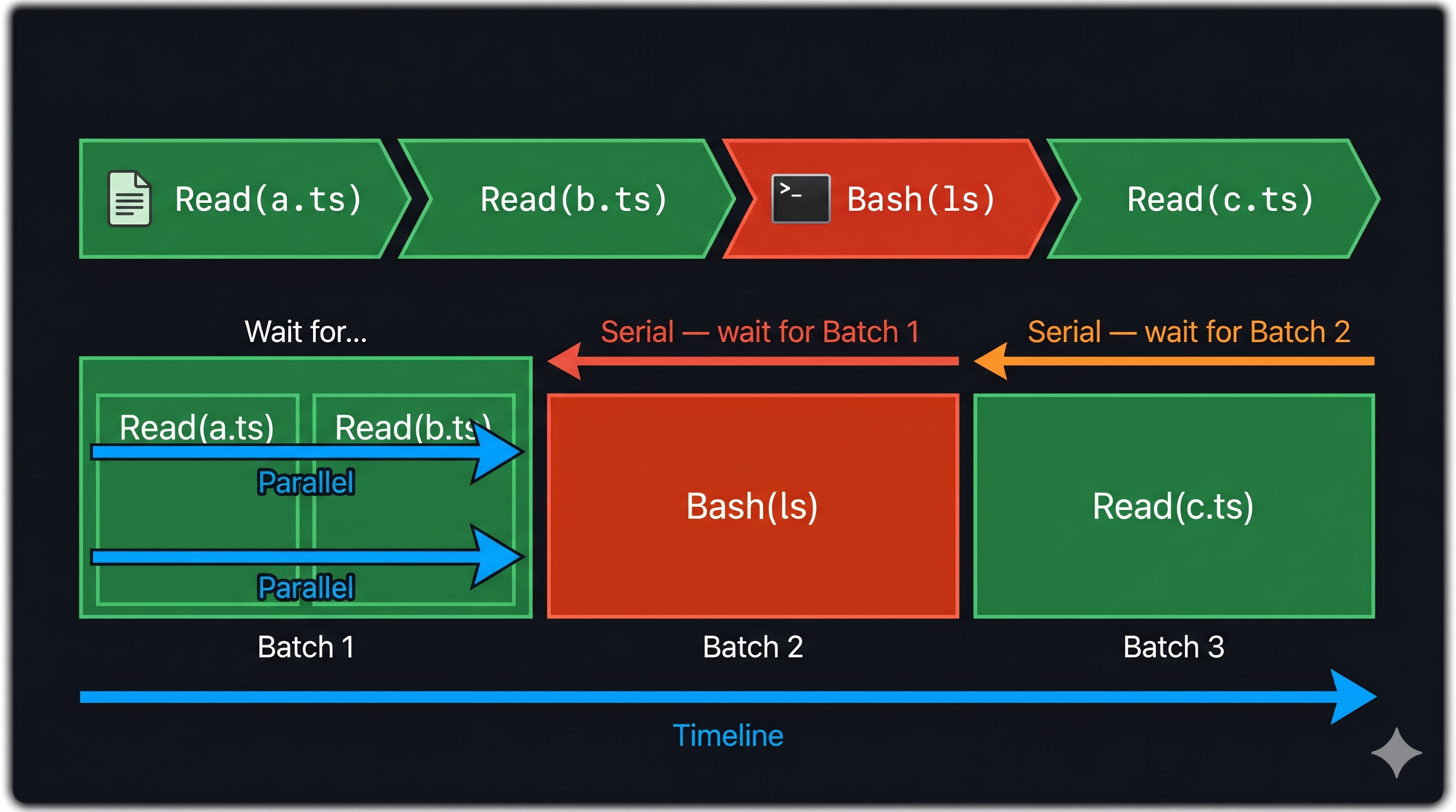
The rule: consecutive concurrency-safe tools form a parallel batch. Any unsafe tool breaks the batch and runs alone.
Example: model requests [Read(a.ts), Read(b.ts), Bash(ls), Read(c.ts)]
Batch 1: Read(a.ts) ‖ Read(b.ts)    [parallel — both safe]
Batch 2: Bash(ls)                    [serial — unsafe]
Batch 3: Read(c.ts)                  [serial — affected by Bash output]
Batch 1 runs in parallel. Batch 2 waits for Batch 1, then runs alone. Batch 3 waits for Batch 2.
The result ordering guarantee: even when tools execute in parallel, results are emitted in the original request order. The model sees [Read(a.ts) result, Read(b.ts) result, Bash(ls) result, Read(c.ts) result] — always in that sequence.
Error propagation in parallel batches: If BashTool fails during execution, all sibling bash tools in the same parallel batch are immediately cancelled. Bash commands often have implicit dependencies — if mkdir fails, subsequent commands that write to that directory are meaningless. Stopping the batch fast prevents cascading failures.
Pattern to steal: Add an
isConcurrencySafe: booleanflag to your tool interface from day one. Most tools that read are safe. Most tools that write are not. Use this to drive your scheduler. Retrofitting this after you have 20 tools is painful.
The StreamingToolExecutor: Four-Stage State Machine
Standard tool execution is batch: wait for the model to finish generating all tool calls, then execute them. The streaming executor goes further: start executing a tool as soon as its parameters are complete, before the model finishes generating the rest of its response.
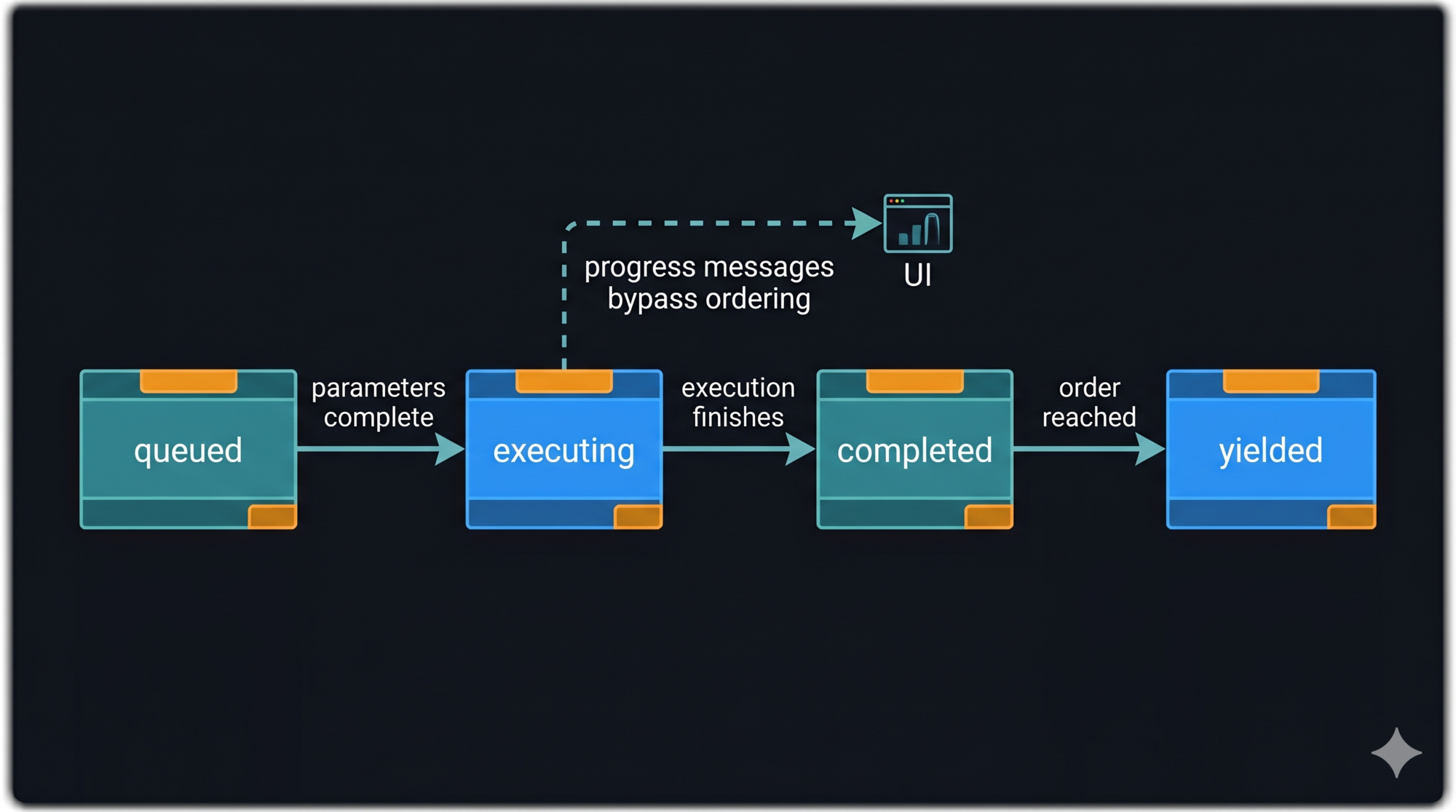
Every tool in the executor passes through four stages:
queued → executing → completed → yielded
- queued: Parameters are accumulating from the streaming API. Tool is not yet runnable.
- executing: Parameters complete. Execution started immediately.
- completed: Execution finished. Result is ready.
- yielded: Result emitted to the caller in request order.
The “yielded” stage is separate from “completed” because order must be preserved. Tool 1 might complete after Tool 2. But Tool 1’s result must be emitted before Tool 2’s. The state machine buffers completed-but-not-yet-ordered results until it’s their turn.
One exception: progress messages are emitted immediately regardless of order. Showing the user that Tool 2 is running doesn’t require waiting for Tool 1’s result.
Deep Dive: The Core Tools
Claude Code’s 45+ tools cover 12 categories. A few are worth understanding in detail because they illustrate the design principles in practice.
BashTool: The Most Powerful, Most Constrained
BashTool is the Swiss Army knife — it can do almost anything a shell command can. This is also why it’s the most carefully constrained.
Error propagation: When BashTool fails in a parallel batch, all sibling bash calls are cancelled. Bash commands have implicit dependencies; a failed mkdir makes subsequent writes to that directory meaningless.
Interrupt behavior: Unlike other tools, BashTool can customize its behavior on user interrupt. Long-running commands like test suites can choose to “block” (let the command finish, show current output) rather than cancel (stop immediately). The tool understands user intent better than a generic interrupt handler.
Semantic analysis: BashTool uses AST parsing to classify commands — distinguishing search/read operations from write operations. This drives collapsible display in the UI (read commands can collapse their output; commands with side effects stay expanded for audit).
The File Trio: Read, Edit, Write
Three tools, three scope levels, three permission tiers.
FileReadTool maintains a file state cache. If the same path is read twice in a session, the second read uses cached content. This prevents redundant I/O and, more importantly, keeps the file state consistent: if the agent reads a file at line 100 of a task, it gets the same content at line 200.
FileEditTool uses exact string matching, not line numbers. Why? Line numbers are fragile — another tool might have already shifted the lines between when you read the file and when you edit it. String matching is idempotent: as long as the target fragment exists, the edit lands correctly regardless of other changes.
FileWriteTool overwrites the entire file. It has the strictest permission checks of the three. The principle: prefer the narrowest-scope operation that accomplishes the task. Edit over Write. Read over Bash. Least privilege is both a security principle and an efficiency principle — narrower operations are faster to permission-check.
The Search Duo: Glob and Grep
GlobTool (filename pattern matching, powered by fast-glob) and GrepTool (content search, powered by ripgrep) are both read-only and concurrency-safe.
Why have dedicated search tools when BashTool can run find and grep? Three reasons:
- Structured output — search tools return structured result arrays. The model parses JSON reliably. Shell text output requires parsing that the model can get wrong.
- Lighter permissions — read-only tools don’t require the same level of permission confirmation as bash commands. More searches get through without interrupting the user.
- Predictable performance — dedicated tools apply result limits and optimization strategies (parallel file traversal, skip binary files) that generic shell commands don’t.
What to Take for Your Own Agent
The tool system patterns that transfer to any agent harness:
1. Interface contract over function pointers. Define a typed interface every tool must implement. Let the type system enforce completeness. No tool ships without a schema, permission model, and concurrency declaration.
2. Schema as the single source of truth. Use one schema definition for both runtime validation and API documentation. Zod, Pydantic, JSON Schema — the specific library matters less than the principle.
3. Fail-closed defaults. isConcurrencySafe defaults to false. isDestructive defaults to true. Require explicit opt-in for optimizations and lighter treatment. Forgetting to declare safety produces slow output, not broken output.
4. Concurrency partitioning from day one. Add the isConcurrencySafe flag before you have many tools, not after. Tag your tools as you write them. The scheduler writes itself once the information is there.
5. Deferred loading for large tool sets. If you’ll have more than 20–30 tools (especially from external sources), implement deferred discovery before launch. Token costs accumulate quickly.
Key Takeaways
- Tools in a production harness are contracts, not functions. They declare schema, permissions, concurrency safety, and UI rendering alongside their logic.
- Zod (or equivalent) serves as a single source of truth for both input validation and API documentation. One definition, two uses.
buildToolfactory with fail-closed defaults means forgetting to declare safety produces slower execution, not unsafe execution.- Concurrency partitioning: consecutive safe tools parallelize; any unsafe tool serializes. Results are always emitted in request order regardless of execution order.
- The StreamingToolExecutor’s four-stage state machine (queued → executing → completed → yielded) enables starting execution before the model finishes generating — significantly reducing end-to-end latency.
- Deferred loading saves 10,000+ tokens per call when tool counts are large.
What’s Next
In Part 4: The Permission Pipeline — Safety That Doesn’t Get in the Way, we go inside the permission system:
- The Fail Fast pipeline: four stages that reject requests as early as possible
- Why “deny always wins” is not just policy — it’s architecture
- Five permission modes from strictest to most permissive, and when each makes sense
- The ResolveOnce pattern: atomic race resolution for concurrent approval requests
- How Claude Code’s BashTool applies three matching strategies for fine-grained command control
References
Tool system design
- Building Effective Agents — Anthropic Research
- Claude Code Overview — Official docs
- 12 Agentic Harness Patterns from Claude Code — Generative Programmer
Concurrency and streaming
- Dive into Claude Code: Design Space of AI Agent Systems — arxiv
- Complete guide to resolving Claude Code tool use concurrency errors — Apiyi
Tool interface patterns
- Anatomy of an Agent Harness — Daily Dose of Data Science
- Harness Design for Long-Running Apps — Anthropic Engineering
Have thoughts on this?
I read every email. If something resonated, felt wrong, or made you think — I'd love to hear from you.


Comments