
The Permission Pipeline: Safety That Doesn't Get in the Way (Part 4)

Series: The Agent Harness — Part 4 of 12
Most agent safety discussions focus on the extremes: “ask the user before every action” or “just let it run.” Neither works in production.
Ask before everything, and users quickly learn to click “allow” without reading — the worst of both worlds. Let it run without checks, and one misunderstood instruction becomes an rm -rf on the wrong directory.
The goal is something harder: a permission system that matches the friction level to the actual risk. Read a file? No prompt needed. Delete a directory? Confirm. In CI? Auto-approve everything safe and block the dangerous operations.
Claude Code’s permission pipeline is built around this goal. Understanding it reveals a set of architectural patterns that apply to any agent harness that needs to stay safe without becoming useless.
Part 3 covered the tool system. This post covers what happens before a tool is allowed to run.
The Core Pattern: Fail Fast, Not Fail Safe
The naive permission system is a single check: “is this tool allowed?” The problem is that “allowed” depends on context. rm -rf node_modules in a dev environment is routine maintenance. rm -rf /etc anywhere is catastrophic. The same tool, different parameters, completely different risk level.
A flat allowlist can’t handle this. A pipeline can.
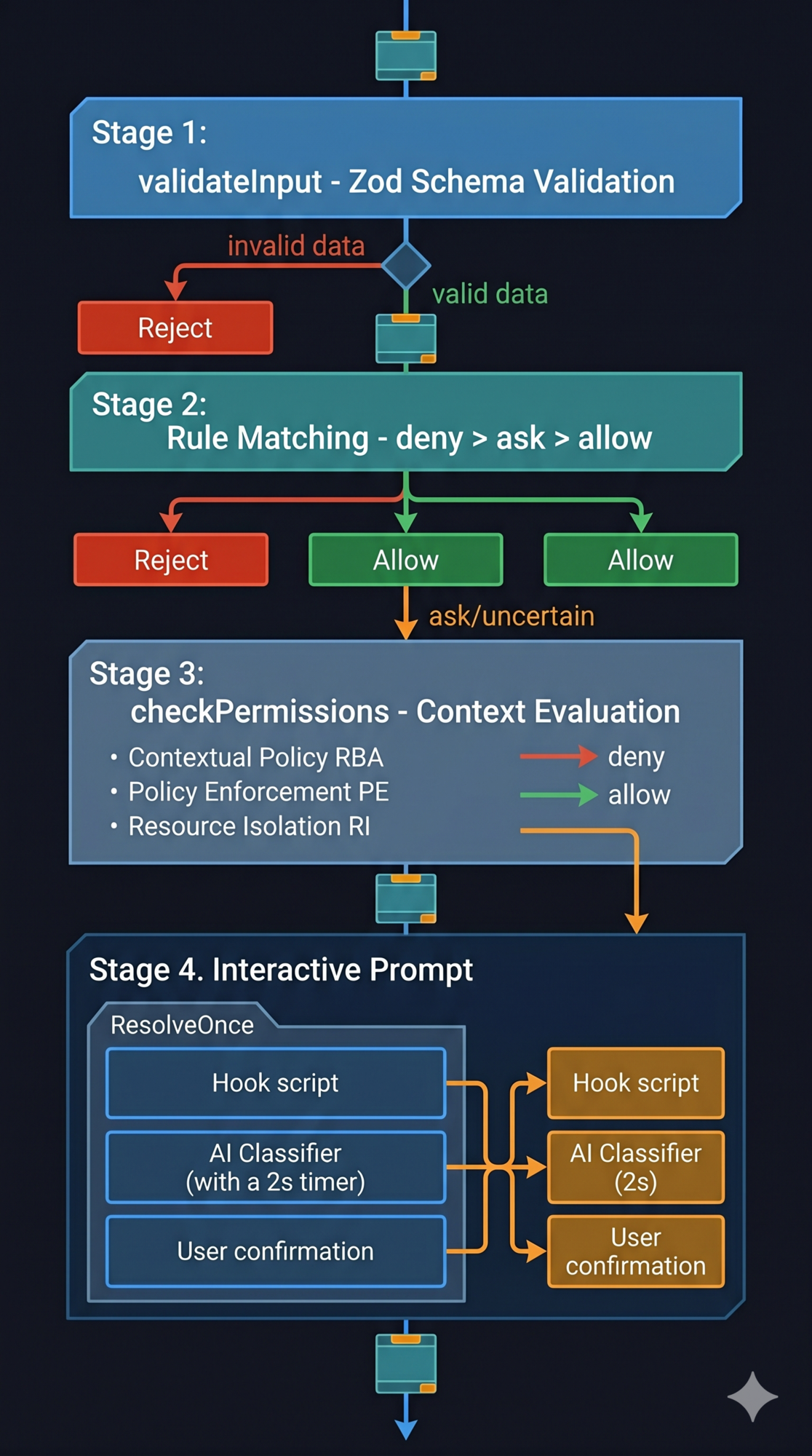
Claude Code’s permission pipeline has four stages that run in sequence. Each stage can short-circuit — if it makes a final decision, later stages don’t run. This is the Fail Fast principle: reject invalid or unauthorized requests as early as possible, at the cheapest checkpoint.
Stage 1: validateInput      → Is the data valid?
Stage 2: Rule matching      → Is there an explicit rule?
Stage 3: checkPermissions   → Does context analysis approve or deny?
Stage 4: Interactive prompt → Should the user or AI classifier decide?
Requests that fail Stage 1 never reach Stage 2. Requests explicitly denied in Stage 2 never reach Stages 3 or 4. Each stage is an independent checkpoint — and a cheaper one than the next.
Stage 1: Input Validation
The first checkpoint isn’t about permissions at all — it’s about data validity. Tool inputs are parsed through the Zod schema defined in the tool interface.
If the LLM passes a malformed parameter (wrong type, missing required field, out-of-range value), validation fails here. No permission check runs. No tool executes.
Note what happens on failure: the system degrades to ask (request user confirmation) rather than crashing. This is intentional — in security systems, errors should be “safe” rather than “correct.” Crashing would interrupt the session. Degrading to user confirmation gives the user a chance to decide whether to proceed with unexpected input.
Stage 2: Rule Matching
This is where explicit permission rules are checked. Three types of rules, in strict priority order:
- Deny rules — checked first, always. If a deny rule matches, the operation is rejected immediately. No exceptions. No overrides.
- Ask rules — if configured to “always ask,” the pipeline flows to Stage 4.
- Allow rules — if an explicit allow rule matches, the operation is permitted.
Rules come from seven sources, prioritized by “proximity” (most specific wins):
session          (highest — most recent, most specific)
command          ↑
cliArg           ↑
policySettings   ↑
flagSettings     ↑
localSettings    ↑
projectSettings  ↑
userSettings     (lowest — most general)
The critical rule: deny always wins over allow, regardless of source. Even if a global user config allows a tool, a project-level deny rule blocks it. This is a security fundamental: the power of explicit denial is greater than explicit permission.
This enables a practical workflow: project settings define broad deny rules for dangerous operations. Local or session settings add temporary allow rules for specific tasks. The deny rules hold firm.
Stage 3: Context Evaluation
Each tool can implement a checkPermissions method for context-aware evaluation. This is where a tool’s own domain knowledge applies.
BashTool, for example, parses the command, inspects subcommands, checks path safety, and matches prefix rules. git status is read-only. git push --force origin main is destructive. Same tool, different parameters, different results.
The stage returns one of four outcomes:
| Outcome | Meaning |
|---|---|
allow |
Permit immediately |
deny |
Reject |
ask |
Request confirmation |
passthrough |
No opinion — let Stage 4 decide |
passthrough is worth explaining. It doesn’t mean “I don’t care.” It means “I have no specific rule for this — let the general pipeline handle it.” If a subsequent Stage 2 allow rule matches, passthrough is upgraded to allow. If nothing matches, passthrough becomes ask. An explicit ask result at Stage 3 cannot be upgraded to allow by Stage 2.
This subtle distinction: passthrough is “no strong opinion,” ask is “I believe this needs confirmation.”
Stage 4: The Race — Hook, Classifier, User
When the pipeline reaches Stage 4, three decision-makers run simultaneously:
1. Hook script — if a PreToolUse hook is configured, it fires first. Its decision (allow/deny/block) is final. Hook scripts represent system administrator intent and have the highest trust level. (We’ll cover hooks in depth in Part 8.)
2. AI Classifier — in auto mode, an asynchronous classifier evaluates the tool call against conversation context. 2-second timeout. Runs in parallel with the user prompt.
3. User prompt — the interactive confirmation dialog. “Allow / Deny / Allow this time.”
All three run concurrently. First come, first served — whichever resolves first takes effect, via a pattern called ResolveOnce.
The ResolveOnce Pattern
Multiple asynchronous participants racing to resolve the same decision is a classic concurrency problem. The user clicks “allow” at the exact moment the classifier returns “approve.” Which wins?
ResolveOnce solves this with a single atomic flag:
class ResolveOnce {
  private claimed = false

  claim(): boolean {
    if (this.claimed) return false
    this.claimed = true
    return true
  }
}
claim() succeeds once and only once. The first participant to call it wins. All others find claimed = true and their decision is discarded. No locks, no coordination overhead — just a “non-transferable ticket” pattern.
In JavaScript’s single-threaded model, the claimed flag check and set happens atomically within one event loop tick. Race conditions in the traditional sense don’t apply, but this pattern ensures logical consistency across async callbacks.
Design lesson: When multiple asynchronous participants might resolve the same decision (hook + classifier + user), use a one-shot claim pattern. The first resolution wins. Track which participant won for audit purposes.
Trust levels, for reference:
- Hook — highest. Represents explicit system administrator rules.
- User — medium. Represents the current operator’s intent.
- Classifier — lowest. AI judgment, may be wrong. Certain operations are “classifier-immune.”
PermissionContext: Immutability as a Safety Property
ToolPermissionContext — the data structure carrying all permission state — has all fields marked readonly. Every permission update produces a new context object. The old one is unchanged.
Why does immutability matter for permissions?
Consider: Tool A and Tool B begin permission checks simultaneously. Mid-check, Tool A’s user confirmation fires and updates a permission rule (user selected “always allow”). If the context were mutable, Tool B might see a partially-updated rule set — the rules that existed before Tool A’s confirmation, mixed with the rules after. The check would use an inconsistent snapshot.
Immutability prevents this. Each tool reads a deterministic snapshot at the start of its permission check. Subsequent updates produce new snapshots for future checks. No tool sees a context it didn’t start with.
Five Permission Modes: A Spectrum, Not a Switch
The permission mode isn’t a single toggle. Claude Code defines five modes across a spectrum from strictest to most permissive:
| Mode | Who approves | When to use |
|---|---|---|
default |
User confirms every tool call | Daily interactive use, maximum oversight |
plan |
Read tools auto-approved, write tools denied | Code review, exploration before committing to changes |
auto |
AI classifier handles approval; user for edge cases | Trusted tasks where you want speed but not full bypass |
bypassPermissions |
Everything auto-approved (except deny rules + safety checks) | CI/CD, containers, automated testing |
bubble (internal) |
Sub-agent inherits parent’s permission context | Used by AgentTool for sub-agent spawning |
plan Mode
Write tools (Edit, Write) return deny from Stage 3. Read tools (Read, Grep, Glob, Search) return allow. The agent can explore but not act.
This is “understand before acting” — explore the codebase in read-only mode, propose a plan, then switch to execution mode when you’re ready.
auto Mode
The AI classifier replaces manual approval for most operations. Before calling the classifier, the system checks a safe-tool allowlist (Read, Grep, Glob, TodoWrite — inherently low-risk tools that skip classifier checking entirely). The classifier handles the rest.
Auto mode includes a circuit breaker: if the classifier rejects consecutively multiple times, the system falls back to interactive prompting. This prevents the agent from looping uselessly when the classifier is consistently uncertain.
Certain operations are classifier-immune: even in auto mode, operations involving .git/ and .claude/ directories cannot be classifier-approved. These directories contain configuration and state that could compromise the entire system if modified incorrectly.
bypassPermissions Mode
Everything auto-approved. But four defenses remain active even in bypass mode:
- Stage 2 deny rules (checked before bypass)
requiresUserInteractionflag (operations that inherently need human input)- Content-level ask rules
safetyCheck(hardcoded dangerous operations)
Bypass mode doesn’t disable safety. It removes the friction for operations that don’t need it.
When to use bypass mode: CI/CD pipelines and automated testing environments where the agent runs in containers with filesystem isolation. Never for production deployments or operations involving credentials. Always pair with explicit deny rules for dangerous operations (
rm -rf *,npm publish,git push --force origin main).
BashTool: Fine-Grained Command Control
BashTool warrants special treatment because shell commands are composable and expressive in ways other tools aren’t. git status is safe. git push --force origin main is destructive. A tool-level allow rule isn’t granular enough.
BashTool supports three rule formats for command-level control:
| Format | Example | Matches | Use case |
|---|---|---|---|
| Exact | Bash(npm test) |
Only npm test |
Fixed steps in CI |
| Prefix | Bash(npm:*) |
Any npm ... command |
Whole toolchain family |
| Wildcard | Bash(git commit *) |
git commit + any args |
Command families |
These form a spectrum: exact is safest (zero false-approvals), wildcard is most flexible (requires careful pattern design).
Two forms are equivalent: Bash(npm:*) and Bash(npm *) both match any npm command. The colon syntax is more explicit; the space+wildcard syntax is more readable.
For auto mode, the classifier also runs against BashTool commands — but classifier decisions are overridden by hardcoded rules for operations on .git/ and .claude/ directories regardless of what the classifier says.
Two-Phase Permission Persistence
When a user grants a permanent permission (“always allow”), the update propagates in two phases:
Phase 1: Synchronous in-memory update. Immediate. The new permission takes effect for the current session before the function returns.
Phase 2: Async file write. The updated permission is persisted to the appropriate config file in the background.
Separating these phases ensures responsiveness: the user’s choice takes effect immediately, without waiting for disk I/O. The file write happens asynchronously and doesn’t block the agent.
Only three config sources persist: localSettings, userSettings, and projectSettings. Session rules and CLI arguments are intentionally ephemeral — they don’t survive past the current run.
Enterprise Configuration Patterns
For teams deploying Claude Code at scale, a layered config strategy:
projectSettings (committed to git):
  deny: [Bash(rm -rf *), Bash(npm publish), Bash(git push --force *)]
  # Team-wide rules — every developer gets these

localSettings (not committed, per-developer):
  allow: [Bash(npm test), Bash(npm run build)]
  # Personal fast paths — override project settings for common safe operations

session rules (temporary, per-task):
  allow: [Bash(git push origin feature/*)]
  # Task-specific — don't persist, just for this session
The rules compose correctly: project deny rules block dangerous operations for everyone; personal allow rules speed up common operations; session allow rules handle task-specific needs without permanently widening permissions.
Key Takeaways
- A permission system for agents should match friction to risk — not be a single allow/deny toggle.
- The Fail Fast pipeline (4 stages) rejects requests at the cheapest applicable checkpoint. Invalid data is rejected at Stage 1 before any permission logic runs.
- Deny always wins over allow, regardless of which config source each came from.
PermissionContextis immutable: every update produces a new object, preventing concurrent tools from seeing inconsistent rule sets.- Five modes span the spectrum from “confirm everything” (default) to “bypass everything safe” (bypassPermissions). Use
planfor exploration,autofor trusted sessions,bypassPermissionsin isolated CI environments. - ResolveOnce handles the race between concurrent decision-makers (hook, classifier, user) — first valid resolution wins.
- BashTool’s three matching formats (exact, prefix, wildcard) enable fine-grained command-level control without per-command configuration.
What’s Next
In Part 5: Configuration as Architecture — The Multi-Layer Settings Problem, we go inside the configuration system:
- Why agent configuration is a multi-stakeholder problem (user prefs vs project rules vs enterprise policy)
- The priority pyramid: six layers with clear override semantics
- How merge semantics (arrays concatenate, objects deep merge, scalars override) shape behavior
- Feature flags: compile-time vs runtime, and why the distinction matters for agent rollout
- AppState: 50+ fields managed by a 34-line state store
References
Permission systems and agent safety
- Building Effective Agents — Anthropic Research
- Harness Design for Long-Running Applications — Anthropic Engineering
- Claude Code Hooks Reference — Official docs
Architecture analysis
- Inside Claude Code: Architecture Behind Tools, Memory, Hooks, and MCP — Penligent
- Dive into Claude Code: Design Space of AI Agent Systems — arxiv
- 12 Agentic Harness Patterns from Claude Code — Generative Programmer
Have thoughts on this?
I read every email. If something resonated, felt wrong, or made you think — I'd love to hear from you.


Comments