
The Hook System: Extension Points That Don't Break the Core (Part 8)

Series: The Agent Harness — Part 8 of 12
The permission pipeline (Part 4) answers: can the agent do this? The configuration system (Part 5) answers: how is the agent configured? But neither answers: what should happen immediately before and after every meaningful agent action?
That’s the hook system’s job.
A hook is a piece of custom logic — a shell command, an LLM call, a webhook — that attaches to a lifecycle event and runs without modifying the agent’s core. A team’s security requirements are different from a CI pipeline’s. An enterprise’s audit needs are different from an individual developer’s. The hook system is how you satisfy all of them from the same codebase.
The design pattern is Observer + Chain of Responsibility: each lifecycle event is a signal, multiple hooks can subscribe to it, they fire in priority order, and any hook can block signal propagation.
Part 7 covered context compression. This post covers how to extend agent behavior at lifecycle boundaries.
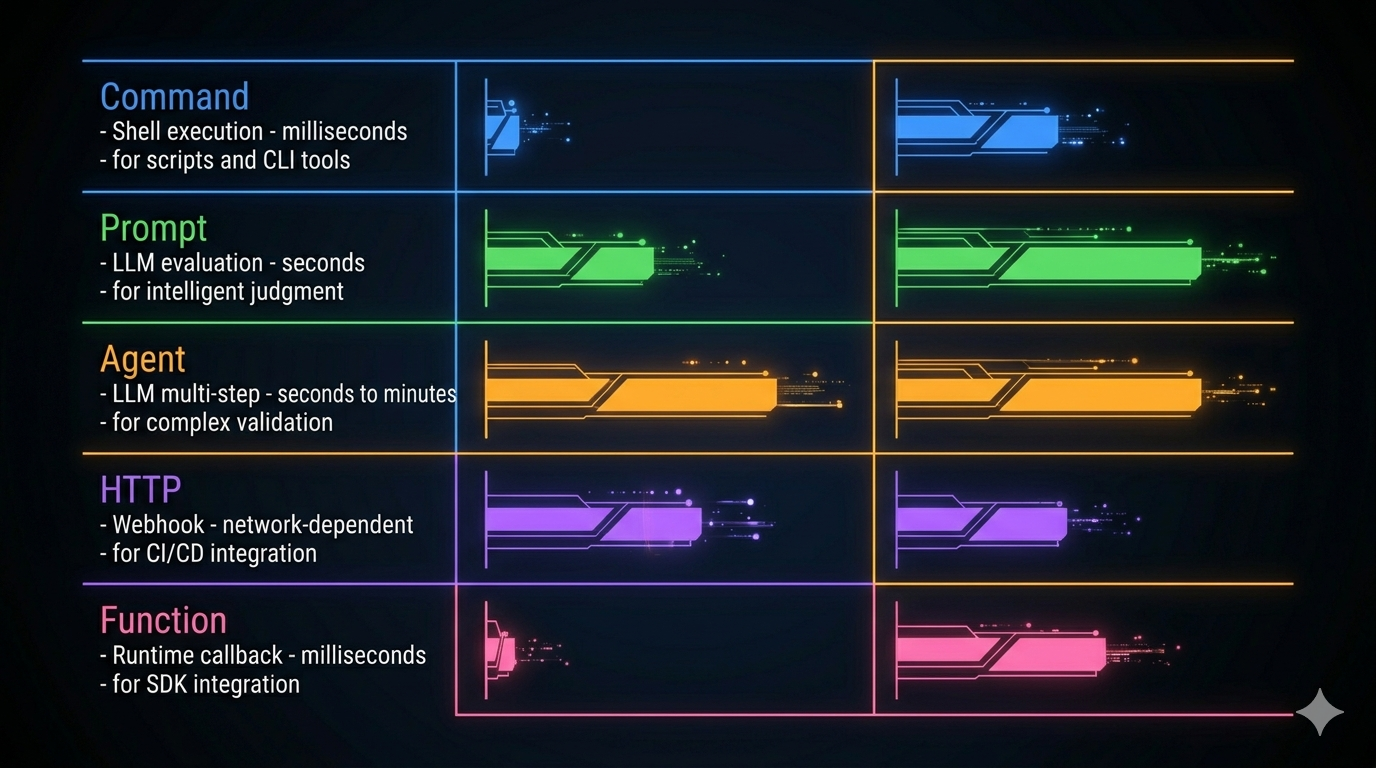
Five Hook Types: Choosing the Right Execution Engine
Not every hook scenario has the same latency budget or capability requirement. Claude Code defines five hook types, each with a different execution model.
Command Hook: The Default Choice
Shell execution. Runs synchronously by default (blocks until complete). Supports custom timeout, a status message shown to users while running, and an once flag for one-shot initialization tasks.
{
  "hooks": {
    "PreToolUse": [{
      "matcher": "Bash",
      "hooks": [{
        "type": "command",
        "command": "python3 scripts/validate_command.py",
        "timeout": 5000,
        "message": "Validating bash command safety..."
      }]
    }]
  }
}
Use Command hooks when: running safety checks, executing linters, calling CLI tools, checking preconditions before operations.
Prompt Hook: When Rules Can’t Express It
Calls an LLM to evaluate the hook input. The placeholder $ARGUMENTS is replaced with the hook’s input JSON. The model returns a structured decision.
{
  "type": "prompt",
  "prompt": "Analyze this file write. If it modifies src/core/, return {\"decision\": \"block\", \"reason\": \"Core module changes require review\"}. Otherwise return {\"decision\": \"approve\"}. Input: $ARGUMENTS"
}
Use Prompt hooks when: the approval decision requires semantic understanding that a regex or script can’t provide. “Is this code modification safe?” is not a question a shell script can answer reliably.
Agent Hook: Multi-Step Validation
Like Prompt, but designed for validation that requires multiple reasoning steps. A code review that needs to read related tests, run them, check coverage, and only then make a decision — that’s an Agent hook.
Use Agent hooks when: the hook itself needs to perform a mini-investigation before reaching a verdict.
HTTP Hook: External System Integration
POSTs the hook input JSON to a configured URL. Supports custom headers and environment variable interpolation via an allowedEnvVars whitelist.
{
  "type": "http",
  "url": "https://audit.internal.company.com/api/log",
  "headers": { "Authorization": "Bearer $AUDIT_TOKEN" },
  "allowedEnvVars": ["AUDIT_TOKEN"]
}
Use HTTP hooks when: audit trails need to land in a SIEM system, approval flows live in external services, CI/CD systems need notification of agent actions.
Security note:
allowedEnvVarsshould contain only the specific variables you need. Never open the whole environment — in multi-user deployments, that’s a credential leak waiting to happen.
Function Hook: Runtime-Only
TypeScript callbacks registered at runtime. Cannot be persisted to configuration files — they exist only for the session. Used for SDK embedding where deep runtime integration is needed.
The reason Function hooks can’t be persisted is architectural: persisting them would mean serializing executable code references to JSON. That’s the boundary between declarative configuration (Command/Prompt/Agent/HTTP) and imperative code (Function). Mixing both in the same config system creates unpredictable behavior and security risks.
Three Execution Modes for Command Hooks
Beyond hook type, Command hooks have three execution modes:
Synchronous (default): Blocks the agent. The operation doesn’t proceed until the hook completes. Use this for pre-approval flows: “check before acting.”
Asynchronous (async: true): Runs in background. The agent continues immediately. Hook results are not visible to the model. Use this for fire-and-forget logging and notifications.
Async-rewake (asyncRewake: true): Runs in background, but if the hook exits with code 2, it injects an error message that wakes the model to continue. Normal exit (0) doesn’t disturb the agent. Use this for long-running monitors: “don’t interrupt me unless something’s wrong.”
The async-rewake pattern is particularly useful for Stop event hooks: monitor conditions in the background and only intervene when the agent is about to stop without finishing its work.
26 Lifecycle Events: The Agent’s Observable Moments
Claude Code defines 26 lifecycle events organized into six categories.
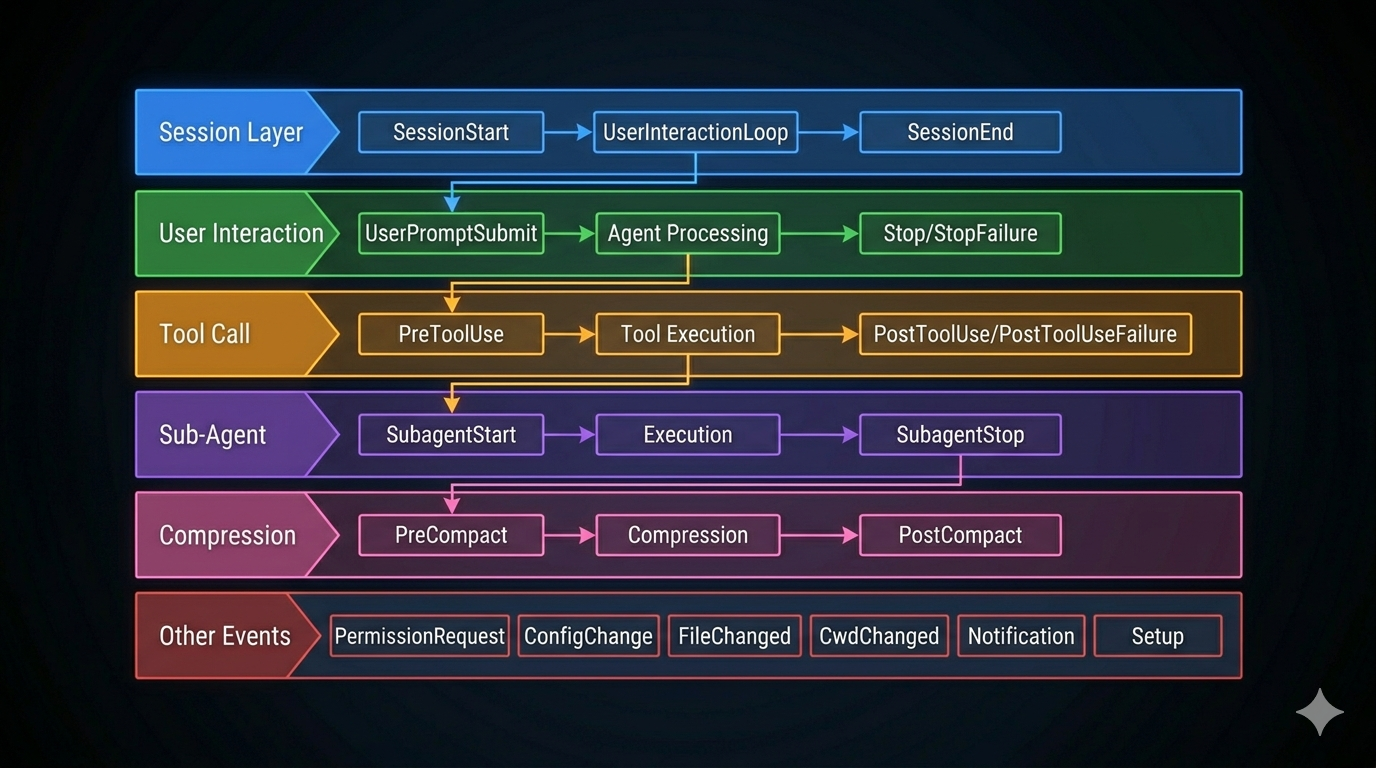
The Tool Call Sandwich: PreToolUse / PostToolUse / PostToolUseFailure
The most-used events. They form a sandwich around every tool execution.
PreToolUse fires before execution. It’s the primary interception point:
- Block the operation (
decision: "block") - Modify the tool’s input parameters (
updatedInput) - Log for audit purposes
Exit code semantics:
0— silent pass (nothing shown to model)2— block the tool call (stderr shown to model)- Other non-zero — warning but continue (stderr shown to user)
PostToolUse fires after success. Carries both the tool’s input and output. Can override MCP tool output via updatedMCPToolOutput.
Tip: PostToolUse hooks should almost always be async. The tool is done; there’s no reason to block the agent’s next action for an audit log write.
PostToolUseFailure fires on failure. Carries error, error_type, is_interrupt, and is_timeout — enough diagnostic data to route to different recovery strategies or monitoring systems.
UserPromptSubmit: The Translation Layer
Fires after user input arrives, before the model sees it. This is your chance to:
- Inject context the user didn’t provide (current git branch, project state)
- Block messages that trigger quota limits or content policies
- Expand brief questions into more complete prompts
{
  "hooks": {
    "UserPromptSubmit": [{
      "hooks": [{
        "type": "command",
        "command": "echo '{\"additionalContext\": \"Branch: '$(git branch --show-current)'. Recent commits: '$(git log --oneline -3)'\"}'",
        "message": "Attaching git context..."
      }]
    }]
  }
}
The additionalContext field injects information into the model’s context without modifying the user’s original message. The user’s input is preserved; the model gets more to work with.
Stop: The Completion Gate
Fires before the agent ends its response. If exit code 2 is returned, the agent continues — the stderr message is injected and the model picks up from there.
This event exists because LLMs sometimes stop before fully completing a task. A completeness check at Stop can detect unfinished items and force continuation:
{
  "hooks": {
    "Stop": [{
      "hooks": [{
        "type": "command",
        "command": "python3 scripts/check_task_completion.py",
        "asyncRewake": true
      }]
    }]
  }
}
PreCompact / PostCompact: Customizing Compression
PreCompact fires before context compression. Its stdout is appended as custom instructions to the compression prompt — enabling project-specific guidance on what to preserve.
"Preserve all database schema decisions and migration rationale."
"Keep the security review comments from earlier in the session."
This is the escape hatch for AutoCompact’s one-size-fits-all summary. Different projects define “important” differently; PreCompact lets you encode that definition.
Exit code 2 on PreCompact blocks compression entirely — useful when you’re mid-debugging and don’t want the context reorganized.
SessionStart / SessionEnd: Session Bookending
SessionStart fires when the session opens. Its stdout is shown to the model. Blocking errors are ignored — if hooks could prevent session startup, one misconfigured hook would make the system unusable. Core initialization can’t be hijacked by extension logic.
SessionEnd has a 1,500ms hard timeout. It runs during the shutdown sequence; any operation exceeding the limit is forcibly terminated. Keep it lightweight.
The Full Event Table
| Event | Category | Blockable | Primary Use |
|---|---|---|---|
| PreToolUse | Tool | Yes | Intercept / modify tool input |
| PostToolUse | Tool | No | Audit / post-process output |
| PostToolUseFailure | Tool | No | Failure diagnosis |
| UserPromptSubmit | User | Yes | Context injection / filtering |
| Notification | User | No | External notification routing |
| SessionStart | Session | No* | Environment initialization |
| SessionEnd | Session | No | Cleanup / session summary |
| Stop | Session | Yes | Completeness check / force continue |
| StopFailure | Session | No | API error reporting |
| SubagentStart | Sub-agent | No | Sub-agent monitoring |
| SubagentStop | Sub-agent | Yes | Result validation |
| PreCompact | Compression | Yes | Custom compression instructions |
| PostCompact | Compression | No | Compression quality check |
| PermissionRequest | Permission | Yes | Auto-approve flows |
| PermissionDenied | Permission | No | Alternative suggestions |
| ConfigChange | Config | Yes | Change auditing |
| Setup | Init | No | Environment preparation |
| FileChanged | Environment | No | Cache invalidation |
| CwdChanged | Environment | No | Directory change notification |
| InstructionsLoaded | Instructions | No | Instruction audit |
*SessionStart blocking is ignored (graceful degradation).
The Structured Response Protocol
A hook doesn’t just run — it communicates a decision. The output is structured JSON:
{
  "decision": "approve",           // or "block"
  "reason": "...",                  // block reason (when blocking)
  "additionalContext": "...",       // injected into model context
  "hookSpecificOutput": {
    "hookEventName": "PreToolUse",
    "updatedInput": { ... },        // modified tool input
    "permissionDecision": "allow"   // override permission decision
  }
}
The stdout channel carries unstructured output (shown to users on non-zero exit). The JSON is the structured control channel.
Default behavior when output isn’t valid JSON: continue execution. A malformed hook output silently passes — this prevents a bad hook from accidentally blocking operations.
Exit Codes and JSON Work Together
Both dimensions jointly determine the outcome:
| Exit Code | JSON Decision | Result |
|---|---|---|
| 0 | approve or absent | Pass |
| 0 | block | Block (JSON takes priority) |
| 2 | any | Block, stderr shown to model |
| Other non-zero | approve | Warning but continue |
| Other non-zero | block | Block |
Don’t let exit codes and JSON express contradictory intents — that’s confusing to maintain and produces unexpected behavior.
Priority Ordering
When multiple hooks fire for the same event, they execute in priority order:
userSettings    (highest — user's global config)
projectSettings
localSettings
pluginHook
builtinHook
sessionHook     (lowest)
User configuration has highest priority. This is the “user sovereignty” principle: your personal security preferences can override what a project or plugin does.
All matching hooks execute — a block decision by one hook doesn’t skip the rest (they just see the blocked state). But the operation is blocked once any hook returns decision: "block" or exits with code 2.
Three-Layer Security Model
Hook configuration is powerful. A PreToolUse hook can execute arbitrary shell commands. A misconfigured or malicious hook is a serious risk. Claude Code gates hook execution through three layers:
Layer 1: disableAllHooks (policySettings)
  → Emergency kill switch. Disables everything.

Layer 2: allowManagedHooksOnly (policySettings)
  → Only enterprise-administrator-configured hooks run.
  → User/project/local hooks are blocked.

Layer 3: Workspace trust check
  → Hooks from untrusted workspaces are blocked.
  → Defense against supply chain attacks via cloned repos.
The workspace trust check is the most important for everyday use. When you clone an open-source project, its .claude/settings.json may contain hooks. Without workspace trust gating, those hooks execute automatically — potentially exfiltrating environment variables on every tool call. Workspace trust requires explicit user consent before any hook from that workspace runs.
This is the same supply chain attack vector described in Part 5 for projectSettings. The defense is the same: explicit trust, not implicit.
Key Takeaways
- Hooks attach custom logic to lifecycle events without touching the agent’s core. The patterns are Observer (subscribe to events) + Chain of Responsibility (priority ordering, any hook can block).
- Five hook types: Command (shell), Prompt (LLM evaluation), Agent (multi-step), HTTP (webhook), Function (runtime-only). Choose based on latency tolerance and capability need.
- Three execution modes for Command: sync (block), async (fire and forget), async-rewake (background with conditional wake).
- 26 lifecycle events across six categories. The most important:
PreToolUse(intercept before),UserPromptSubmit(modify user input),Stop(force continuation),PreCompact(customize compression). - Hook output is structured JSON (
decision,updatedInput,additionalContext) plus exit codes. Both channels matter. Keep them consistent. - Priority: userSettings > projectSettings > localSettings > plugin > builtin > session. User configuration wins.
- Three-layer security: global disable → managed-hooks-only → workspace trust. Workspace trust is the defense against supply chain attacks from cloned repositories.
What’s Next
In Part 9: Sub-Agents, Coordinators, and Skills — Multi-Agent Orchestration, we cover multi-agent patterns:
- The Fork pattern: how sub-agents share prompt cache without wasting tokens
- Built-in agent types: Explore, Plan, General, Verification — and their design constraints
- The Coordinator pattern: one agent orchestrating many specialists
- Skills and plugins: packaged reusable behaviors beyond tools
- MCP: the external capability protocol and why a standard matters
References
Hook systems and extensibility
- Claude Code Hooks Reference — Official docs
- Building Effective Agents — Anthropic Research
- Harness Design for Long-Running Applications — Anthropic Engineering
Architecture analysis
- Inside Claude Code: Architecture Behind Tools, Memory, Hooks, and MCP — Penligent
- Dive into Claude Code: Design Space of AI Agent Systems — arxiv
- 12 Agentic Harness Patterns from Claude Code — Generative Programmer
Have thoughts on this?
I read every email. If something resonated, felt wrong, or made you think — I'd love to hear from you.

Comments