
Context Management: The Compression Problem (Part 7)

Series: The Agent Harness — Part 7 of 12
The context window is the agent’s working memory. Everything the agent knows — conversation history, tool results, intermediate reasoning — has to fit on it at once. And unlike human working memory, it has a hard ceiling.
For short tasks, this isn’t a problem. For long-running autonomous agents — the kind that read dozens of files, run multiple tool chains, and iterate over hundreds of turns — the ceiling is the central engineering problem.
Most frameworks handle this badly: they truncate the oldest messages when you get close to the limit. That works until it doesn’t. You lose the decision that explained why the current approach was chosen. You lose the error that the agent just recovered from. You lose the context that would have prevented the next mistake.
The right solution isn’t truncation. It’s a cascade: try the cheapest intervention first, escalate only when cheaper options are insufficient, and never compress more information than necessary.
Part 6 covered the memory system for cross-session persistence. This post covers context management within a session.
The Effective Window Formula
Before you can manage a context window, you need to know how much space you actually have.
The naive answer is: “whatever the model’s maximum context is.” That’s wrong. The LLM also needs room to output a response. If you fill the context to capacity and ask for a summary, the summary generation itself can fail — there’s no room to produce output.
Claude Code reserves the lesser of the model’s maximum output tokens and 20,000 tokens as a hard output reservation:
Effective Window = Model Window - Reserved Output Tokens
For a 200K token model with 16K max output:
- Reserved = min(16,384, 20,000) = 16,384 tokens
- Effective = 200,000 - 16,384 = 183,616 tokens
Those 183,616 tokens are your actual budget for conversation history. Plan around that number, not the headline context size.
The Four Warning Thresholds
Claude Code maintains four progressively tighter thresholds based on the effective window:
| Zone | Usage Level | Response |
|---|---|---|
| Safe zone | 0–85% | Normal operation |
| Warning | ~85% | Show yellow indicator |
| Danger | ~90% | Trigger auto-compression |
| Blocked | ~95% | Reject new requests |
These aren’t just UI states — they drive actual system behavior. The warning threshold exists so users see the problem while there’s still time to act. The danger threshold triggers compression while there’s still enough room to generate a quality summary. The blocked threshold is the hard stop: if compression has failed and usage is this high, sending more API calls would fail anyway.
The spacing between thresholds matters. There’s a 5% buffer between each level so that the system doesn’t thrash between states if usage is hovering near a boundary.
The Circuit Breaker
Auto-compression requires an LLM call. If the API is down, the network is flaky, or the conversation structure itself is malformed, compression fails. Without a circuit breaker, the system retries on every subsequent turn — making doomed API calls indefinitely.
Claude Code uses a classic circuit breaker pattern with a threshold of three consecutive failures:
CLOSED (normal) → compression fails → counter increments
counter reaches 3 → OPEN (stop attempting)
New session or manual compression success → CLOSED (reset)
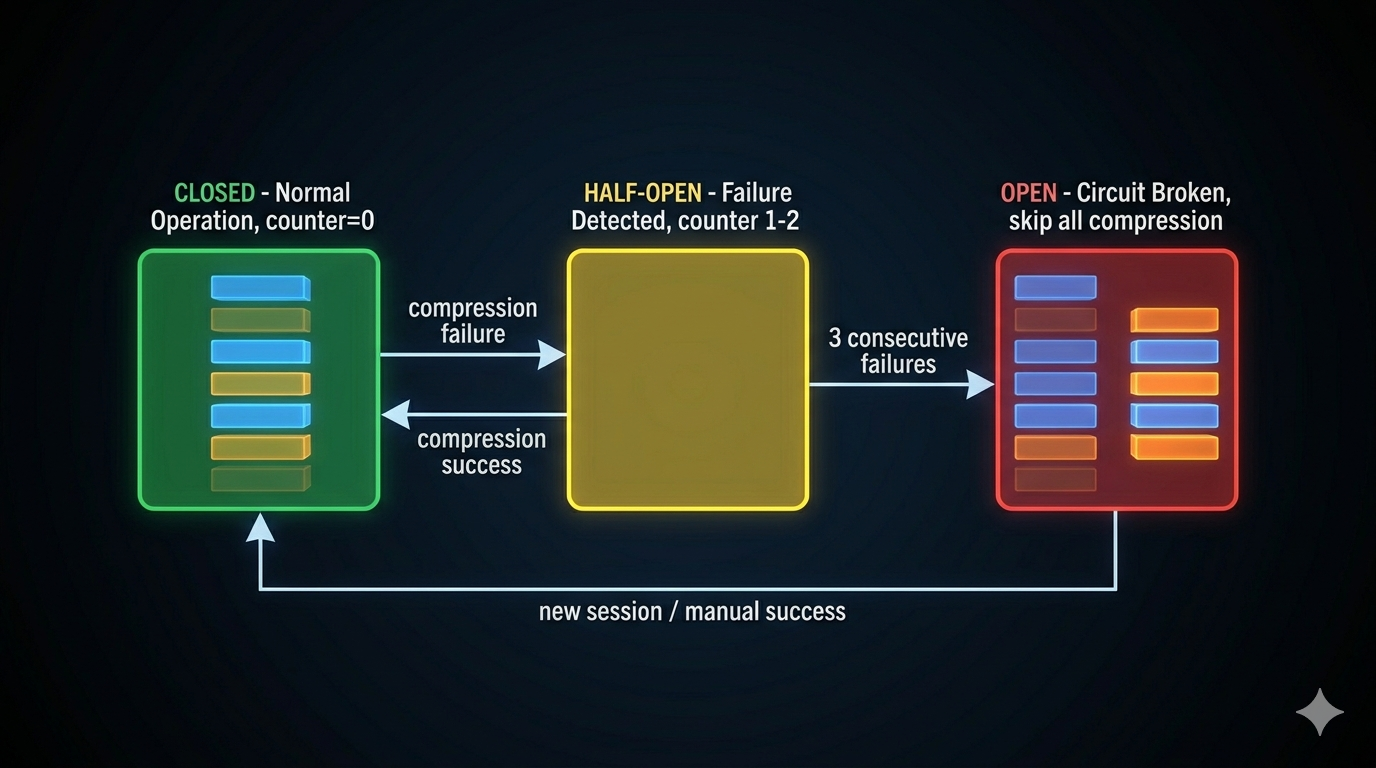
Before the circuit breaker existed, Claude Code observed 1,279 sessions with over 50 consecutive compression failures each — some reaching 3,272 consecutive failures. That’s approximately 250,000 wasted API calls per day. After the circuit breaker, cascading failures dropped to zero.
The lesson: Any system that retries on failure without a counter is vulnerable to this class of avalanche. The fix is two lines of state and a threshold check.
The Four-Level Compression Cascade
Compression is not a single operation. It’s a cascade of four levels, each more aggressive than the last. The system tries the cheapest option first and escalates only when cheaper options have already fired.
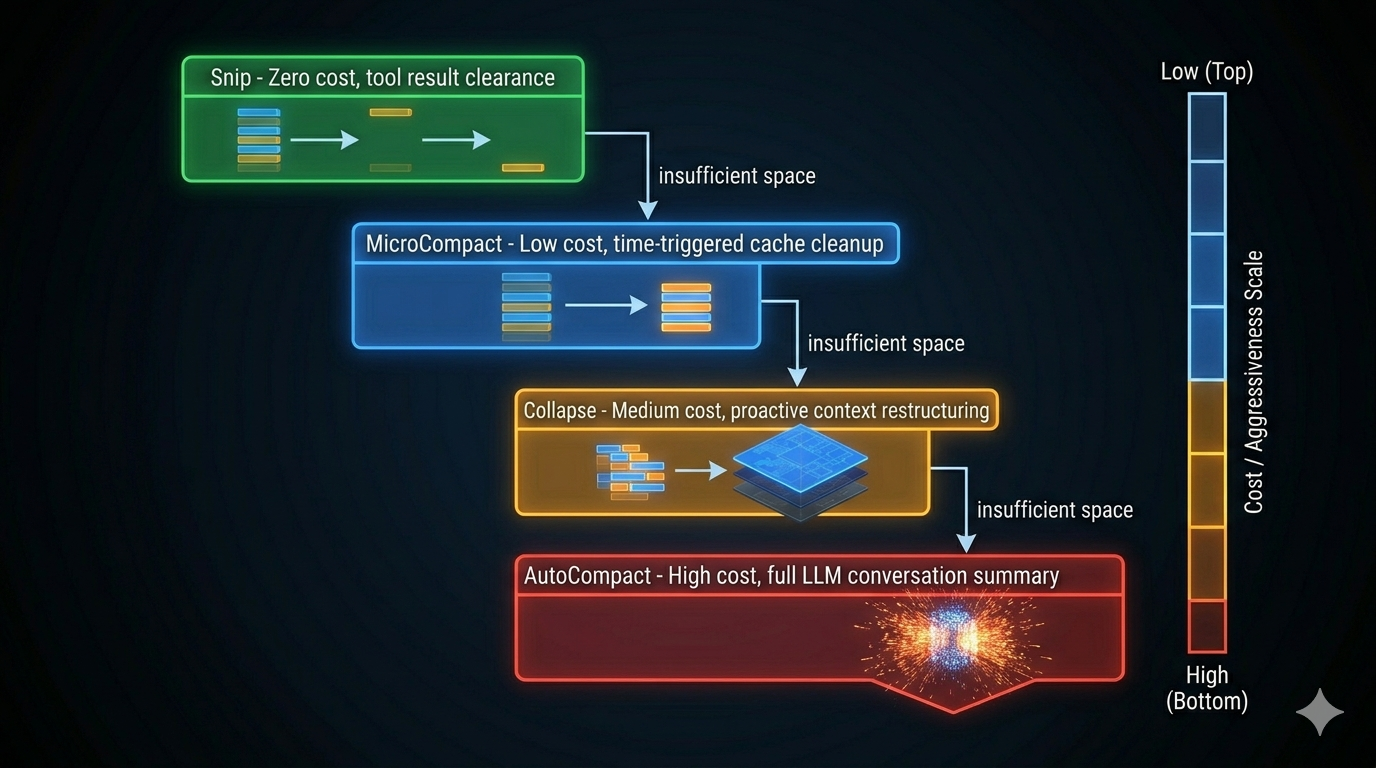
Level 1: Snip — Zero LLM Cost
Snip replaces old tool result content with a marker: [Old tool result content cleared]. No LLM call. No information synthesis. Just token clearance.
Why replace rather than delete? Because deleting messages breaks the message chain — subsequent turns may reference earlier tool call IDs. The marker preserves structural integrity while freeing the tokens.
Snip is triggered manually (user marks messages as no longer needed) and is the first method tried. After reading 10 large files to analyze an architecture, those file contents are often no longer needed once the analysis is done. Snip reclaims that space immediately.
Level 2: MicroCompact — Time-Triggered Cache Cleanup
MicroCompact fires when a configured time interval has elapsed since the last assistant message. When that threshold is crossed, the server-side prompt cache has already expired — the full context would need to be resent on the next API call anyway. At that point, old tool results are just wasted payload.
MicroCompact keeps the most recent N tool results (configurable, minimum 1) and replaces everything older with the clearance marker.
The time-trigger is elegant: it converts a natural conversation pause into a compression event, at the moment when clearing costs the least (cache was expired anyway).
Compressible tool types: Read, Bash, Grep, Glob, WebSearch, WebFetch, Edit, Write.
Level 3: Collapse — Proactive Context Restructuring
Collapse shifts the philosophy from “react when full” to “restructure before full.” It activates at 90% context utilization (before the danger threshold) and proactively reorganizes the message structure.
The key distinction from Level 4: Collapse is selective. It restructures groups of messages rather than summarizing everything into one flat summary. More original detail survives. This is why it runs at 90% instead of waiting for 95%.
Level 4: AutoCompact — Full LLM Summary
AutoCompact is the final fallback. It calls the LLM to produce a complete conversation summary, replacing the compressed history with a structured document.
The process:
- Fire
PreCompacthook (user can inject custom compression instructions) - Select compression prompt template (full history, partial from a point, or partial up to a point)
- Stream summary generation via a restricted one-turn agent
- If the prompt is too long, truncate the oldest API turn group and retry (up to 3 times)
- Rebuild context: boundary marker + summary + re-injected attachments
- Fire
PostCompacthook
The output is always in a fixed order: boundary marker → summary messages → retained messages → attachments → hook results. Consistent ordering matters for the agent to correctly identify what has and hasn’t been compressed.
The Dual-Phase Prompt: Thinking vs. Output
AutoCompact’s compression prompt asks the model to produce two XML blocks:
<analysis>
  [Chain-of-thought: organize thoughts, identify what matters,
   ensure comprehensive coverage before writing the summary]
</analysis>

<summary>
  ## Goals and Intent
  ## Key Decisions and Changes
  ## Unresolved Issues
  ## File Change Summary
  ... (9 structured sections total)
</summary>
The <analysis> block is a scratchpad — it improves summary quality by giving the model a thinking space before committing to the summary. Then it’s discarded before entering the final context. The thinking didn’t need to be remembered; only the result does.
This is the dual-phase compression principle: thinking is the process, the summary is the result. Don’t put the process in the context window.
Without the analysis phase, the model tends to miss things — it writes the summary too quickly without reasoning through the full history. With it, but keeping it in context, you waste tokens on a scratchpad. The discard step is what makes this work.
The CompactBoundaryMessage
After each compression, a CompactBoundaryMessage is inserted into the message stream. It marks the dividing line between pre-compression and post-compression history and carries metadata:
- Trigger type: manual or automatic
- Pre-compression token count
- Number of messages included in the compression
- A
logicalParentUuidlinking it to the last message before compression
Why does the boundary marker matter? Because subsequent compression operations need to know which messages have already been summarized. Without it, you’d re-summarize already-summarized content — a waste at best, confused history at worst.
Post-Compression Token Budget
After AutoCompact, the system re-injects some content back: recent attachments, hook results, skills. Without a budget, this re-injection can trigger another compression immediately.
Hard limits:
| Budget | Value | What it protects |
|---|---|---|
| Total budget | 50,000 tokens | Total re-injection ceiling |
| Per file | 5,000 tokens | Prevents one large file from consuming all budget |
| Per skill | 5,000 tokens | Same protection for skill definitions |
| Skills subtotal | 25,000 tokens | Prevents skill spam |
| Max files restored | 5 | Prevents reopening too many files |
These limits ensure the conversation doesn’t immediately re-inflate after compression. The common mistake is re-loading all previously-read files after compression. Don’t. Only reload what’s needed for the current task.
Proactive vs. Reactive: When to Compress
The worst time to compress is when the system forces you to. By then, you’re at 90%+ utilization, the model is under token pressure, and the summary will miss things.
The best time is when you decide to — at a natural milestone, with guidance about what matters.
Reactive compression (don't):
  Turn 80: Context fills. Auto-compress fires.
  Summary loses some context. Maybe the critical decision.

Proactive compression (do):
  Turn 50: Analysis phase complete.
  User triggers /compact with: "preserve all database schema decisions"
  Compression is targeted. Important content explicitly preserved.
Three practical patterns:
Phased work: Research → compress → planning → compress → implementation. Each phase starts with a clean context budget.
Manual Snip: After reading files you no longer need, use Snip to clear them before they drain the budget.
Memory + Compression: Before triggering compression, save key decisions to the memory system (Part 6). After compression, the memory is still there. This combination prevents the “we made that decision three hours ago and the summary lost it” problem.
Key Takeaways
- Effective window = model window − reserved output tokens. Reserve space for compression output or compression itself can fail.
- Four-level cascade: Snip (zero cost) → MicroCompact (time-triggered) → Collapse (proactive restructuring) → AutoCompact (full LLM summary). Try cheap options first; escalate only when necessary.
- Circuit breaker: Three consecutive failures → stop attempting. Without it, one broken API session generates thousands of wasted calls.
- Dual-phase prompt:
<analysis>scratchpad improves summary quality; discard it before storing. Thinking is the process; the summary is the result. - CompactBoundaryMessage prevents double-compression of already-summarized content.
- Post-compression token budget (50K total, 5K/file) prevents immediate re-inflation after compression.
- Proactive beats reactive. Compress at milestones with guidance, not when the system forces you to.
What’s Next
In Part 8: The Hook System — Extension Points That Don’t Break the Core, we cover the lifecycle extension system:
- 26 lifecycle events and which ones are actually worth hooking
- Five hook types: when to use a shell command vs. an LLM call vs. a webhook
- The structured JSON response protocol — how hooks communicate decisions, not just output
- Three-layer security model: global disable, managed-hooks-only, workspace trust
References
Context management
- Building Effective Agents — Anthropic Research
- Harness Design for Long-Running Applications — Anthropic Engineering
- Claude Code Overview — Official docs
Architecture analysis
- Dive into Claude Code: Design Space of AI Agent Systems — arxiv
- Inside Claude Code: Architecture Behind Tools, Memory, Hooks, and MCP — Penligent
- 12 Agentic Harness Patterns from Claude Code — Generative Programmer
Have thoughts on this?
I read every email. If something resonated, felt wrong, or made you think — I'd love to hear from you.


Comments