
The Memory System: How Agents Remember Across Sessions (Part 6)

Series: The Agent Harness — Part 6 of 12
Every conversation with a stateless agent starts from zero. It doesn’t know your name, your coding style, your project’s architectural constraints, or the feedback you gave it last Tuesday. You explain the same context every time. It makes the same mistakes it made last week.
This isn’t a model limitation. It’s a harness limitation.
The model could use that information — it just doesn’t have it. Your job as a harness builder is to get it there. That means building a memory system: a mechanism that persists what matters across sessions and loads it back at conversation start.
But “save everything” is worse than saving nothing. It bloats the context window, buries signal under noise, and teaches the agent to treat stale state as current fact. The interesting engineering is in what to save, how to organize it, how to extract it without blocking the main loop, and how to load it without blowing the token budget.
Part 5 covered the configuration system. This post covers the memory system that rides on top of it.
The Core Question: What Is Worth Remembering?
Before designing a memory system, answer one question: what information can’t be derived from the current project state at runtime?
Code patterns, file structure, API route lists, library versions — all of these can be obtained in milliseconds via a tool call (ls, grep, cat package.json). For a human developer, memorizing them saves hours of re-reading. For an agent, the cost to re-acquire them is a few hundred tokens. The value of a memory is proportional to how hard it is to re-acquire. Low re-acquisition cost = low memory value.
What has high re-acquisition cost? Information that lives in people’s minds or external systems:
- Who the user is — their expertise, role, how they like to work
- Validated practices — what the agent got right, what got corrected
- Project decisions — why things are the way they are (the “why” is never in the code)
- External system pointers — the Grafana dashboard URL, the Linear project, the Slack channel
These four categories form the closed type system used by Claude Code’s memory architecture. The closed design is intentional.
A Closed Four-Type System (And Why “Closed” Is the Right Call)
Claude Code constrains memory to exactly four types: user, feedback, project, and reference. No custom types allowed.
This seems restrictive. It isn’t. An open type system has a fatal flaw in agent contexts: type explosion. Different users and projects create dozens of types. The agent can’t efficiently determine relevance. Classifications overlap. The index bloats. A closed system trades apparent flexibility for consistent, reliable relevance reasoning.
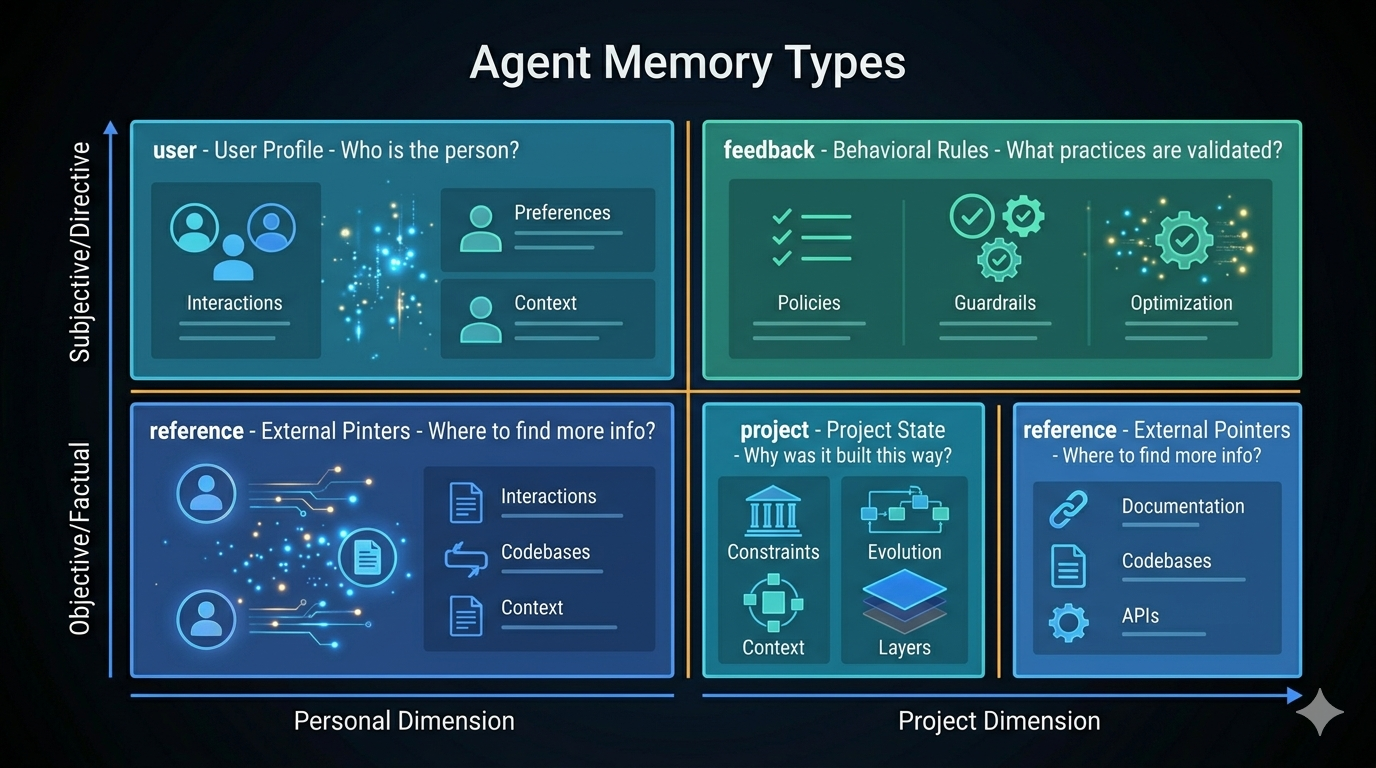
user — Who You’re Working With
Stores role, expertise, and communication preferences. An agent that remembers “ten years of Go, first week of React” frames all frontend explanations in backend analogues. An agent that remembers “junior developer, new to TypeScript” keeps examples concrete and avoids jargon.
When to save: User shares their background, role, or working preferences
How to use:   Calibrate explanation depth, vocabulary, and analogy selection
This is cross-project information — stored in the user’s global directory, it applies everywhere.
feedback — Validated Rules
Records both corrections (“don’t mock the database in integration tests”) and confirmations (“yes, the single bundled PR was the right call”). Most systems only save failures. That’s wrong. If you only record what went wrong, the agent grows overly cautious and drifts away from approaches that were already validated.
When to save: User corrects an approach OR confirms a non-obvious choice without pushback
Structure:    The rule itself → Why: (the reason given) → How to apply: (when it triggers)
The Why field is critical. “Don’t mock the database” without context is a rule to blindly follow. “Don’t mock the database — we got burned when mock tests passed but the migration failed” is a rule you can reason about in edge cases.
project — Why Things Are the Way They Are
Records decisions, deadlines, and work in progress. The code shows what was built. The memory explains why.
When to save: Who is doing what, why, and by when
Structure:    The fact or decision → Why: (motivation) → How to apply: (what it changes)
Special:      Always convert relative dates to absolute ("next Thursday" → "2026-05-08")
Relative dates decay. A memory saved today that says “launches next week” will say “launches next week” in six months — worse than useless. Absolute dates stay accurate.
reference — External System Pointers
Pointers to things that don’t live in the codebase: dashboards, documentation, ticketing projects, Slack channels.
When to save: You learn the location of an external resource and what it's for
How to use:   When the user references an external system or you need to check external state
The Index: MEMORY.md
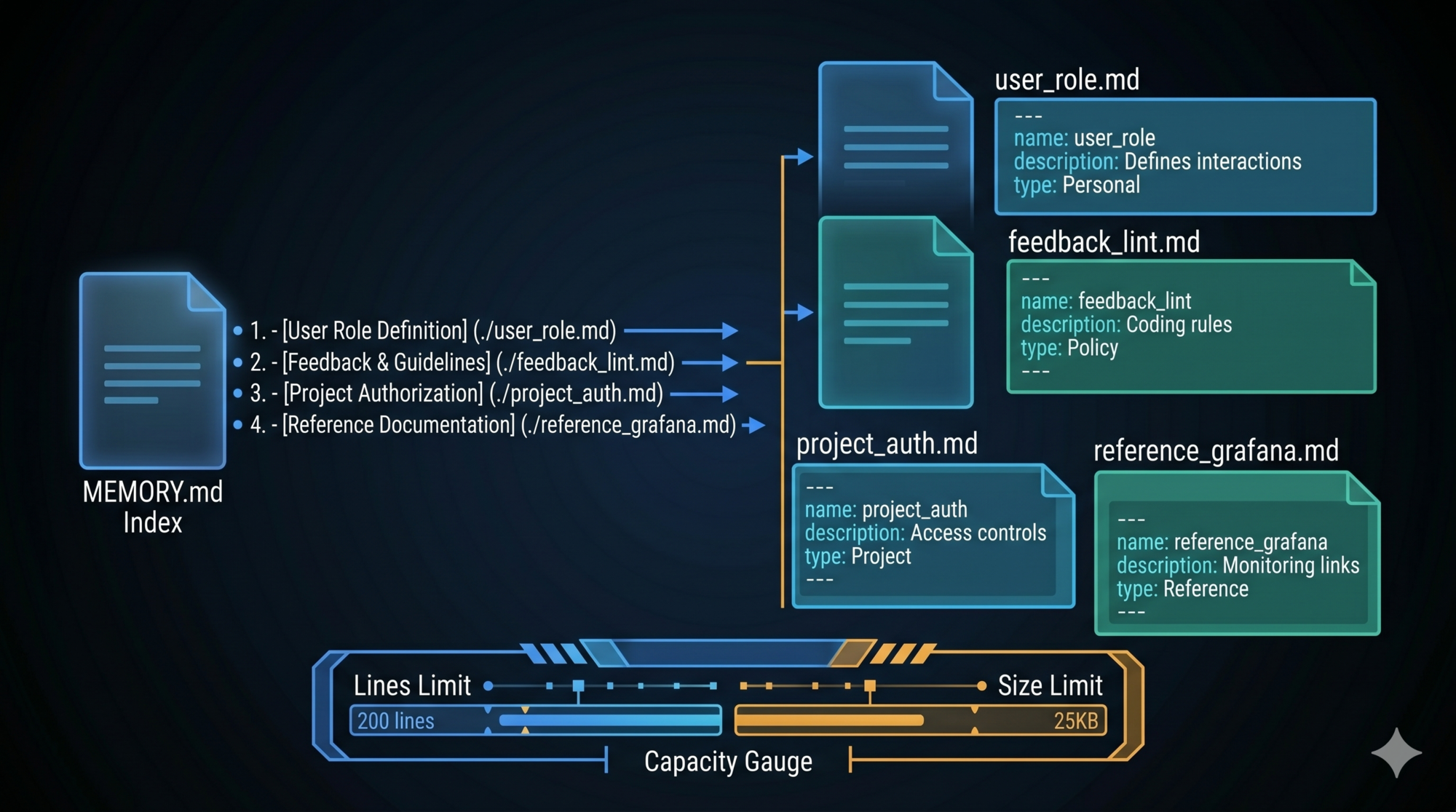
The memory directory contains two components: individual memory files and an index.
MEMORY.md is automatically loaded at the start of every conversation. It’s not a memory — it’s a table of contents. One line per entry, each line a link and a hook description:
- [pre-commit-lint-requirement](feedback_lint.md) — Run npm run lint before every commit; CI failed for a day over unlinted code
- [user-go-background](user_role.md) — Deep Go expertise, new to React; use backend analogues for frontend explanations
- [auth-rewrite-motivation](project_auth.md) — Auth middleware rewrite driven by legal compliance, not tech debt
The index has hard capacity limits: 200 lines and 25KB, whichever triggers first.
Why two limits? They catch different problems:
- Line limit protects comprehension efficiency. Even short lines add cognitive overhead. Over 200 entries, the index is no longer a quick browse — it’s a document to parse.
- Byte limit protects the token budget. Long descriptions (approaching the 150-character per-entry limit) on 200 entries could reach 30KB. That’s real cost per conversation.
Line truncation runs first. This means: when entries are few but verbose, the byte limit triggers; when entries are many but terse, the line limit triggers. Either way, there’s a ceiling.
What NOT to Save
The exclusion list is as important as the inclusion list.
Don’t save:
- Code patterns, file structure, architecture — derivable by reading the code
- Git history —
git logis authoritative - Debugging solutions — the fix is in the code; the commit message has the context
- Anything already in
CLAUDE.md - Ephemeral task details — current session state, in-progress work
The test: “If this memory were deleted, would the agent’s behavior be substantively different?” If not, don’t save it.
When a user asks to save something that fails this test, redirect toward what’s actually worth keeping. If they want to save a PR list, ask what was surprising or non-obvious about it. That’s the part that belongs in memory.
The Background Extraction Problem
There’s a timing problem at the heart of memory systems: the best moment to extract memories from a conversation is after it ends — but that’s also when the user is waiting for the next thing.
Memory extraction requires an LLM call. If you run it synchronously at conversation end, you’re adding latency on every turn. That’s unacceptable.
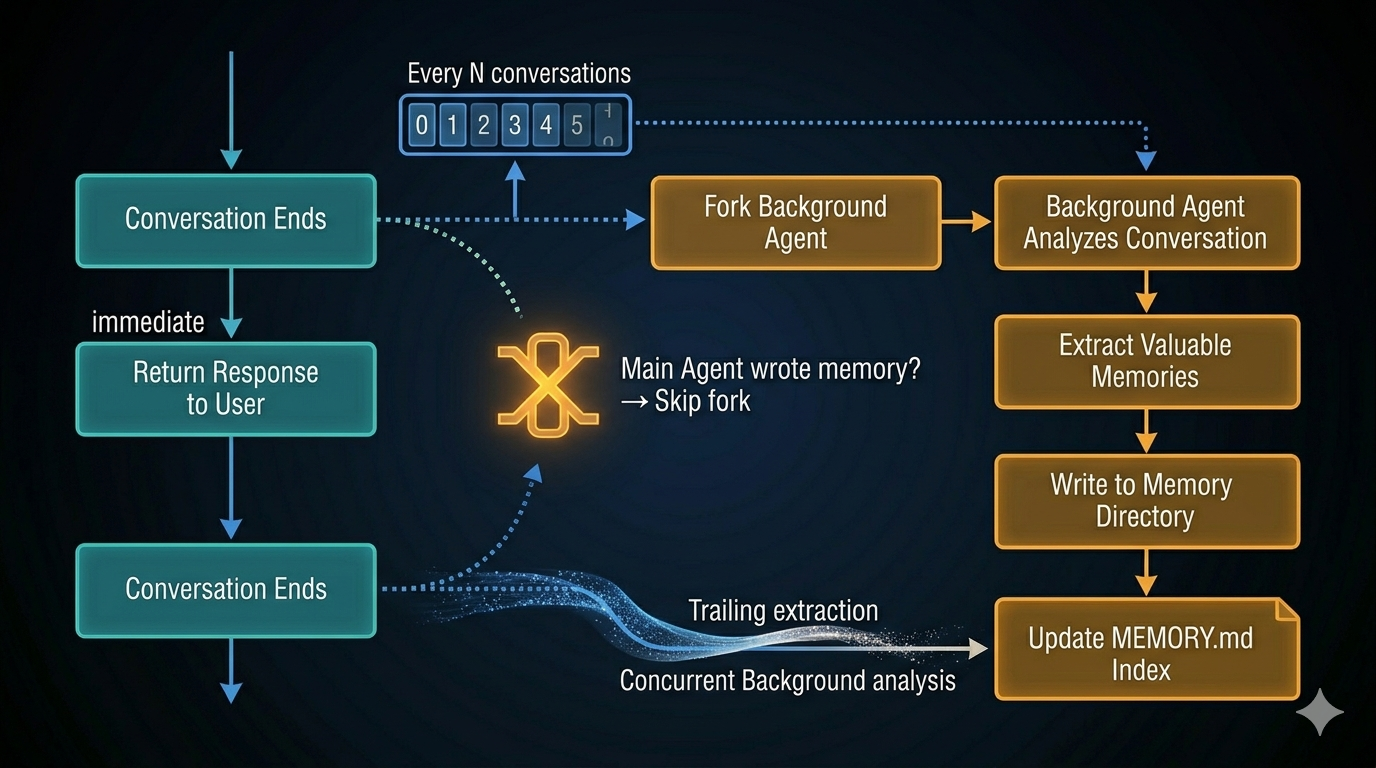
The solution is background extraction: a forked agent that runs in parallel while the user continues.
The Fork Pattern
Claude Code extracts memories via runForkedAgent — a background agent that’s a near-perfect copy of the main conversation:
- Same system prompt
- Same tool definitions
- Shared prompt cache
The fork triggers at the end of each complete query loop (when the model returns a text response with no tool calls pending).
Direct extraction in main loop:
  + Simple implementation
  - Adds wait time on every turn
  - Consumes main conversation's token budget
  - Extraction failures risk destabilizing the main session

Fork-based background extraction:
  + Zero user-visible latency
  + Independent token budget
  + Failures don't affect main conversation
  + Cache sharing dramatically reduces cost
  - Requires mutex mechanism to prevent duplicate writes
User experience wins. The implementation complexity is worth it.
The Mutex: Preventing Duplicate Extraction
There’s a logical conflict: if the main agent has already written a memory during a conversation, the background agent might independently analyze the same conversation and write the same memory.
The mutex check solves this cleanly: if the main agent has written any memory file during the current session, the background extraction skips entirely. The two are mutually exclusive — one runs, the other doesn’t.
This is eventual consistency rather than strict coordination. No locks, no inter-process communication. Just: “did anyone already handle this? If yes, skip.”
The Tool Permission Allowlist: Least Privilege
The background agent needs enough access to do its job. Not more.
| Tool | Permission | Reason |
|---|---|---|
| Read / Grep / Glob | Unrestricted | Need to read code to understand conversation context |
| Bash | Read-only commands only | Can verify state, cannot modify files or execute destructive commands |
| Write / Edit | Memory directory only | Can write memory files, cannot touch project code |
| All other tools | Denied | No side effects — no network calls, no external services |
The boundary is precise: read everything needed to understand context, write only to the memory directory, touch nothing else. A background agent that silently modifies project code during memory extraction would be dangerous and untraceable.
Throttling and Trailing Extraction
Extraction doesn’t run after every conversation. A counter-based throttle means it fires only every N turns. This is a cost-benefit trade: each extraction is an API call. For frequent short conversations (quick Q&A), extraction cost can exceed extraction value. Throttling improves information density per extraction.
But throttling creates a gap: what if two conversations complete while one extraction is running? The later conversation’s context could be lost.
The trailing extraction mechanism handles this. When an extraction is running and another conversation completes, the new context is staged. After the current extraction finishes, a trailing extraction runs immediately using the staged context — bypassing the throttle counter. Already-completed work shouldn’t be delayed.
Cache-Aware Architecture
The background agent reuses the main conversation’s prompt cache. This is a significant cost optimization that shapes an architectural decision you might not notice until you understand why it’s there.
The numbers:
System prompt + tool definitions ≈ 30,000 tokens
Message history ≈ 50,000 tokens (medium conversation)

Without cache sharing:
  Background agent resends 80,000 tokens → ~$0.24

With cache sharing:
  Background agent reuses cached prefix → ~$0.008

Savings: ~97%
For heavy users (dozens of conversations per day), this difference compounds.
The Hidden Constraint: Tool List Consistency
Cache sharing has a non-obvious requirement: the tool list is part of the API cache key. If the background agent uses a different set of tools than the main conversation, the cache key doesn’t match. No cache hit.
This explains a subtle design choice: instead of giving the background agent a smaller tool list, the background agent uses the same tool list with permissions enforced via a canUseTool callback at execution time. The tool definitions are identical — only the runtime behavior differs.
Approach A (breaks cache):
  Main agent tools:       [Read, Write, Edit, Bash, Grep, Glob, ...]
  Background agent tools: [Read, Grep, Glob, MemoryWrite]
  → Different cache keys → cache miss

Approach B (preserves cache):
  Main agent tools:       [Read, Write, Edit, Bash, Grep, Glob, ...]
  Background agent tools: [Read, Write, Edit, Bash, Grep, Glob, ...]  ← same
  Permission filter:       canUseTool() callback → blocks write outside memory dir
  → Same cache keys → cache hit
Design principle: Consistent interface, variable behavior. Keep cache-sensitive parameters (tool lists, system prompt prefixes) stable. Put differentiation in runtime execution control.
Memory Is a Clue, Not a Conclusion
The most important principle for reading memory is this: memory is a point-in-time snapshot, not current fact.
"Memory says X exists" ≠ "X currently exists."
Code gets refactored. Files move. Dependencies upgrade. A memory saved six months ago about src/auth/handler.ts is a pointer to investigate, not a guarantee the file is still there.
Before acting on a memory:
- If it names a file path: check that the file exists
- If it names a function or flag: grep for it
- If the user is about to act on your recommendation: verify first
The three levels of trust are:
| Level | Approach | Problem |
|---|---|---|
| Level 0 | No trust — re-acquire everything | Memory has no value |
| Level 1 | Trust as clue — verify before acting | ← Correct balance |
| Level 2 | Trust as fact — memory is current truth | Stale memories cause wrong actions |
Level 1 is the right balance. Memories guide where to look. Current state determines what’s true.
This rule is easiest to follow for “why” memories (architecture decisions, motivation behind choices) — these almost never become stale. It’s most important for “what” memories (file locations, version numbers, team member roles) — these change regularly.
Key Takeaways
- The right question for memory design is: what information can’t be re-acquired at runtime? Code, history, and structure can be. User preferences, decision rationale, and external pointers can’t.
- A closed four-type system (user, feedback, project, reference) enables reliable relevance reasoning. Flexibility in type taxonomy costs you consistency in retrieval.
- The MEMORY.md index has dual capacity protection: 200 lines (comprehension limit) and 25KB (token budget limit), with line truncation applied first.
- Background fork extraction — triggered after each completed query loop, running in parallel — gives you memory extraction without user-visible latency.
- The mutex between main agent writes and background extraction prevents duplicate memories. When the main agent writes, the background skips.
- Cache-aware design: the background agent uses the same tool list as the main agent, with permissions enforced at runtime via callback. Same tool definitions = same cache key = cache hit.
- Memory is a clue, not a conclusion. Verify file paths and flags before acting on them. Trust “why” memories directly; verify “what” memories against current state.
What’s Next
In Part 7: Context Management — The Compression Problem, we tackle the finite context window:
- The four-level progressive compression cascade: why you try cheap methods first
- The circuit breaker pattern: how to stop compression loops from running forever
- Prompt cache stability: why the order of your preprocessing pipeline matters
- How a compression summary differs from a compression log — and why it matters for agent reasoning
References
Memory and persistence
- Building Effective Agents — Anthropic Research
- Harness Design for Long-Running Applications — Anthropic Engineering
- Claude Code Overview — Official docs
Architecture analysis
- Inside Claude Code: Architecture Behind Tools, Memory, Hooks, and MCP — Penligent
- Dive into Claude Code: Design Space of AI Agent Systems — arxiv
- 12 Agentic Harness Patterns from Claude Code — Generative Programmer
Have thoughts on this?
I read every email. If something resonated, felt wrong, or made you think — I'd love to hear from you.


Comments