
Plan Mode: The Architecture of Thinking Before Acting (Part 11)

Series: The Agent Harness — Part 11 of 12
The most expensive agent mistake is acting on a misunderstood requirement. By the time you discover the misunderstanding — modified files, failed tests, broken pipelines — the cost of correction is high. The mistake didn’t happen because the agent was bad at coding. It happened because the agent started coding before understanding the problem.
This is the Premature Action failure mode. It’s common. It’s expensive. And it has an architectural solution.
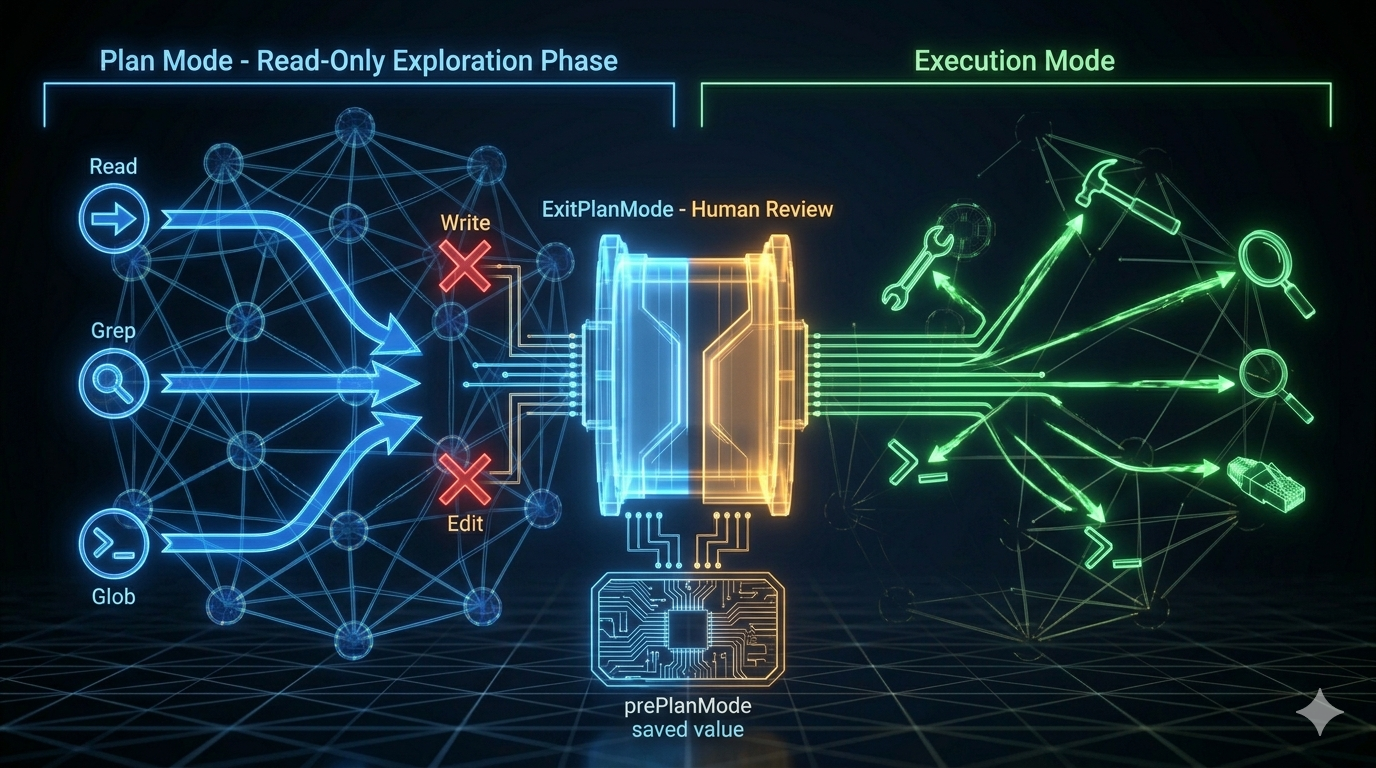
Plan Mode separates agent behavior into two phases: a read-only exploration phase where the agent understands the problem, and an execution phase where it acts on that understanding. The key insight is that during the planning phase, there are no side effects — no files modified, no commands run. The cost of discovering and correcting a misunderstanding is zero.
Part 10 covered streaming performance. This post covers the planning architecture that shapes when agents act.
The Problem: Premature Action
Without a planning phase, an autonomous agent faces a dilemma on complex tasks: act immediately (high risk of misunderstanding) or re-read the same files in every turn without committing to a direction (inefficient).
The table below shows what happens with and without Plan Mode:
| Scenario | Without Plan Mode | With Plan Mode |
|---|---|---|
| Misunderstood requirements | Implemented wrong feature; needs rollback | Discovered misunderstanding in read-only phase; zero-cost correction |
| Ignored existing patterns | Code inconsistent with project style | Explored patterns first; implementation matches |
| Poor solution choice | Implemented slow approach; needs rewrite | Compared solutions before acting |
| Missed edge cases | Found post-implementation; rework | Enumerated in plan; incorporated before acting |
Every row in that table describes a real kind of agent failure. Plan Mode doesn’t prevent all of them — but it catches the ones that stem from acting without understanding.
The Mode Switch: How Read-Only Becomes Enforced
Plan Mode isn’t a suggestion. It’s an enforced permission mode change.
When the agent enters Plan Mode:
- The current permission mode is saved to
prePlanMode - The permission context switches to
planmode - In
planmode, Write tools returndenyfrom the permission pipeline (Stage 3:checkPermissions) - The agent receives a clear behavioral instruction set
In plan mode, you should:
1. Thoroughly explore the codebase to understand existing patterns
2. Identify similar features and architectural approaches
3. Consider multiple approaches and their trade-offs
4. Use AskUserQuestion if you need to clarify the approach
5. Design a concrete implementation strategy
6. When ready, use ExitPlanMode to present your plan for approval
The six-step sequence has a structure: steps 1–2 are divergent (broad exploration), steps 3–4 are convergent transition (focused analysis, open to questions), steps 5–6 are fully convergent (concrete plan, ready to present). The instructions encode a cognitive model, not just a to-do list.
The Sub-Agent Constraint
Sub-agents cannot enter Plan Mode. This is an architectural constraint, not a policy choice.
The reason: Plan Mode requires the user to review and approve a plan before execution begins. If a sub-agent enters Plan Mode, it blocks waiting for user approval — but the user may not know the sub-agent exists, and may not be watching for approval requests from nested agents. The entire parent agent’s execution stalls on an invisible approval request.
The constraint is enforced in EnterPlanModeTool.call(): the first check is whether the call is in an agent context. If it is, the tool throws an error immediately. Plan Mode is only for the main conversation.
Exiting Plan Mode: The Approval Gate
The exit is more complex than the entrance. ExitPlanModeV2 handles several scenarios.
Mode restoration with circuit breaker. The saved prePlanMode value is read and restored. But there’s a guard: if prePlanMode was auto, the system checks whether auto mode’s gate is currently open. If it was closed during the planning phase (due to a circuit breaker trigger or policy change), the system falls back to default mode.
Why? There’s a time window between entering and exiting Plan Mode. The state that allowed auto mode at entry may no longer be valid at exit. Restoring to auto mode blindly would bypass security controls that were activated in the interim.
prePlanMode = "auto"
  ↓
Is auto mode gate open?
  Yes → Restore to auto mode
  No  → Fall back to default mode (security takes priority)
The approval UI. After presenting the plan, the user reviews it. If the plan looks correct, they approve — the agent switches back to execution mode and begins implementation. If not, they request changes — the agent remains in Plan Mode for another round of exploration.
This is the human-in-the-loop moment. Not at every tool call (that’s the default permission mode), not never (that’s bypass mode) — but at the right moment: when the full plan is visible and the user can make an informed judgment.
Plan-Execute Workflow in Practice
A concrete example: adding pagination to a REST API.
Exploration phase (Plan Mode):
Tool calls (all read-only):
1. Glob("src/routes/*.ts")           ← discover route files
2. Glob("src/models/*.ts")           ← discover model files
3. Grep("limit|offset|page|cursor")  ← existing pagination patterns
4. Read("src/routes/users.ts")       ← typical route implementation
5. Read("src/middleware/validate.ts") ← validation patterns
6. Grep("interface.*Response")       ← response type definitions
Discoveries: Express + TypeScript, 12 route files, no existing pagination, Zod validation middleware, Prisma ORM.
Analysis phase (still Plan Mode):
The agent compares offset pagination (simple, worse at scale) vs cursor pagination (complex, better at scale), considers the current project’s scale, and selects an approach.
Plan presentation (ExitPlanMode):
## Pagination Implementation Plan

Solution: Offset pagination (project scale doesn't warrant cursor complexity)

Steps:
1. Create src/types/pagination.ts — type definitions
2. Create src/middleware/pagination.ts — parameter parsing
3. Modify src/routes/users.ts — first route implementation
4. Add Zod validation — limit (1–100), offset (>=0)
5. Update ApiResponse type — pagination metadata

Files affected: 2 new, 3 modified
Risk: Low — additive change, no modification to existing functionality
User approves. Execution phase begins.
Zero side effects occurred during the exploration and planning. The agent now acts with full context.
Background Scheduling: Cron and Remote Triggers
Plan Mode handles interactive planning within a session. But agent harnesses also need to schedule tasks that run without user interaction: nightly code reviews, periodic health checks, automated report generation.
Claude Code supports two scheduling mechanisms:
Cron jobs (CronCreate): Session-scoped recurring prompts. Standard five-field cron syntax in local timezone. Jobs fire when the REPL is idle. A 7-day auto-expiry prevents zombie jobs from accumulating.
"Run smoke tests every morning at 9"
→ CronCreate: cron="57 8 * * *", recurring=true

"Remind me to check the deploy in 30 minutes"
→ CronCreate: cron="<now+30>", recurring=false
Note the off-by-a-minute pattern: 57 8 instead of 0 9. When many users ask for “9am,” all their jobs land at the same API timestamp. Offset by a few minutes reduces thundering herd.
Remote triggers: Long-lived triggers that persist beyond the session. Configured via API, they can fire on external events or remote schedules. Useful for CI/CD integration: trigger an agent run when a PR is opened, a deploy completes, or a monitoring alert fires.
The integration point with Plan Mode: a scheduled agent can be configured to run in Plan Mode, surfacing a plan for human review before any destructive operations execute. This combines autonomous scheduling with mandatory oversight for high-risk operations.
Two User Models: External vs. Internal
An interesting design detail from the source: Plan Mode presents different behavioral guidance to different user types.
For external users, the system encourages Plan Mode: “For implementation tasks, consider using Plan Mode first.” Safety and alignment take priority.
For internal (Anthropic) users, the guidance is more direct: “Start working immediately; clarify through questions when in doubt.” Efficiency and fluency take priority.
This reflects a genuine trade-off. Plan Mode adds overhead — an extra exploration phase, an approval step. For users who deeply trust the agent and work at speed, that overhead isn’t worth it. For users who are still building trust in the agent’s behavior, the overhead is entirely worth it.
The lesson for harness builders: one mode doesn’t fit all users. Build the planning pattern for the use case, then tune the defaults for your audience.
Key Takeaways
- Premature Action is the most expensive agent failure mode. It stems from acting before understanding. Plan Mode’s architectural solution is a read-only phase where exploration has no cost.
- Mode switch is enforced, not advisory. In
planmode, Write tools returndenyfrom the permission pipeline. The constraint is structural, not just instructional. - Sub-agents cannot enter Plan Mode. A nested plan approval request would block the parent agent invisibly. Plan Mode is main-conversation only.
- Exit with circuit breaker. If
prePlanModewasautoand the auto-mode gate closed during the planning phase, fall back todefault. Don’t bypass controls that activated mid-session. - The six-step planning sequence encodes a cognitive model: diverge (explore) → converge-transition (analyze) → fully converge (present plan).
- Cron scheduling provides session-scoped recurring tasks. Remote triggers provide persistent external-event-driven invocations. Both integrate with Plan Mode for human-in-the-loop oversight.
What’s Next
In Part 12: Build Your Own Agent Harness — The Practical Blueprint, we synthesize the series into a practical guide:
- The decision flowchart: when to use a simple API call vs. function calling vs. a full harness
- Six-step implementation roadmap: dialog loop → tools → permissions → context → memory → hooks
- Pseudocode skeleton for the minimal viable harness
- Production readiness checklist
- Framework comparison: build-your-own vs. LangGraph, CrewAI, AutoGen
References
Planning and workflow patterns
- Building Effective Agents — Anthropic Research
- Harness Design for Long-Running Applications — Anthropic Engineering
- Claude Code Common Workflows — Official docs
Architecture analysis
- Dive into Claude Code: Design Space of AI Agent Systems — arxiv
- 12 Agentic Harness Patterns from Claude Code — Generative Programmer
- Inside Claude Code: Architecture Behind Tools, Memory, Hooks, and MCP — Penligent
Have thoughts on this?
I read every email. If something resonated, felt wrong, or made you think — I'd love to hear from you.

Comments