
Streaming Architecture: Building Agents That Feel Fast (Part 10)

Series: The Agent Harness — Part 10 of 12
An agent can be architecturally correct — proper permission pipeline, solid memory system, working context compression — and still feel unusably slow. The problem isn’t correctness, it’s latency perception.
The gap between “instant response” and “waiting to load” is usually measured in how early the agent starts showing output, not how quickly the underlying computation finishes. Streaming is what closes that gap. And streaming isn’t just a UI feature you add at the end — it’s an architectural constraint that shapes how every component is built.
Part 9 covered multi-agent orchestration. This post covers the performance architecture those agents run on.
QueryEngine: The Session State Owner
Most harness implementations pass session state through function parameters: the message list, the abort controller, the file cache. This works until it doesn’t — every new state field requires updating all function signatures across the call chain.
Claude Code’s solution is a class: QueryEngine. One session, one instance. State lives as instance properties. Adding a new field requires only updating the constructor, not every function that touches session state.
class QueryEngine {
  private messages: Message[]
  private abortController: AbortController
  private deniedPermissions: Set<string>
  private usage: TokenUsage
  private fileStateCache: Map<string, FileState>
  private discoveredSkills: Set<string>

  async *submitMessage(input: string): AsyncGenerator<StreamEvent> {
    // Each call starts a new turn; state persists between turns
  }
}
Single ownership matters in concurrent scenarios. If multiple components simultaneously read from and write to a shared message list, messages can arrive out of order or get processed twice. The class provides a natural mutual exclusion boundary: all state modifications go through one owner.
submitMessage is an AsyncGenerator — callers consume events one at a time without waiting for the turn to complete. The UI renders each token as it arrives. Tool results surface immediately. The user sees progress.
Streaming vs. Non-Streaming: The Real Performance Difference
The performance argument for streaming isn’t about raw computation time. It’s about when work starts.
Consider a model response that triggers three tool calls over 5 seconds:
| Strategy | Second 1 | Second 2 | Second 3–5 | Finish |
|---|---|---|---|---|
| Non-streaming | Waiting | Waiting | Waiting | All tools start → complete |
| Streaming | Tool 1 starts | Tool 2 starts | Tool 3 starts | Tools complete during model output |
In streaming mode, Tool 1 starts executing at second 1. By the time the model finishes generating at second 5, the tools may already be done. Non-streaming mode waits 5 seconds for the complete response, then begins tool execution.
The latency difference is the model’s entire generation time. For complex multi-tool turns, that’s meaningful.
Streaming also means the user sees partial output immediately. A tool response that takes 2 seconds to stream feels faster than one that dumps 2 seconds of accumulated output at once.
Streaming Processing: Token by Token
The API returns streaming events: message_start, content_block_start, content_block_delta, content_block_stop, message_delta, message_stop.
The system processes each event as it arrives:
message_start→ reset usage counters for the new messagecontent_block_startwith typetool_use→ immediately prepare tool execution contextcontent_block_delta→ append to incremental buffer, attempt incremental JSON parsingcontent_block_stop→ hand completed tool call to StreamingToolExecutormessage_delta→ accumulate token usage
The key moment is content_block_start with tool_use. The system doesn’t wait for content_block_stop to prepare. It pre-looks up tool definitions and permission contexts as soon as it knows a tool call is coming. By the time the parameters arrive, setup is already done.
Incremental JSON Parsing
Tool parameters are JSON, but they arrive character by character in streaming. Traditional JSON.parse() requires a complete string. The harness maintains an accumulation buffer, appending each delta, and attempts parsing at key boundary events.
Streaming arrives: {"path": "/src/ind
Buffer:            {"path": "/src/ind   ← not valid JSON yet
                   {"path": "/src/index.ts"}  ← valid at content_block_stop
Heavy computation belongs at boundary events (content_block_stop), not on every delta. A delta may contain one or two tokens. Parsing overhead on every delta costs more than it saves.
StreamingToolExecutor: Execute on Arrival
StreamingToolExecutor is the component that executes tools immediately as their parameter blocks complete, rather than waiting for the entire model response.
Each tool tracked by the executor passes through four states:
queued → executing → completed → yielded
When a new tool call completes its parameter block, it enters queued and immediately triggers execution logic. Whether it can execute depends on one rule:
A tool can execute if and only if: no tools are currently executing, OR all currently executing tools AND the new tool are concurrency-safe.
Non-concurrency-safe tools execute exclusively — nothing runs in parallel with them.
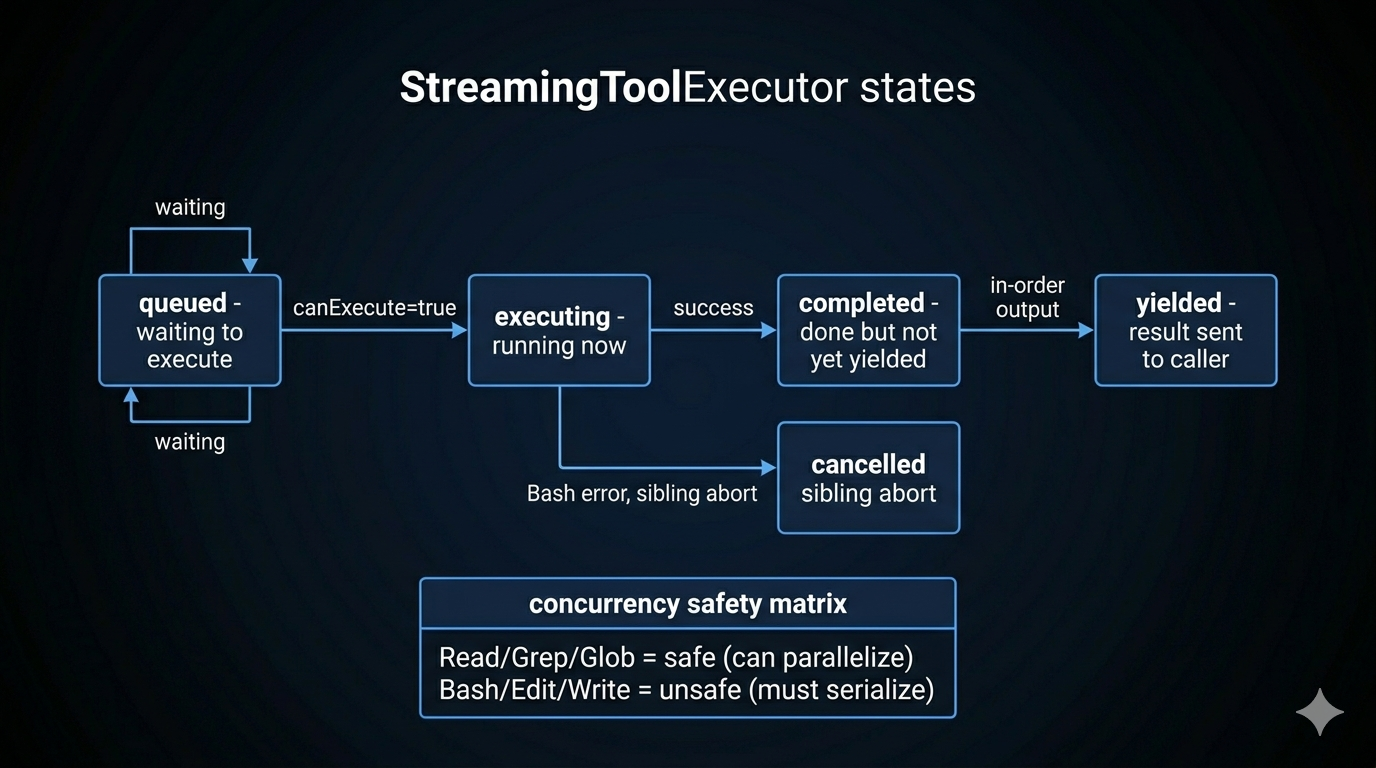
Safe vs. Unsafe: The Concurrency Matrix
| Tool Class | Concurrency Safe | Reason |
|---|---|---|
| Read, Grep, Glob, Search | Yes | Read-only, no side effects |
| Bash, Edit, Write | No | Side effects; may conflict |
Read-only tools parallelize freely. Write tools serialize.
Why not do fine-grained dependency analysis between Bash commands? Theoretically, echo hello and echo world could run in parallel while mkdir foo && echo bar > foo/file.txt has a dependency. But parsing shell semantics reliably is expensive and error-prone. The conservative rule — Bash is always unsafe — is simpler, more maintainable, and the extra second of serialization is rarely noticeable.
Order Guarantee
Results are always emitted in request order, regardless of execution order. A faster tool (completing at state completed) waits until all previous tools have been yielded before its result is forwarded.
This matters for the conversation history: tool results must appear in the same order as the tool calls that produced them. If Bash Tool 3 completes before Read Tool 1, Tool 3 waits in completed state until Tools 1 and 2 have been yielded.
Sibling Abort on Bash Failure
When a Bash command fails, all other parallel tools (siblings) are cancelled. This prevents cascading issues where later steps depend on a failed earlier step. Bash is the primary execution primitive; its failure usually means the overall plan is wrong, not just one step.
Startup Performance: Parallel Prefetch and Lazy Load
Response latency during a conversation is the primary performance metric. But startup latency matters too — a CLI tool that takes 3 seconds to start feels broken.
Claude Code handles both:
Parallel prefetching: Tools, skills, and MCP servers are initialized in parallel at startup. Independent initializations don’t wait for each other. The expensive operations (spawning MCP server processes, loading skill files) happen concurrently.
Lazy loading: The ToolSearchTool (Part 3) allows the agent to discover tools on demand rather than loading all tool schemas upfront. Sending 50 tool definitions to the model costs tokens every turn. Lazy discovery means only the tools currently needed are included in the request.
deferred loading: Some tools are registered but not loaded until first use. The initialization cost is spread across the session rather than frontloaded.
Prompt Cache Strategy
The Anthropic API’s prompt cache is byte-prefix matching — if consecutive requests share the same prefix, the cached prefix is reused, saving input token costs and latency.
Three rules for cache-stable requests:
1. Stable system prompt prefix. The system prompt should not change between turns within a session. Dynamic elements (current time, session ID) should go at the end of the system prompt, not the beginning. A change at byte position N invalidates the cache for everything from position N onward.
2. Consistent tool definitions. Tool schemas included in the API request are part of the cache key. Tools should not appear/disappear between turns unless necessary. This is why the Fork pattern (Part 9) passes exact tool bytes to sub-agents rather than reconstructing.
3. Message history order. The conversation history prefix is part of the cache key. Don’t reorder messages between turns (they shouldn’t be reordered anyway — this is a hygiene note).
Cache hits dramatically reduce turn latency. A 30,000-token system prompt that costs $0.30 at standard input rates costs $0.008 at cache rates. For heavy users, this compounds across dozens of turns per session.
Key Takeaways
- Streaming is an architectural choice, not a UI feature. It shapes every component: the loop abstraction, tool execution timing, event types, buffer management.
- QueryEngine owns session state as a class. Single ownership prevents concurrent state corruption.
submitMessageis anAsyncGenerator— callers consume events immediately. - Execute on arrival: StreamingToolExecutor starts tool execution as soon as parameter blocks complete, not when the entire model response arrives.
- Concurrency safety is binary: read-only tools parallelize, write tools serialize. Conservative simplicity over fragile dependency analysis.
- Results yield in request order regardless of completion order. Faster tools wait in
completedstate. - Sibling abort cancels all parallel tools when a Bash command fails — prevents cascading from a broken plan.
- Cache stability requires stable system prompt prefix, consistent tool definitions, and stable message history ordering.
What’s Next
In Part 11: Plan Mode — The Architecture of Thinking Before Acting, we cover the planning system:
- Why autonomous agents need a “thinking space” before acting
- The mode switch mechanism: how read-only becomes the enforced constraint
- The six-step planning workflow the model follows
- The approval gate: where human-in-the-loop belongs in an autonomous system
- Background scheduling for long-running workflows
References
Streaming and performance
- Building Effective Agents — Anthropic Research
- Master the Claude API for Streaming and Tool Use — n1n.ai
- Claude Code Common Workflows — Official docs
Architecture analysis
Have thoughts on this?
I read every email. If something resonated, felt wrong, or made you think — I'd love to hear from you.


Comments