
Configuration as Architecture: The Multi-Layer Settings Problem (Part 5)

Series: The Agent Harness — Part 5 of 12
Every application has settings. But most applications have a single, well-understood set of users who control those settings.
An Agent harness doesn’t. It has to serve:
- Individual developers who want personal model preferences and shortcut permissions
- Project teams who need shared standards and consistent hooks across all contributors
- Enterprise administrators who need to enforce security policies that can’t be overridden
- Plugin authors who provide base defaults for their tools
- CI/CD pipelines that inject one-time overrides without touching any persistent config
Each of these stakeholders has legitimate, non-overlapping needs. They all configure the same system. The needs conflict constantly. When “user allows npm publish” meets “project denies npm publish” meets “enterprise locks the model list” — who wins?
A flat config file has no good answer. A priority hierarchy does.
Part 4 covered the permission pipeline. This post covers the configuration system that feeds it.
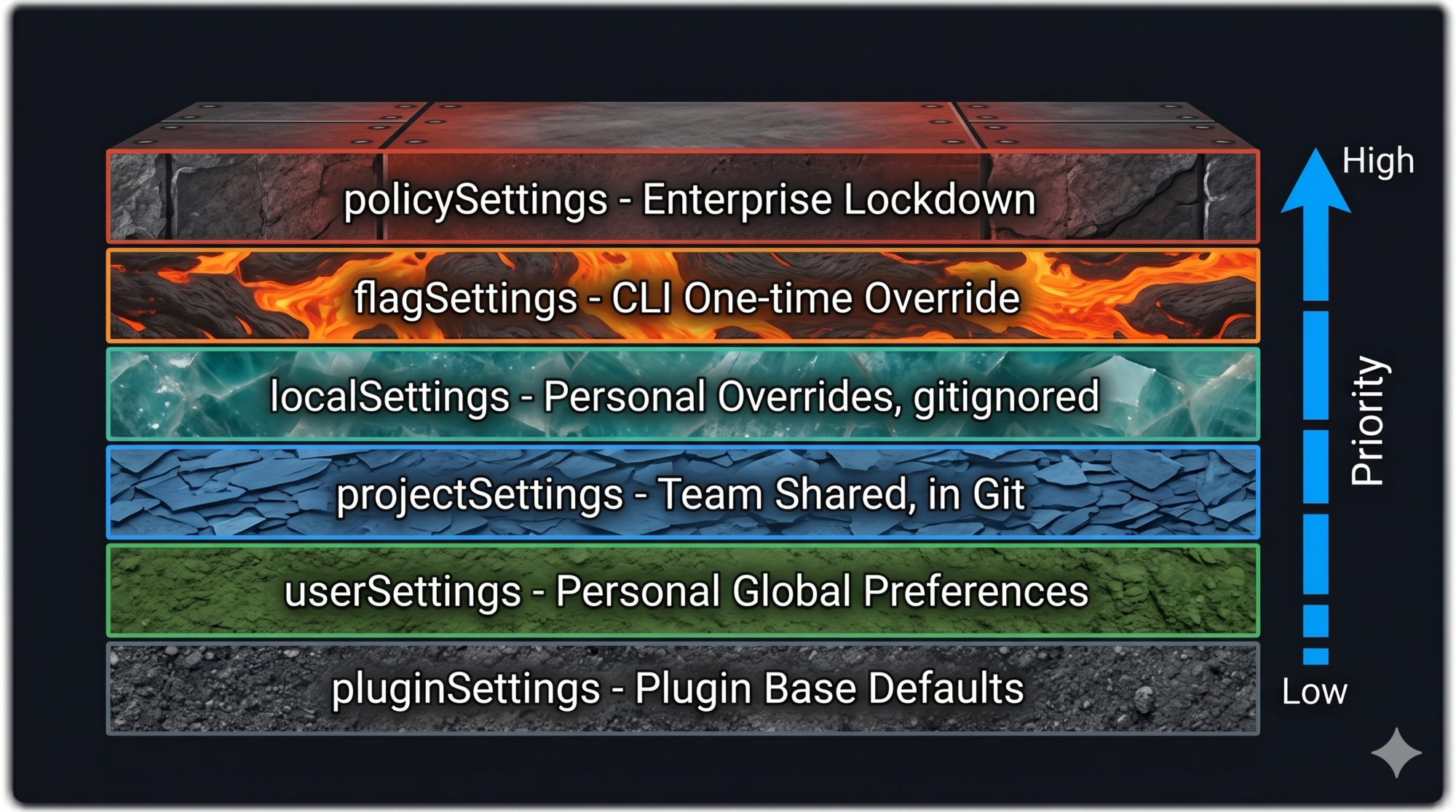
The Six-Layer Priority Hierarchy
Claude Code resolves configuration conflicts through a six-layer priority system. Lower layers provide defaults; higher layers override them.
pluginSettings      (lowest — plugin base defaults)
userSettings        ↑ personal global preferences
projectSettings     ↑ team-shared, committed to git
localSettings       ↑ personal project overrides, gitignored
flagSettings        ↑ CLI-injected, one-time override
policySettings      (highest — enterprise lockdown)
Later layers shadow earlier ones. If userSettings says model: "claude-sonnet-4" and localSettings says model: "claude-opus-4", the effective value is "claude-opus-4".
The geological strata analogy is accurate: each layer of rock was deposited at a different time, and you can read the full history by looking at all layers — but the surface layer is what you see first.
Three Merge Semantics (And Why Each One Exists)
The merge isn’t a simple “later layer overrides earlier.” Different field types use different merge strategies. The choice of strategy isn’t arbitrary — each is designed to prevent a specific class of misconfiguration.
Arrays: Concatenate and Deduplicate
Permission rules, hooks, and allow-lists are arrays. They accumulate from all layers.
// userSettings
{ "permissions": { "allow": ["Bash(npm *)", "Bash(node *)"] } }

// projectSettings
{ "permissions": { "allow": ["Bash(npm run lint)", "Read(*)"] } }

// localSettings
{ "permissions": { "allow": ["Bash(git *)"] } }

// Result: concatenated and deduplicated
{ "permissions": { "allow": ["Bash(npm *)", "Bash(node *)", "Bash(npm run lint)", "Read(*)", "Bash(git *)"] } }
Why concatenate instead of replace? Because each layer should only declare the rules it wants to add. If a higher-priority layer’s array replaced a lower-priority layer’s array, you’d have to repeat every lower-layer rule in every higher layer to avoid accidentally losing coverage. Missing one rule becomes a security hole.
The anti-pattern: You cannot revoke a lower-layer rule by omitting it in a higher layer (arrays concatenate). To revoke, explicitly add a deny rule.
Objects: Deep Merge
Nested objects merge field by field. A higher-priority layer can override specific nested keys without replacing the whole object.
// projectSettings
{ "hooks": { "PreToolUse": [{ ... audit hook ... }] } }

// localSettings — overrides one nested field only
{ "hooks": { "PostToolUse": [{ ... my hook ... }] } }

// Result: both nested fields survive
{ "hooks": { "PreToolUse": [{ ... }], "PostToolUse": [{ ... }] } }
Scalars: Later Wins
Simple values (strings, booleans, numbers) follow straightforward override semantics. model: "claude-opus-4" in localSettings overrides model: "claude-sonnet-4" in userSettings.
Design lesson: Match your merge strategy to the semantic meaning of the field. Permission rules are additive (arrays concatenate). Configuration namespaces are hierarchical (objects deep-merge). Single-value preferences are override-able (scalars replace).
The Security Boundary: Why projectSettings Is Treated Differently
Here’s a security fact that most documentation glosses over: projectSettings (.claude/settings.json) lives in your project directory and gets committed to git. That means when you clone a third-party repository, you automatically load their configuration.
Now consider what configuration can do: configure hooks that execute shell commands, set permission modes, configure which model is used. A malicious .claude/settings.json could include a PreToolUse hook that silently exfiltrates environment variables (API_KEY, AWS_SECRET_ACCESS_KEY) on every tool call.
This is a supply chain attack vector unique to agent harnesses.
Claude Code’s defense: systematically exclude projectSettings from all security-sensitive checks.
The functions that determine whether auto mode can bypass permission dialogs, whether the permission prompt can be skipped, whether the classifier can auto-approve — all of them read from userSettings, localSettings, flagSettings, and policySettings. projectSettings is explicitly excluded.
The code comments say it directly: “projectSettings is intentionally excluded — a malicious project could otherwise auto-bypass the dialog (RCE risk).”
The trust levels reflect this:
| Source | Trust | Why |
|---|---|---|
policySettings |
Highest | Enterprise-administered, audited |
flagSettings |
High | User explicitly passed this flag |
localSettings |
High | User wrote this file, on their own filesystem |
userSettings |
High | User’s own global config |
projectSettings |
Low | May come from a cloned third-party repo |
pluginSettings |
Lowest | Plugin ecosystem, requires separate verification |
The lesson: not all config sources are equally trusted, and your architecture should make the trust levels explicit rather than treating all config as equivalent.
Enterprise Mode: allowManagedHooksOnly
When policySettings sets allowManagedHooksOnly: true, only hooks from policySettings itself are executed. All hooks from user/project/local sources are skipped.
For organizations with compliance requirements (financial institutions, healthcare), this ensures only audited, administrator-approved hooks ever run — regardless of what individual projects or developers configure.
Feature Flags: Compile-Time vs Runtime
Claude Code distinguishes between two types of feature flags:
Compile-Time Flags
The feature() function evaluates at build time. When a feature is disabled, the corresponding code is removed by the bundler’s tree-shaking. The tool doesn’t just fail to register — it doesn’t exist in the binary at all.
This has a security implication: internal tools (debugging tools, REPL tools, experimental features) that are disabled in external builds don’t appear in the distributed artifact. No dead code to reverse-engineer. No feature detection from the outside.
Runtime Flags (GrowthBook)
GrowthBook-based flags are evaluated at runtime. These enable A/B testing and gradual rollouts — enable a new tool for 10% of users, monitor behavior, expand to 50%, then 100%.
For an agent harness, the difference matters:
- Compile-time: “This feature is not available in this build.” Zero runtime cost. Clean binaries.
- Runtime: “This feature is being rolled out gradually.” Requires server-side configuration. Enables targeted rollouts.
Pattern to steal: Use compile-time flags to gate features that genuinely shouldn’t exist in certain builds (internal tools, experimental APIs). Use runtime flags for gradual rollout control. Don’t conflate the two.
AppState: A Minimalist State Store
Configuration defines what the agent can do. AppState holds what the agent is currently doing.
Claude Code’s AppState contains 50+ state fields covering:
- Current settings and permission context
- UI state (streaming, rendering)
- Session state (messages, tool context)
- MCP server connections
- Plugin and skill registrations
- Communication state (notifications, attachments)
The state store itself is remarkably small — approximately 34 lines. It follows the Zustand pattern:
function createStore<T>(initialState: T) {
  let state = initialState
  const listeners = new Set<() => void>()

  return {
    getState: () => state,
    setState: (updater: (prev: T) => T) => {
      const next = updater(state)
      if (next !== state) {  // Reference equality check
        state = next
        listeners.forEach(fn => fn())
      }
    },
    subscribe: (listener: () => void) => {
      listeners.add(listener)
      return () => listeners.delete(listener)  // Cleanup function
    }
  }
}
Three design decisions worth noting:
Updater function pattern. setState accepts (prev: T) => T rather than the new state value. This ensures every update explicitly derives from the previous state, preventing the “stale state” problem where two concurrent updates each read the same old state and one overwrites the other.
Reference equality check. Notifications only fire when the state object actually changes (next !== state). If an updater returns the same object reference (no-op update), no listeners are notified. This prevents unnecessary re-renders.
Cleanup functions. subscribe returns a function to remove the listener. No unsubscribe(listener) call needed — just call the returned function. This prevents memory leaks and makes cleanup explicit.
For the React/Ink UI layer, AppState integrates with React’s useSyncExternalStore hook — the official React API for subscribing to non-React state stores. This ensures the terminal UI re-renders exactly when state changes, without manual coordination.
Design lesson: A state store for an agent harness doesn’t need to be complex. The Zustand-style minimalist store — get/set/subscribe with updater functions and reference equality — handles most use cases in under 40 lines. Don’t reach for a heavy state management library until you’ve tried the simple version.
The policySettings Exception
There’s one rule that doesn’t follow the normal priority hierarchy: policySettings.
While userSettings through flagSettings use deep merge (each layer adding to the previous), policySettings uses “first non-empty source wins.” The sources it checks, in order:
- Remote API settings (highest)
- MDM settings (macOS plist / Windows HKLM)
managed-settings.jsonandmanaged-settings.d/*.json- HKCU registry (Windows user-level)
Why first-wins instead of merge? Enterprise security policies are typically complete, audited configuration schemes. Merging policies from different sources (a remote API policy + a local managed-settings.json) could create semantic conflicts: one policy restricts the model list, another restricts permissions, but the merged result accidentally allows using a restricted model to bypass permissions.
First-wins ensures policy comes from one authoritative source, not a combination of sources that may not have been designed to work together.
Configuration Patterns in Practice
Three patterns for teams at different scales:
Pattern 1: Personal-Team Separation (Most Common)
~/.claude/settings.json      → personal model, personal shortcuts
.claude/settings.json        → team lint rules, shared hooks, permission baseline
.claude/settings.local.json  → personal debug flags, personal fast paths
Pattern 2: CI/CD Injection
# Inject one-time config without touching persistent files
claude --settings /path/to/ci-settings.json
CI settings are temporary, don’t pollute local environments, and are auditable in the pipeline config.
Pattern 3: Enterprise Layering
policySettings    → model whitelist, mandatory security hooks, allowManagedHooksOnly: true
projectSettings   → team-specific (non-security) hooks, MCP configs
userSettings      → personal UI preferences, verbose mode
Enterprise admins lock security surface. Teams customize within allowed space. Users personalize within team space.
Key Takeaways
- Configuration for an agent harness is a multi-stakeholder problem. Design a priority hierarchy — not a flat config — from the start.
- Six layers: plugin → user → project → local → flag → policy. Later layers shadow earlier ones.
- Three merge semantics: arrays concatenate (additive permission rules), objects deep-merge (namespace isolation), scalars override (single-value preferences).
projectSettingsis explicitly excluded from security-sensitive checks — it may come from untrusted repositories. Trust levels are not uniform across config sources.- Feature flags: compile-time gates (dead code elimination, no runtime cost) vs. runtime flags (gradual rollout). Don’t conflate them.
- AppState is 34 lines. The updater function pattern, reference equality check, and cleanup functions are the only patterns you need for a harness state store.
What’s Next
In Part 6: The Memory System — How Agents Remember Across Sessions, we cover the memory architecture:
- The four memory types every agent harness should support
- Why structured memory outperforms raw conversation history
- The background extraction problem: writing memory without blocking the main loop
- Capacity protection: what happens when memory grows unbounded
- The “clue not conclusion” principle for verifiable memory records
References
Configuration architecture
- Claude Code Overview — Official docs
- Harness Design for Long-Running Applications — Anthropic Engineering
- 12 Agentic Harness Patterns from Claude Code — Generative Programmer
Security and supply chain
- Building Effective Agents — Anthropic Research
- Inside Claude Code: Architecture Behind Tools, Memory, Hooks, and MCP — Penligent
State management patterns
Have thoughts on this?
I read every email. If something resonated, felt wrong, or made you think — I'd love to hear from you.
Comments