
How Claude Code's Safety Model Works (Part 6) — Patterns to Steal for Your Own Agentic System
Series: Agentic System Design, Learned from Claude Code — Part 6 of 6
This is the last post in the series. We’re going to do two things.
First, we’ll cover Claude Code’s safety model — the full picture, not just the surface-level permissions you see as a user. Second, we’ll step back and turn everything we’ve learned across this series into a concrete playbook: 10 patterns you can apply when building your own agentic system.
Let’s start with the thing most engineers get backwards.
The Wrong Mental Model of Agentic Safety
Most people think agentic safety is about making the model safer. Better alignment training. Refusal behaviour. Content filters.
Those matter. But they’re not the reason most agentic systems fail in production.
Most failures are architectural. The model did exactly what it was told. The problem was that the surrounding system didn’t have the right constraints, permissions, or oversight in place. A perfectly well-behaved model can still:
- Delete production database records because no one restricted write access
- Exfiltrate SSH keys via
curlbecause no network allowlist was in place - Spend $3,000 in API calls in one session because there was no cost limit
- Loop forever because there was no iteration cap
These are not model problems. They are design problems. And you can’t fix them with better prompting.
Safety is architecture, not a guardrail you bolt on after you ship.
Claude Code’s Safety Model
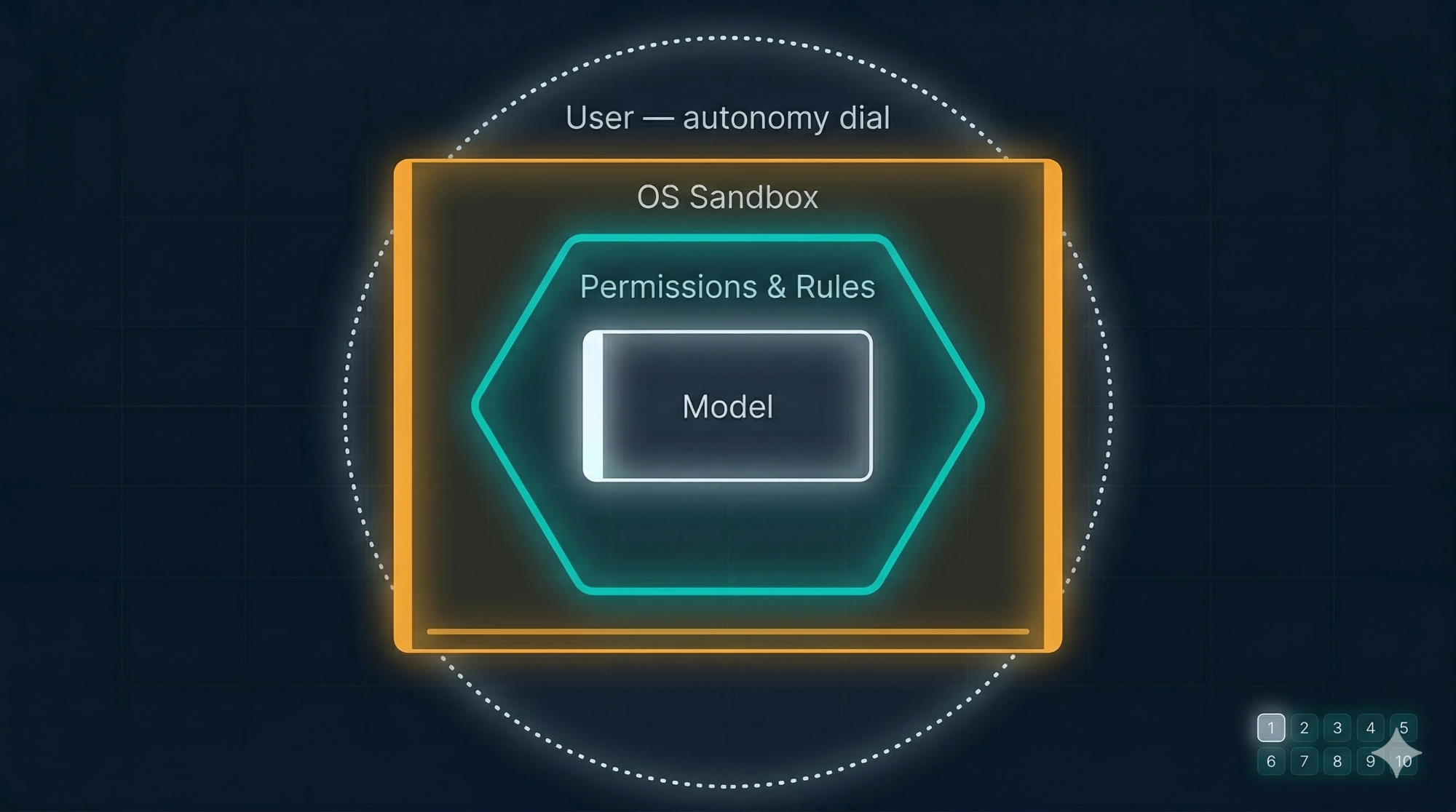
Claude Code uses four distinct layers of safety. Each layer assumes the layer above it might fail.
Layer 1 — The Autonomy Dial (Three Modes)
The first layer is the one users see: three operating modes that control how much the agent can do without asking.
Plan Mode — read-only. Claude can explore, analyse, and plan, but cannot modify any file or run any command. Nothing changes. Safe to use in unfamiliar codebases.
Default Mode — full tools available, but every write operation and shell command requires explicit user confirmation before it runs. You see what’s about to happen before it does.
Auto-Accept Mode — writes and commands execute without asking. You’re trusting the direction. This mode is fast and useful — but should only be used when you’ve already reviewed the plan and trust the scope.
The design principle is an autonomy dial: users can set the level of trust per session, per task, even per tool. Not a binary “safe vs unsafe” switch. A gradient.
Layer 2 — The Permission System
Below the mode-level control, there’s a per-tool permission system in .claude/settings.json. This is where you define explicit allow and deny rules:
{
  "permissions": {
    "allow": [
      "Bash(npm run test *)",
      "Bash(git status)",
      "Bash(git diff *)"
    ],
    "deny": [
      "Bash(git push *)",
      "Bash(curl *)",
      "Bash(rm -rf *)",
      "Read(./.env)",
      "Read(./secrets/**)"
    ]
  }
}
Rules follow an ordered evaluation: deny takes precedence over allow. If nothing matches, Claude falls back to asking. The pattern Bash(curl *) blocks any curl command regardless of what follows. Read(./secrets/**) blocks reading anything in the secrets directory.
Commit this file to your repository and every developer inherits the same baseline. Security teams can define the deny rules. Developers add narrow allows locally.
Layer 3 — OS-Level Sandboxing
Below the permission system, the sandbox enforces boundaries at the OS level, using platform primitives (Apple Seatbelt on macOS, bubblewrap on Linux). These cannot be bypassed by the model through clever command construction.
Two boundaries:
Filesystem isolation — write access is limited to the current working directory and subdirectories. The model cannot touch ~/.bashrc, SSH keys, system files, or anything outside the project boundary — even if it tries.
Network isolation — all outbound connections go through a proxy that enforces a domain allowlist. A compromised command trying to reach attacker.com fails at the network level if the domain isn’t approved.
The value of this layer is that it defeats prompt injection. If malicious instructions are hidden in a file Claude reads, and those instructions make it to the Bash tool, the sandbox still contains the blast radius. What the model is tricked into attempting is bounded by what the OS allows.
Layer 4 — Structural Limits
The final layer is built into the architecture itself:
- Sub-agent depth cap: subagents cannot spawn their own subagents. One level of delegation maximum.
- Maximum iteration limit: the loop has a circuit breaker. If it runs more than N iterations without returning to the user, it stops.
- WebFetch URL restriction: the agent can only fetch URLs that appeared in your message or in files it already read. It cannot browse the web speculatively.
- Injection filtering on Bash: backticks and
$()constructs are scanned before execution — a first line of defence against injected shell commands.
These limits are not configurable. They’re baked in because the cost of getting them wrong is too high.
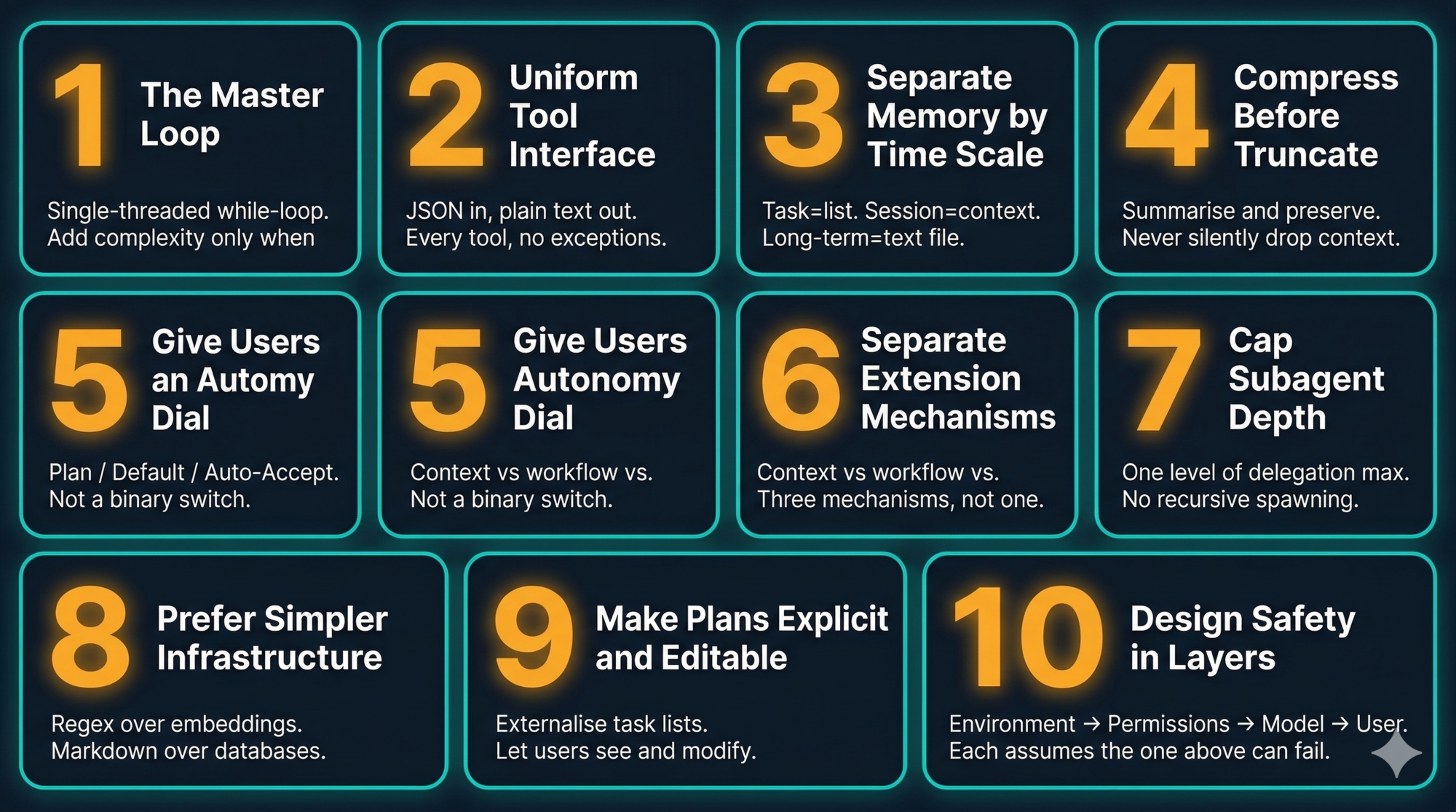
The 10 Patterns to Steal
Here is the complete playbook distilled from this series. Each pattern is a design decision Claude Code made deliberately, with the reasoning behind it.
Pattern 1: The Master Loop
What Claude Code does: A single-threaded while-loop. One flat message history. The loop continues as long as the model calls tools; it ends when the model returns plain text.
Why it works: A flat message history is an audit trail. When something goes wrong, you read the list in order and find the step that went wrong. There’s nowhere for the failure to hide.
When to break it: Only when you have measured that the bottleneck is genuinely the single-thread constraint, and you need parallel execution for performance reasons — not because parallel sounds more capable.
Steal it: Start every agent you build with a while-loop. Resist the graph until you can articulate exactly what problem the graph solves.
Pattern 2: Uniform Tool Interface
What Claude Code does: Every tool — file reads, shell commands, external APIs — uses the same interface. JSON in, plain text out. The loop doesn’t know what any tool does.
Why it works: You can add a new tool without touching the loop. You can wrap every tool call with logging, permissions, and sandboxing in one place. You can test any tool in isolation.
Steal it: Define your tool contract first, before implementing any tools. The contract is the design. The tools are the implementation.
Pattern 3: Separate Memory by Time Scale
What Claude Code does: Task state → JSON TODO list in working memory. Project knowledge → Markdown files on disk. Context window → the active session.
Why it works: The right storage mechanism for a piece of information is determined by how long it needs to live, not by how important it is.
Steal it: Ask “how long does this information need to exist?” before deciding where to put it. Task state that’s gone after 30 minutes doesn’t belong in a database.
Pattern 4: Compress Before You Truncate
What Claude Code does: When the context window hits 92%, the Compressor summarises the conversation, writes key facts to disk, and resets with the summary. It never silently drops the oldest messages.
Why it matters: Silent truncation is invisible to the model. The model continues reasoning as if it still knows things it no longer has access to. This produces subtle, hard-to-debug failures — inconsistent decisions, forgotten constraints, repeated work.
Steal it: Whenever your agent needs to manage a memory or context limit, summarise and preserve before you drop anything. Make the compression visible in the output so users understand what happened.
Pattern 5: Give Users an Autonomy Dial
What Claude Code does: Three modes — Plan (read-only), Default (confirm each action), Auto-Accept (run freely). The user sets the level of trust per session.
Why it works: Different tasks need different levels of oversight. A one-time irreversible operation and a low-risk repetitive task should not have the same permission model.
Steal it: Build the autonomy dial into your agent’s design, not as an afterthought. Let users set how much trust they’re granting for this specific session and task.
Pattern 6: Separate Extension Mechanisms by Type
What Claude Code does: Skills (auto-loaded context), Slash Commands (explicit workflows), Subagents (isolated delegation). Three mechanisms. Each handles a different kind of “adding capability.”
Why it matters: A single “plugin” abstraction tries to handle all three use cases and ends up handling none of them well. Auto-invocation and explicit invocation need different reliability characteristics. In-context and isolated execution need different token budgets.
Steal it: When you design your extension system, ask: “what kind of capability is this?” Context injection, workflow execution, and task delegation each need their own mechanism.
Pattern 7: Cap Subagent Depth
What Claude Code does: Subagents cannot spawn their own subagents. Hard limit, not configurable.
Why it matters: Without the cap, a model that decides to be “helpful” can create an unbounded tree of agent processes. Each one consumes tokens, may make file changes, and runs without visibility. The compound cost and failure modes are unpredictable.
Steal it: If you allow delegation in your agent, set a hard depth limit from day one. One level is usually sufficient. The benefit of deeper delegation rarely outweighs the debugging complexity.
Pattern 8: Prefer Simpler Infrastructure
What Claude Code does: Regex over vector embeddings for code search. Markdown files over databases for memory. A bundled binary over a cloud service for fast text search.
Why it works: Simpler infrastructure fails in simpler ways. A Markdown file has no SLA, no schema migration, no connection pool, no cold start. When something goes wrong, you read it with cat.
Steal it: Ask “what’s the simplest thing that could work?” before reaching for a database, an embedding model, or a vector store. The sophisticated solution is sometimes the right one. It’s rarely the first one you need.
Pattern 9: Make Plans Explicit and Editable
What Claude Code does: Before executing a complex task, Claude writes a TODO list visible to the user. In Plan Mode, the full plan is presented for review and editing before any action is taken.
Why it matters: An agent that acts without showing its plan is an agent users don’t trust. Seeing the plan before execution is the single biggest factor in whether engineers feel comfortable granting an agent more autonomy over time.
Steal it: Externalise your agent’s task decomposition. Show it to the user. Let them edit it. Only then execute. This single pattern will do more for user trust than any number of safety rails.
Pattern 10: Design Safety in Layers
What Claude Code does: User modes → Permission rules → OS sandbox → Structural limits. Each layer assumes the one above it can be compromised or misconfigured.
Why it matters: Prompt injection, supply chain attacks, and misconfigurations are real. Any single layer can be bypassed. Multiple independent layers with different enforcement mechanisms are what actually contains the damage.
Steal it: Draw your safety model as layers, not a checklist. For each layer ask: “if this layer fails, what does the next one catch?” If the answer is “nothing,” you have a gap.
A Starter Architecture
If you were building a Claude Code-inspired agent for your own domain — customer support, document processing, data analysis — what would it look like?
Start here:
Your Agent
├── Agent Core
│   └── while-loop (ReAct: think → act → observe)
│       └── async input queue (for user steering)
│
├── Tool Layer
│   ├── Uniform interface: JSON in, plain text out
│   ├── Built-in tools (domain-specific: read, search, edit, call API)
│   ├── Permission gate (allow/deny per tool)
│   └── Protocol hook (your version of MCP)
│
├── Memory
│   ├── Short-term: task list, injected after each tool call
│   ├── Long-term: project/user config file (your CLAUDE.md equivalent)
│   └── Context manager: compress at 80%, write to disk, reset
│
├── Extension System
│   ├── Auto-loaded context (your version of Skills)
│   ├── User-triggered workflows (your version of Commands)
│   └── Isolated delegates (your version of Subagents, depth cap = 1)
│
└── Safety
    ├── Autonomy dial (read-only / confirm / auto-execute)
    ├── Permission rules per tool/domain
    ├── Execution sandbox (OS-level or container-level)
    └── Structural limits (iteration cap, depth cap, URL restriction)
You don’t build this all at once. You build it in order:
- Start with the loop and two tools
- Add the uniform interface contract before you add the third tool
- Add the permission gate before you give it write access
- Add memory when sessions start to feel stateless
- Add compression when context management becomes a problem
- Add extensions when the system prompt gets too long
The order matters. Each step is justified by a real problem you’ve experienced, not speculative future needs.
What the Series Covered
Looking back across the six posts:
| Post | Core lesson |
|---|---|
| Part 1 | The five layers. ReAct loop. Three modes. The full picture. |
| Part 2 | The master loop in depth. Streaming. Steering. Message history as audit trail. |
| Part 3 | Tool interface contract. Sandboxing. MCP as an open protocol. |
| Part 4 | Three memory problems. CLAUDE.md, MEMORY.md. Context compression. |
| Part 5 | Skills, Commands, Subagents. Three mechanisms, three problems. |
| Part 6 (this post) | Four safety layers. Ten patterns. A starter architecture. |
The through-line across all six: Claude Code’s power is not in any single component. It’s in the coherence of the whole. A simple loop, a uniform tool interface, layered memory, explicit safety, and a dial for autonomy — each piece designed to work with the others.
The patterns are available to you. You don’t need to build a coding assistant to use them. You just need to build an agent.
Key Takeaways
- Most agentic failures are architectural, not model failures. The model did exactly what it was told. The design was wrong.
- Claude Code uses four safety layers: autonomy modes, permission rules, OS sandboxing, and structural limits. Each assumes the layer above it can fail.
- The 10 patterns in this post are the distilled design lessons from across the series. Each one is a real decision Claude Code made, with reasoning you can apply.
- Build in order: loop first, tool interface second, permissions third, memory when needed, extensions when the system prompt gets long.
- Make your agent’s plans visible and editable. This is the pattern that most directly builds user trust.
References and Further Reading
This series
- Part 1: High-Level Architecture
- Part 2: The Master Loop
- Part 3: Tools and MCP
- Part 4: Memory and Context Management
- Part 5: Skills, Commands, and Subagents
Claude Code official documentation
Architecture and safety
- Making Claude Code more secure — Anthropic Engineering Blog
- Claude Code: Behind-the-scenes of the master agent loop — PromptLayer
- Claude Code Internals (15-part series) — Marco Kotrotsos
- Claude Code security best practices — Backslash Security
ReAct pattern
- ReAct: Synergizing Reasoning and Acting in Language Models — Yao et al. 2022
- What is a ReAct Agent? — IBM Think
Model Context Protocol
Have thoughts on this?
I read every email. If something resonated, felt wrong, or made you think — I'd love to hear from you.

Comments