
How Claude Code's Memory System Works (Part 4) — What Agents Remember and Why It's Hard
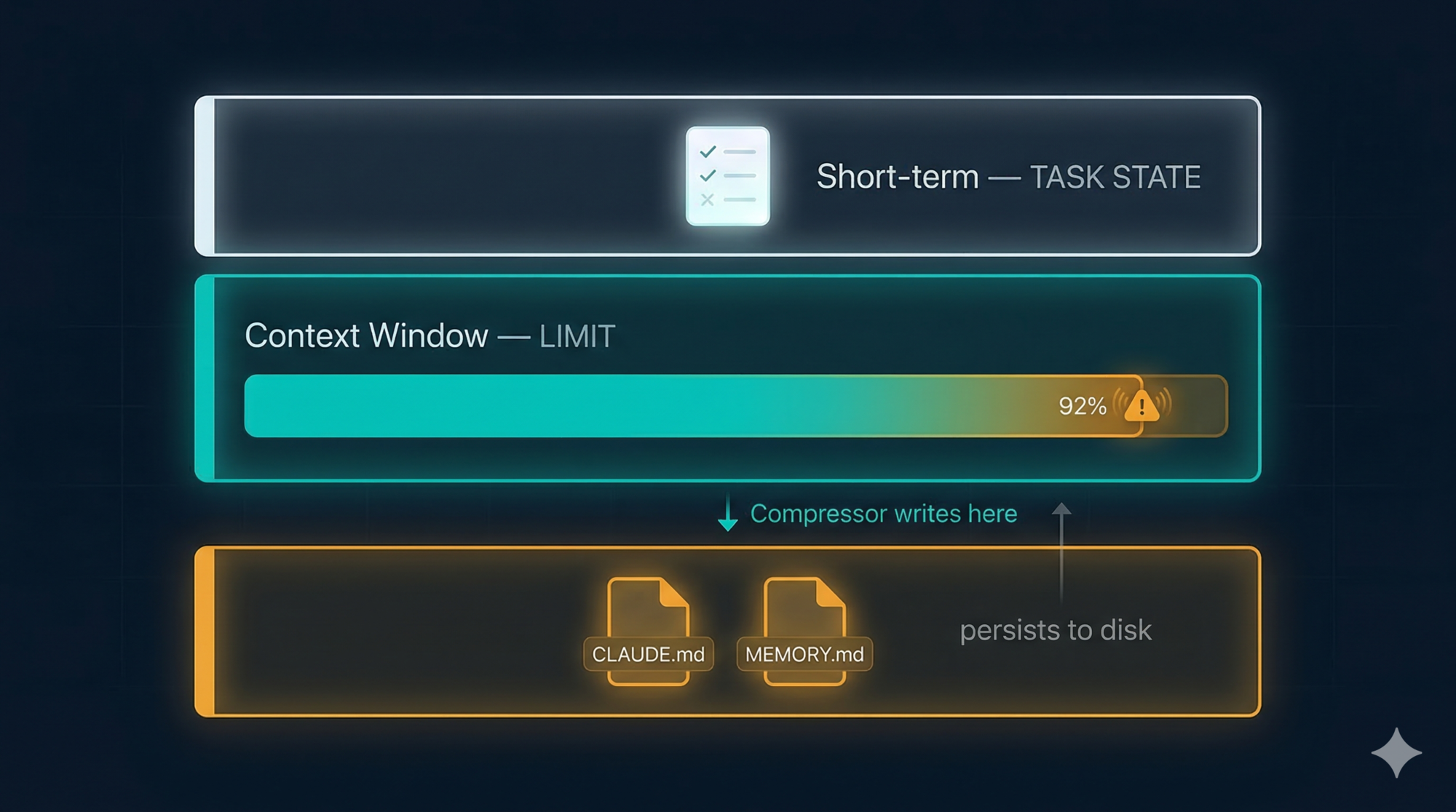
Series: Agentic System Design, Learned from Claude Code — Part 4 of 6
In the previous post, we covered how Claude Code’s tool layer turns thoughts into actions. But tools alone aren’t enough. Every AI agent eventually runs into the same wall: memory is hard.
Not because the technology is exotic. Because memory in an AI agent is actually three different problems that look like one. Treat them as one and you’ll solve none of them well.
Claude Code separates them cleanly. Each one gets a different mechanism, matched to how long that information needs to live. The result is a system that feels surprisingly persistent without a vector database or complex infrastructure in sight.
This post breaks down all three problems, how Claude Code solves each one, and what happens when you ignore the third one — the context window — until it’s too late.
The Three Memory Problems
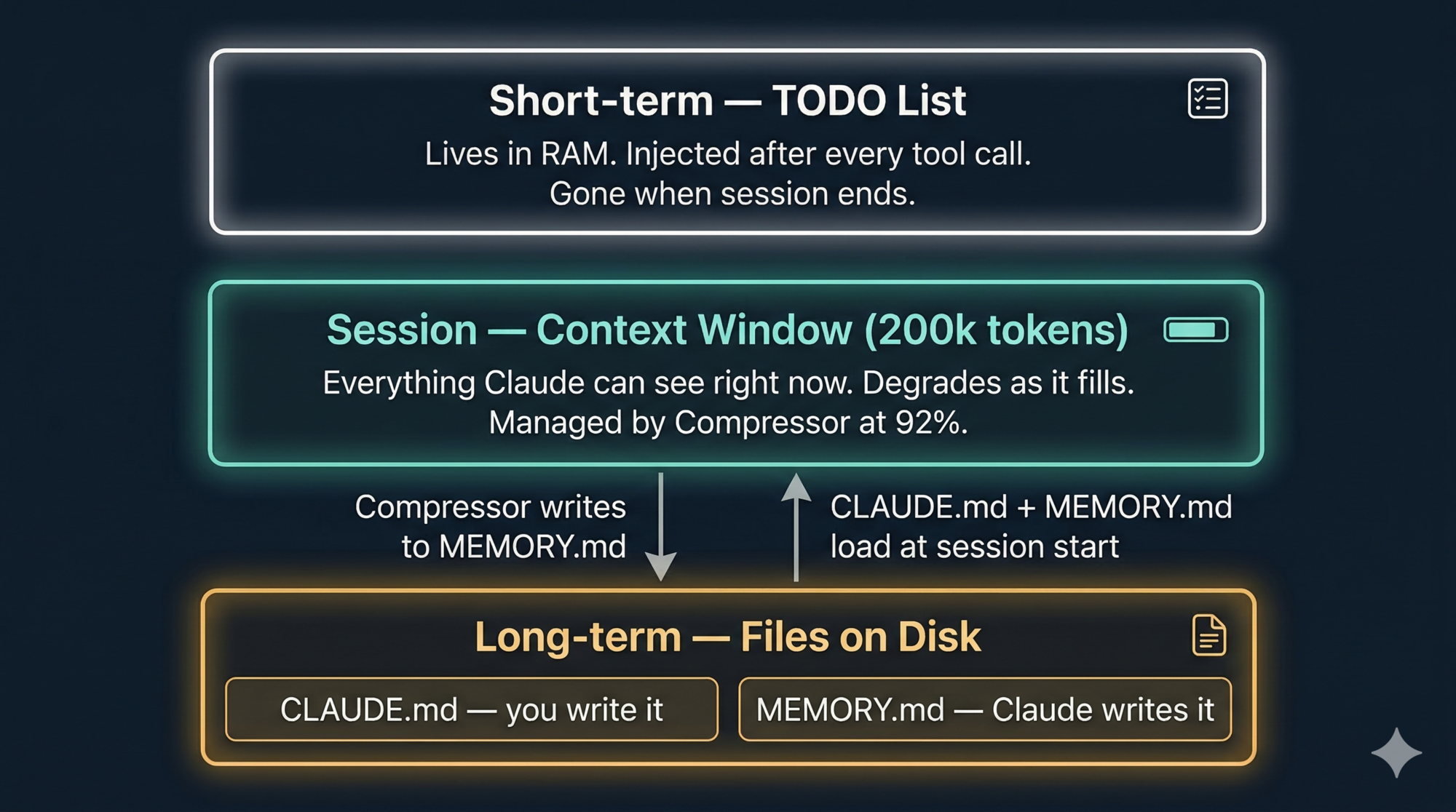
Here’s the distinction that matters:
| Problem | Question it answers | How long it lives |
|---|---|---|
| Short-term | What am I doing right now? | This session, this task |
| Long-term | What do I know about this project? | Across sessions, days or months |
| Context window | What can I fit in my working memory right now? | Right now — measured in tokens |
These are fundamentally different. Conflating them leads to over-engineered solutions (vector databases for task state) or under-engineered ones (nothing for context management until the session crashes).
Let’s go through each.
Problem 1 — Short-Term Memory: TODO Lists
When you give Claude a non-trivial task, its first move is almost always to call TodoWrite. This creates a structured task list in the active context window:
[
  { "id": "1", "content": "Read the auth module", "status": "completed", "priority": "high" },
  { "id": "2", "content": "Find session handling code", "status": "in_progress", "priority": "high" },
  { "id": "3", "content": "Add timeout logic", "status": "pending", "priority": "medium" },
  { "id": "4", "content": "Write and run tests", "status": "pending", "priority": "low" }
]
This list lives in working memory only — RAM, not disk. It doesn’t get saved to a file. When the session ends, it’s gone.
What makes it powerful is what happens after every tool call: the system injects the current TODO state back into the message as a reminder. The model sees its own task list after each step, so it doesn’t drift. Long sessions with many tool calls are where agents most commonly lose track of what they were doing. The TODO injection prevents this without the model needing to “remember” anything itself.
The UI renders the TODO list as a live checklist that updates as the task progresses. This isn’t just cosmetic — it gives you visibility into the agent’s plan before it executes anything.
Three key design choices make this work:
-
The entire list is replaced on each update. There’s no partial update mechanism. When a task completes, the model calls
TodoWriteagain with the full list, this time with one item markedcompleted. This keeps the data structure simple and avoids synchronisation bugs. -
This is ephemeral by design. Task state is only useful during the task. Persisting it across sessions would be noise, not signal.
-
The reminder injection is automatic. After every tool call, the system re-injects the current TODO state. The model doesn’t need to “remember” — it sees its plan fresh each iteration.
Design lesson: Short-term task state should be a structured list injected back into context after each step, not a database entry or a conversation thread. The reminder injection is the mechanism that keeps long agentic tasks on track.
Problem 2 — Long-Term Memory: Files on Disk
This is where Claude Code’s design is most surprising to people who’ve spent time building RAG pipelines or vector search systems.
Long-term memory in Claude Code is just Markdown files.
Two of them, with distinct purposes:
CLAUDE.md — you write it, Claude reads it
CLAUDE.md is the briefing document you write for Claude at the start of every project. Claude reads it at session start and treats it as standing instructions. Think of it as the document you’d write for a capable new team member who forgets everything between days.
Where to put it:
./CLAUDE.md               → project root, committed to git, shared with the whole team
~/.claude/CLAUDE.md       → global, applies to every project on your machine
./CLAUDE.local.md         → personal overrides for this project, not committed to git
Claude walks up the directory tree on startup and loads every CLAUDE.md it finds, from global down to local. More specific files take precedence over broader ones. A monorepo can have root-level conventions plus per-package instructions that only load when you’re working in that package.
What to put in it:
# Architecture
- pnpm monorepo with packages: api, web, shared
- Database: PostgreSQL 16 via Prisma

# Conventions
- TypeScript strict mode on all new files
- Use named imports for tree-shaking
- Component names in PascalCase

# Commands
- Build: `pnpm build`
- Tests: `pnpm test --run`
- Lint: `pnpm lint`

# Prohibitions
- NEVER modify files in /migrations/ directly
- Do not use moment.js — use date-fns instead
What not to put in it: everything. A 500-line CLAUDE.md consumes a large chunk of your context window at the start of every session, and the longer it is, the less reliably Claude follows what’s in it. Research from the SFEIR Institute found that files under 200 lines have a 92% rule-application rate; beyond 400 lines, that drops to 71%. Keep it short. Write rules not descriptions. Use imperative language (“Use named imports”) not descriptive (“The project uses named imports”).
MEMORY.md — Claude writes it, you can review it
MEMORY.md is Claude’s own notepad. When it discovers something useful about your project during a session — a quirk in the codebase, a preference you corrected it on, a build command that works differently than expected — it saves that to:
~/.claude/projects/<your-project-path>/memory/MEMORY.md
Only the first 200 lines of this file load at each session start. Claude is instructed to keep it concise and move detailed notes into separate topic files in the same directory.
The key difference between the two: you write CLAUDE.md. Claude writes MEMORY.md.
You can inspect, edit, or delete what Claude has saved at any time by running /memory in your session.
Design lesson: Most agents don’t need a vector database for memory. A structured, human-readable file that loads at session start is simpler, version-controllable, and easier to debug when something goes wrong. Use the right tool for the time scale — short-lived task state is RAM, long-term project knowledge is a file.
Problem 3 — Context Window: The Hard Limit You Can’t Ignore
This is the one that surprises engineers the most. The other two memory problems are about what to remember. This one is about how much you can hold at once — and the ceiling is non-negotiable.
What is the context window?
When Claude processes your request, it reads everything at once: your system prompt, your conversation history, all the files it has read, all the tool outputs it has received, the CLAUDE.md contents. This entire combined text is called the context window.
The context window has a hard size limit because of how transformer-based models work. Processing text requires storing intermediate representations of every token in memory. Double the context length and the memory and compute required grows more than linearly. Claude Code’s default is 200,000 tokens — roughly 500 pages of text, or 150,000 words.
That sounds huge. In practice, a real session fills it faster than you expect:
- A
CLAUDE.mdof 100 lines costs ~4,000 tokens - Reading a large source file: 5,000–20,000 tokens
- Each tool call and its result: 1,000–5,000 tokens
- Running 30–40 tool calls in a complex refactor: easily 100,000+ tokens
What happens when it fills up
Two things, both bad, and in this order:
First: gradual quality degradation. As the window fills, the model has more and more to attend to. Earlier decisions and instructions get effectively diluted — not forgotten, but deprioritised against the mass of recent content. You’ll notice Claude starting to ignore earlier project conventions, repeat work it already did, or make inconsistent decisions across a long session. This happens silently. There’s no warning.
Second: the session crashes. Eventually the window is completely full. The session terminates. Any work that wasn’t explicitly saved to disk is gone.
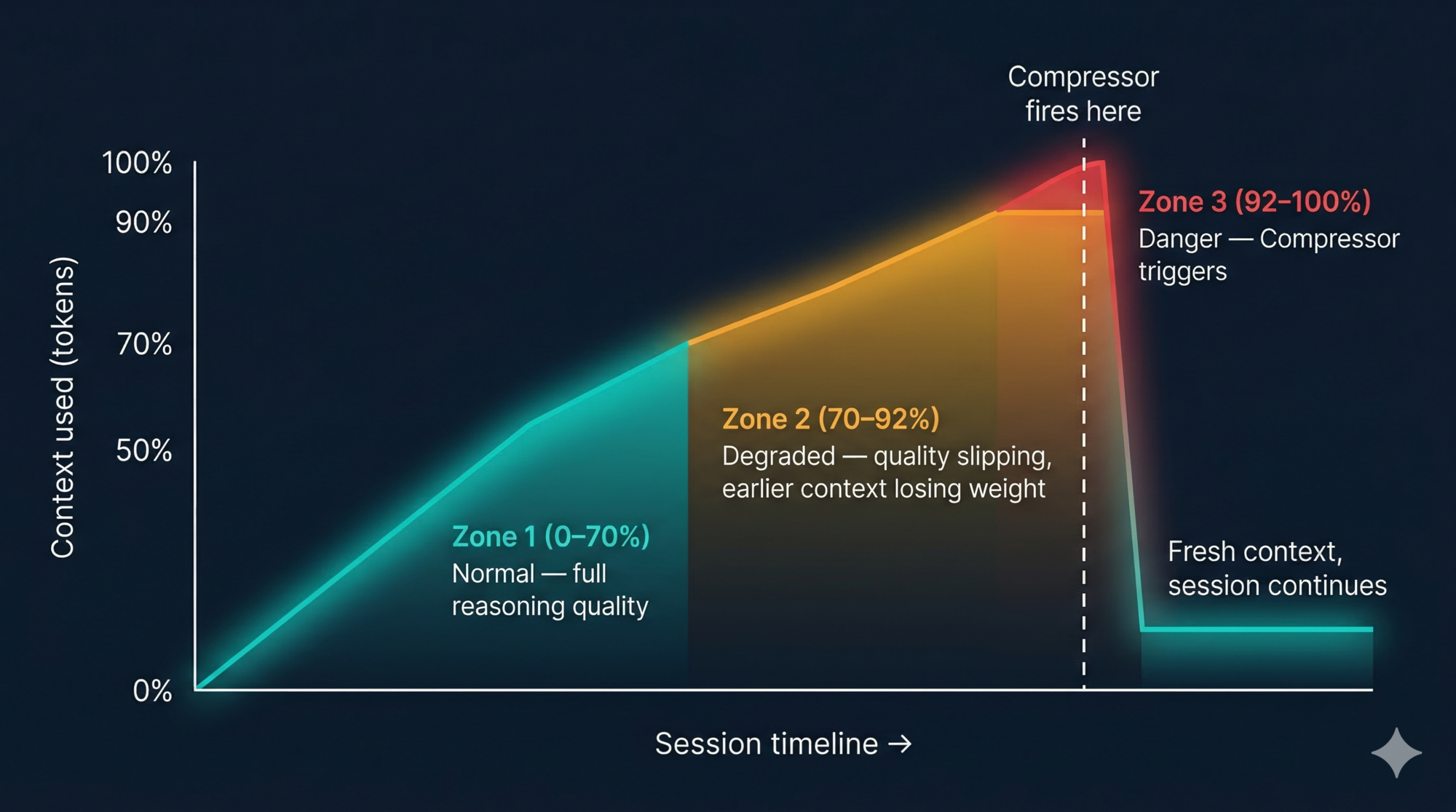
The degradation starts well before the hard limit. In practice, quality starts slipping around 70–80% capacity. By 90% you’re working with noticeably reduced reasoning quality. Here’s how it looks over time:
The Compressor: summarise, don’t truncate
Claude Code handles context overflow with a component called the Compressor (internally wU2). It triggers automatically when the context reaches approximately 92% full.
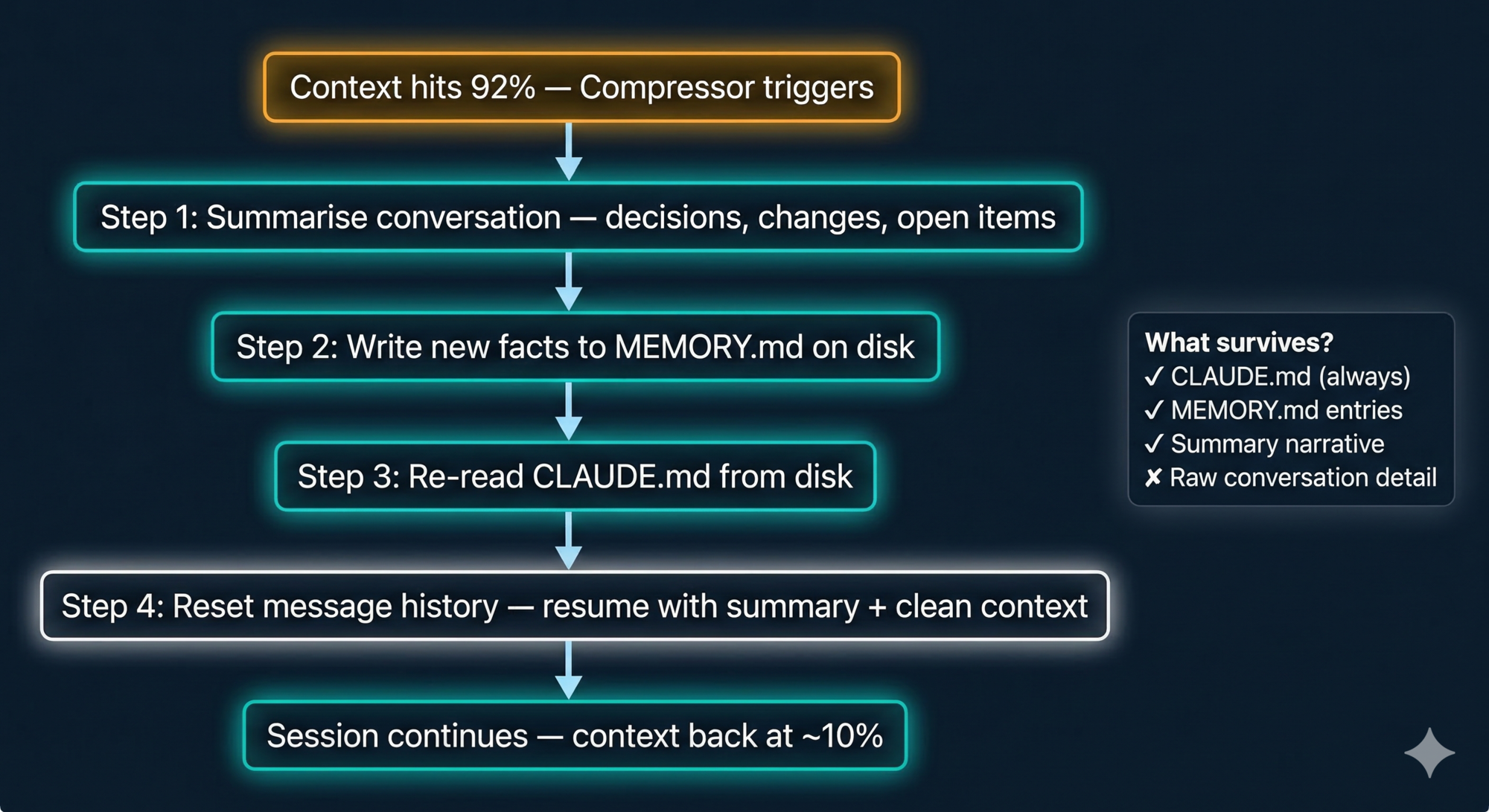
When it fires, it does four things in sequence:
- Summarises the conversation so far into a compact, structured narrative — what was decided, what changed, what’s still open
- Preserves the most important decisions and context in that summary
- Writes newly discovered facts about your project to
MEMORY.mdon disk - Resets the message history and resumes with the summarised version plus a fresh context
CLAUDE.md is always re-read from disk after compaction. It fully survives the reset. The things most likely to be lost are things you said only in conversation — which is exactly why CLAUDE.md exists.
You can also trigger compaction manually at any time with /compact. The right moment is before you start a major new phase of work — not mid-task when you’re in the middle of something. Here’s the full compressor process:
Plan Mode’s trick: clean context from the start
Plan Mode (the read-only exploration mode) uses a clever trick here. When you enter it, Claude spins up a lightweight sub-agent specifically for codebase exploration. This sub-agent reads files, runs searches, and builds an understanding of your project — all in its own context window, not yours.
When it’s done, it returns a compact summary to the main session. Your main context only gets the distilled result, not every file the sub-agent had to read to produce it. This means you can explore a large, unfamiliar codebase and still have most of your context window available when you switch to implementation mode.
It’s context-efficient by design.
A Worked Example: 3 Hours of Refactoring, 2 Context Resets
Let’s make this concrete with a realistic session.
Hour 1 — Fresh session, full context
You open a session to refactor the authentication system. CLAUDE.md loads (4,000 tokens). Claude reads the auth module, the middleware, the session handler, and three test files. Starts the TODO list. Makes the first set of changes. Context is at 45%.
Hour 2 — Mid-session, quality starts slipping
Claude has made 25 tool calls. It’s read more files, written code, run tests twice, and gone back to fix a mistake it made in an earlier edit. Context is at 78%. You notice Claude’s suggestions are getting slightly less consistent — it suggested using moment.js once, which your CLAUDE.md explicitly prohibits. This is the degradation starting.
You run /compact manually, before reaching the auto-trigger threshold. The Compressor summarises the session, writes three new entries to MEMORY.md (“prefers date-fns over moment.js”, “auth middleware uses custom JWT strategy”, “session expiry should be configurable per environment”), and resets. CLAUDE.md is re-read. Context drops to 8%.
Hour 3 — Second compaction, near the end
The refactor is mostly done. Claude has been running tests, fixing edge cases, and cleaning up. Context hits 92% again — this time the auto-trigger fires. The Compressor runs automatically. You lose the raw detail of the last hour’s conversation but the important decisions are preserved in the summary.
You finish the session by running the full test suite, reviewing the diff, and committing. Claude writes two more entries to MEMORY.md before you close.
Next session, those entries are already loaded. You don’t have to re-explain the JWT strategy or the date-fns preference. Claude already knows.
Key Takeaways
- Memory in an agent is three problems: short-term task state, long-term project knowledge, and context window management. Solve each one differently.
- TODO lists solve the short-term problem. They live in working memory and get injected as reminders after each tool call.
- CLAUDE.md solves the long-term problem for rules and conventions you write. MEMORY.md is what Claude learns on its own. Both are just Markdown files on disk.
- Keep
CLAUDE.mdunder 200 lines. Imperative instructions. No fluff. Every token in that file is a token not available for actual work. - The context window is finite and degrades before it’s full. Quality starts slipping around 70–80%. Design your compaction strategy before you hit production.
- The Compressor at 92% summarises and preserves — it doesn’t truncate. The distinction matters.
- Plan Mode’s sub-agent keeps the main context clean by doing heavy exploration work in an isolated context window and returning only the distilled result.
What’s Next
Part 5: Skills, Commands, and Subagents covers the three extension mechanisms Claude Code gives you, why they’re deliberately separate, and a decision framework for which one to use when.
References
Claude Code memory
- How Claude remembers your project — official docs
- Claude Auto Memory guide — ClaudeFast
- Anthropic added Auto-Memory to Claude Code — MEMORY.md — Medium
- You (probably) don’t understand Claude Code memory — Jose Parra
CLAUDE.md
- The CLAUDE.md Memory System FAQ — SFEIR Institute
- The CLAUDE.md Memory System Deep Dive — SFEIR Institute
- Writing a good CLAUDE.md — HumanLayer
Context window and compressor
Have thoughts on this?
I read every email. If something resonated, felt wrong, or made you think — I'd love to hear from you.

Comments