
How Claude Code's Extension System Works (Part 5) — Skills, Commands, and Subagents
Series: Agentic System Design, Learned from Claude Code — Part 5 of 6
In the previous post, we explored how Claude Code manages memory across different time scales. Now we tackle another critical design challenge: extensibility.
Once your core agent loop is working, you’ll eventually hit the same limit: you want to add new capabilities, but you don’t want to touch the loop itself.
Most systems solve this with one mechanism. Call it plugins, extensions, or tools — there’s one way to add new things, and it tries to handle every case. The problem is that “new capability” can mean very different things:
- The agent should automatically know how our team reviews PRs
- I want a keyboard shortcut to run a common workflow
- I need the agent to explore a large codebase without filling my context window
These are different problems. Forcing them through the same mechanism means making trade-offs that hurt all three.
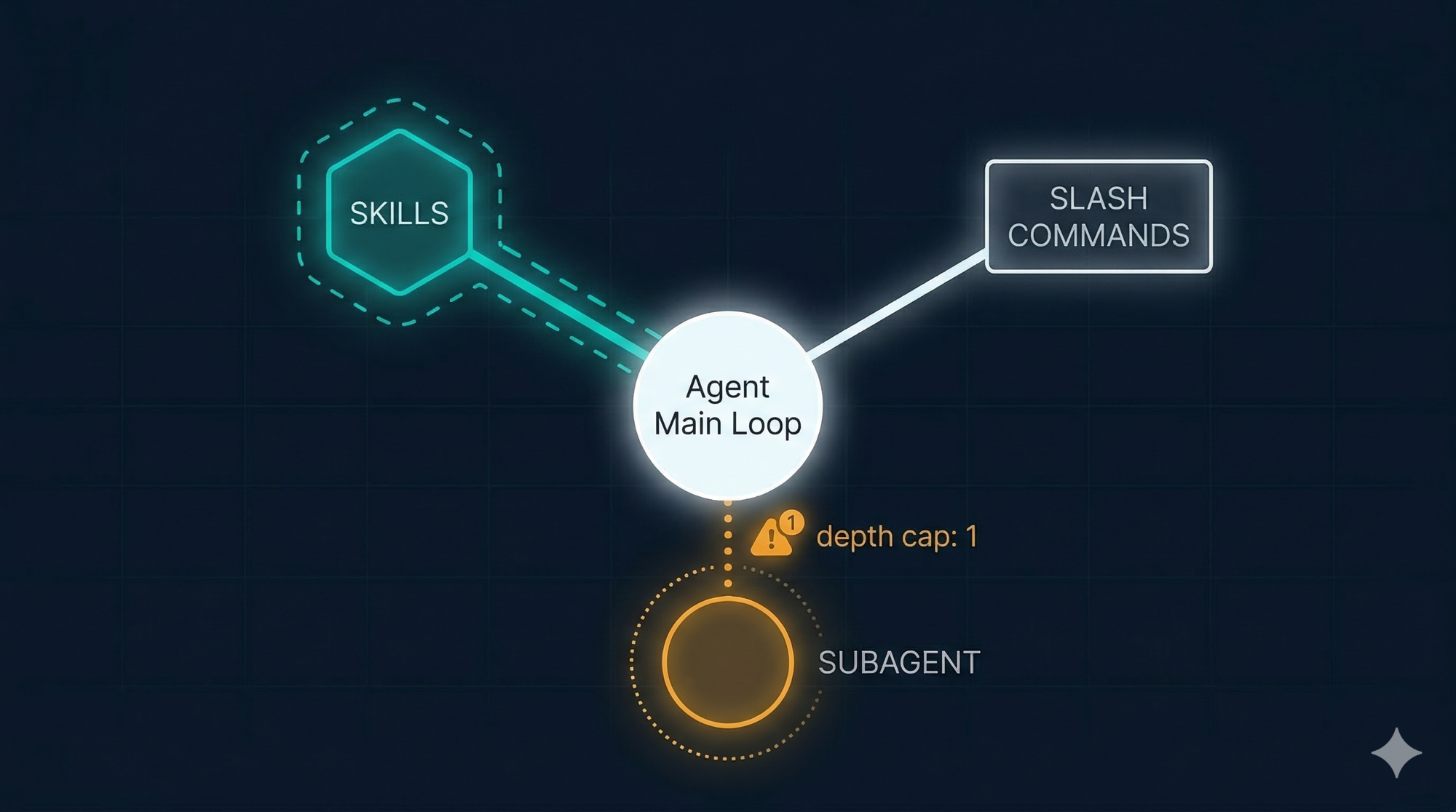
Claude Code uses three deliberately separate mechanisms. Understanding which one to reach for — and why — is one of the more nuanced design skills in this system.
Why You Can’t Just Make the System Prompt Longer
Before explaining the three mechanisms, it helps to understand the failure mode they’re avoiding.
The simplest way to give an agent new capabilities is to write more instructions in the system prompt. “Always follow our PR review checklist.” “When doing research, use these sources.” “Here’s our full API documentation.”
This breaks down fast. Every instruction you add consumes tokens from the context window at the start of every session — whether or not it’s relevant to the current task. A 10,000-token system prompt is 5% of your context window gone before you type your first message. And the more instructions there are, the less reliably the model follows any of them. Research consistently shows that instruction-following quality degrades as prompt length grows.
You need a way to add capabilities that:
- Loads only when relevant
- Doesn’t pollute the main context with irrelevant content
- Can be triggered automatically or explicitly, depending on the use case
That’s exactly what the three mechanisms provide, each in a different way.
The Three Mechanisms
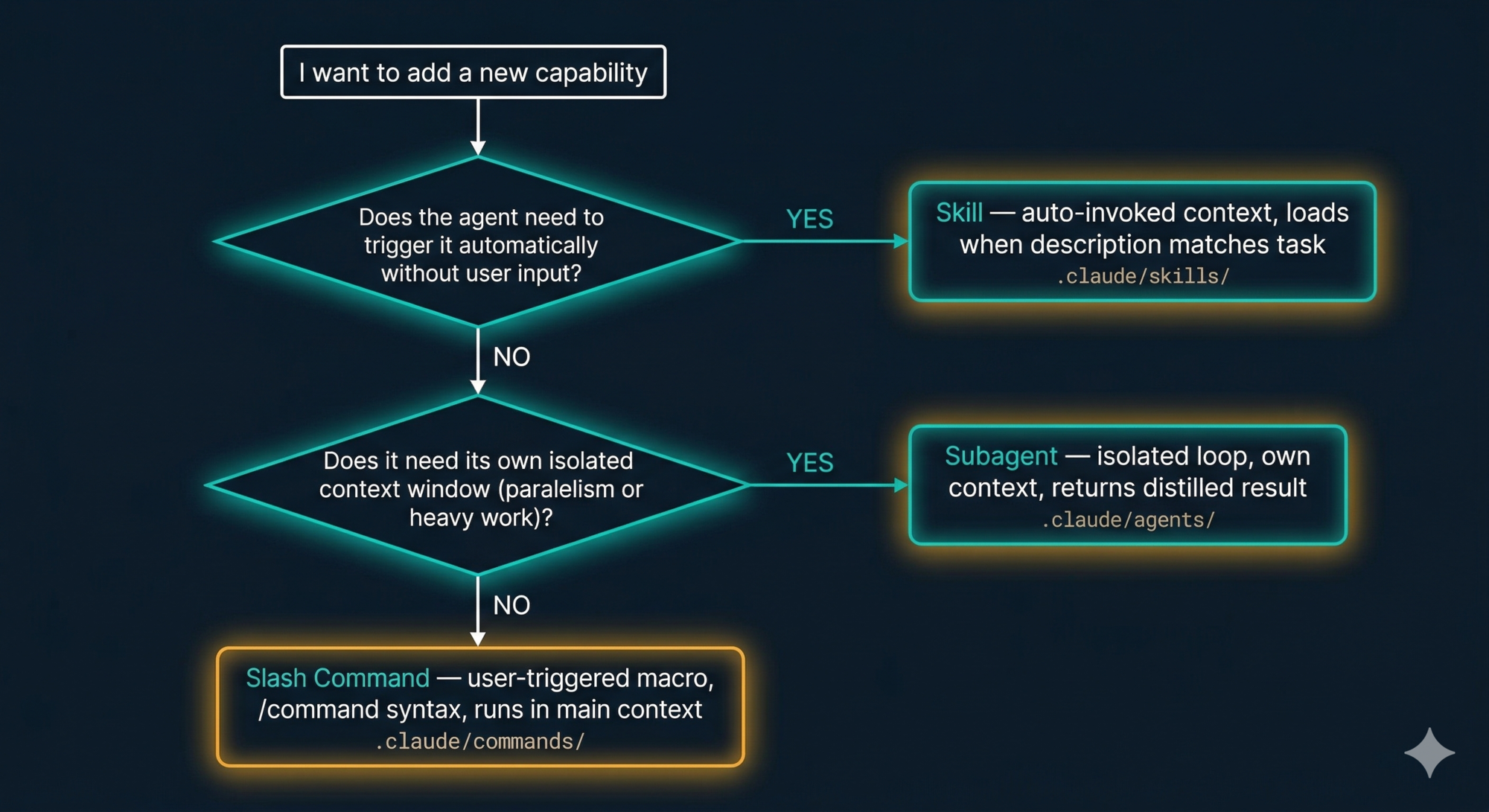
Skills — Auto-Invoked Context
Skills are the mechanism for capabilities you want the agent to apply automatically, without you having to ask each time.
A skill is a folder containing a SKILL.md file. The key field is the description — a natural language sentence describing when this skill is relevant. When you start a task, Claude reviews the descriptions of all available skills and loads the full content of any that match.
.claude/skills/
└── pr-review/
    ├── SKILL.md          ← the main file Claude loads
    ├── checklist.md      ← supporting content SKILL.md can reference
    └── examples/         ← example reviews for context
The SKILL.md frontmatter looks like this:
---
name: pr-review
description: >
  Load when the user asks to review a pull request, check code changes,
  or audit a diff. Provides team conventions and review checklist.
---
When you say “can you review this PR?”, Claude matches the task description to the skill description and automatically loads the full skill content — the checklist, the conventions, the examples. You didn’t type /pr-review. You didn’t mention the skill at all.
Skills vs CLAUDE.md
The difference is scope. CLAUDE.md is always-on — it loads at every session start regardless of what you’re doing. Skills are on-demand — they load only when relevant.
Put universal conventions in CLAUDE.md. Put specialised workflows in skills. If you find yourself writing a section in CLAUDE.md that only applies to 20% of your sessions, move it to a skill.
One honest caveat
Skill auto-invocation is not perfectly reliable. Research from the Claude Code community has found that basic intent matching achieves roughly a 20% success rate without careful description writing. The fix: write very specific, concrete descriptions. Don’t write “helps with code quality” — write “load when the user asks to run linting, fix ESLint errors, or check code style.” The more specific, the more reliable.
When you need guaranteed invocation, use a Slash Command instead.
Slash Commands — User-Triggered Macros
Slash Commands are saved prompts you trigger explicitly with /command-name. They’re the right choice when you want a repeatable, predictable workflow that you control — not one Claude decides to apply.
A command is a single Markdown file:
.claude/commands/
└── review-pr.md    ← becomes the /review-pr command
Where you save it determines where you can use it:
.claude/commands/in your project → available in this project only~/.claude/commands/globally → available in every project on your machine
The content of the file is the prompt that gets injected into the main context when you run the command. It can include instructions, context, and even instructions to invoke other mechanisms:
# PR Review

You are reviewing a pull request. Follow these steps:

1. Run `git diff main` and read the changed files
2. Invoke the @security-auditor subagent to check for vulnerabilities
3. Apply the pr-review skill conventions
4. Return a structured report with: summary, risks, suggestions

Arguments: $ARGUMENTS
The key difference from Skills
Slash Commands inject their content into the main context and run there. They’re deterministic — typing /review-pr always does the same thing. Skills are probabilistic — Claude decides whether to load them based on description matching. For anything you need to work every time, use a command.
Commands can orchestrate
The example above invokes a subagent and a skill from within the command. This is the composition pattern — a command acts as the entry point, and it wires together whichever pieces are needed.
Subagents — Isolated Parallel Execution
Subagents are the most powerful and most distinct mechanism. Unlike Skills (which inject content into the main context) and Slash Commands (which run in the main context), a subagent is a completely separate agent loop with its own context window.
You define a subagent as a Markdown file in .claude/agents/:
.claude/agents/
└── security-auditor.md    ← invoked as @security-auditor or via Task tool
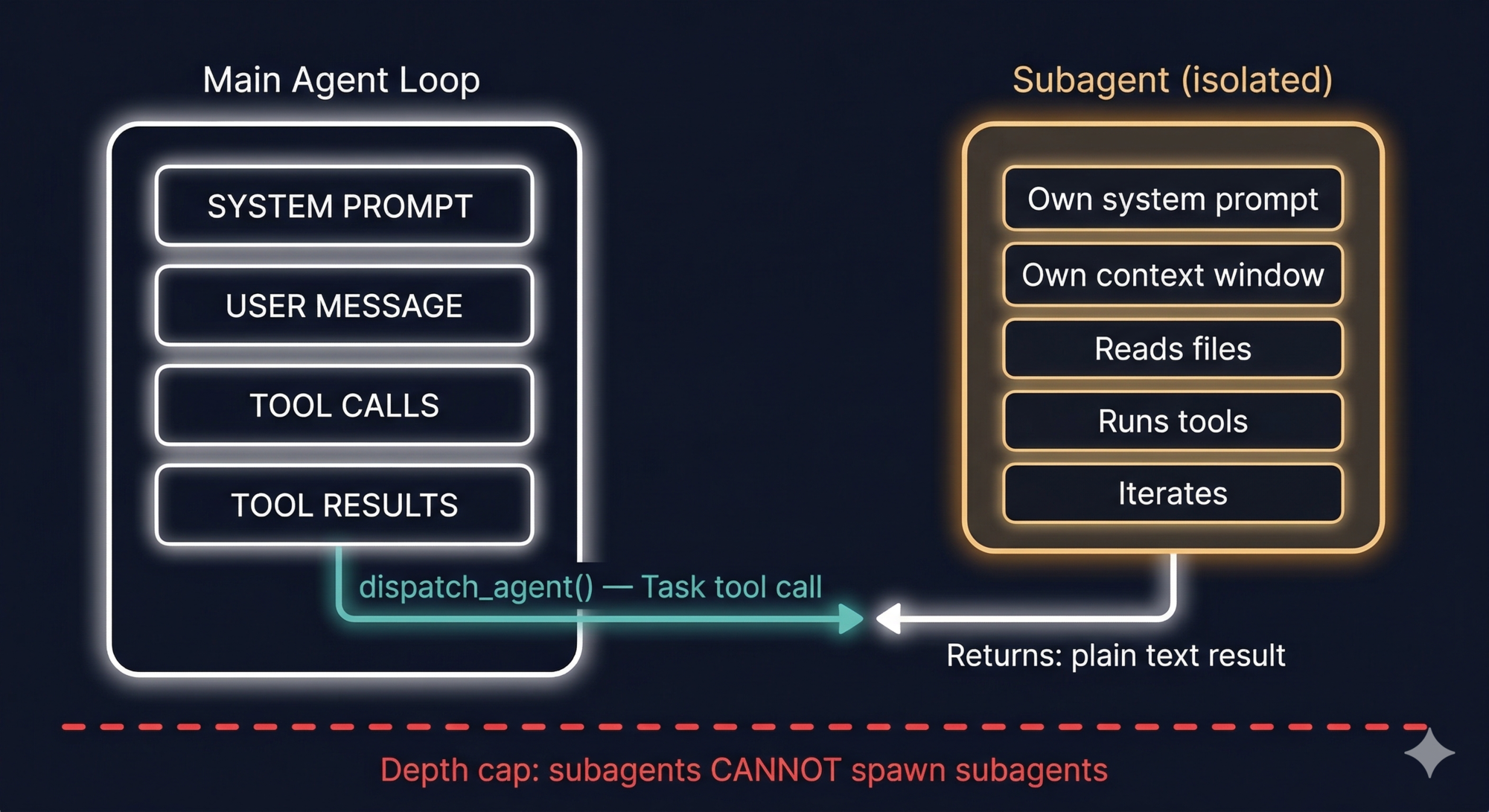
When Claude (or a Slash Command) invokes a subagent, here’s what happens:
- A new, isolated agent loop starts
- The subagent gets its own fresh context window (not a copy of yours)
- It runs autonomously — reads files, executes tools, reasons, iterates
- When done, it returns its result as plain text to the main loop
- The main loop receives this as a regular tool output
The subagent might consume 180,000 tokens exploring your codebase. Your main context only sees its final 3,000-word report.
When subagents help most
The biggest benefit is context isolation. When you ask Claude to explore a massive codebase, scan 400 files for security issues, or run a suite of tests and parse all their output — all of that noisy intermediate work would otherwise flood your main context window. A subagent absorbs it and returns only the summary.
The Explore subagent in Plan Mode is the built-in example. When you enter Plan Mode, a lightweight subagent powered by a smaller model scans the codebase, builds a map of relevant files and patterns, and returns a compact report to the main session. Your main context stays clean. You get the understanding without the noise.
The depth limit — why it exists
Subagents cannot spawn their own subagents. This is a hard architectural constraint. Without it, a model that decides to be “helpful” by delegating aggressively could create an unbounded tree of agent processes — each consuming tokens, potentially making file changes, and running without visibility. The depth cap makes the system predictable: at most one level of delegation, always.
Async subagents
You can also send a subagent to run in the background while you continue working. Press Ctrl+B to background the current agent task. This is useful for long-running operations — running a full test suite, indexing a large codebase — where you don’t want to sit and wait.
A Real Example: The PR Review Workflow
Let’s put all three together. Here’s how a production PR review workflow might wire them up.
What we want: type /review-pr 1234 and get a structured review of PR #1234.
The pieces:
-
A Skill that contains the team’s code review conventions and checklist — it auto-loads when PR review is in context.
-
A Subagent (
security-auditor) that gets the diff, reads the changed files, and checks for security issues in its own isolated context. -
A Slash Command (
/review-pr) that orchestrates the whole thing:
# PR Review Workflow

Review pull request number $ARGUMENTS.

Steps:
1. Use the GitHub MCP tool to fetch the PR diff for PR #$ARGUMENTS
2. Dispatch the @security-auditor subagent to check the changed files
3. Apply the pr-review skill conventions when writing your assessment
4. Return a report with these sections:
   - Summary (2–3 sentences)
   - Security risks (from the subagent's findings)
   - Code quality observations
   - Specific suggestions with line references
What happens when you type /review-pr 1234:
- Slash Command injects the prompt into your main context
- Main loop calls GitHub MCP → fetches the diff (tool output back to main context)
- Main loop dispatches
@security-auditorsubagent → it reads changed files, checks patterns, returns a security report (3,000 tokens, not 50,000) - pr-review Skill auto-loads because the task now matches its description
- Main loop writes the final structured report using the conventions from the Skill and the findings from the Subagent
Your main context window absorbed: the command, the PR diff, the security report summary, and the skill conventions. Not: all the files the security auditor read, all the intermediate reasoning, all the tool calls it made.
When to Use Which
| Situation | Use |
|---|---|
| I want Claude to automatically apply conventions or context when relevant | Skill |
| I need guaranteed, repeatable invocation — not probabilistic | Slash Command |
| I need to do heavy work (explore large codebase, parse huge outputs) without polluting main context | Subagent |
| I want to wire together multiple mechanisms | Slash Command as the orchestrator |
| I need the agent to do background work while I continue | Async Subagent (Ctrl+B) |
| Something needs to apply to every session always | CLAUDE.md |
Key Takeaways
- One extension mechanism trying to handle everything will make trade-offs that hurt all your use cases.
- Skills load automatically when the task matches their description. Best for context and conventions you want applied without asking.
- Slash Commands are explicit, deterministic, and reliable. Best for repeatable workflows you control.
- Subagents run in isolation with their own context windows. Best for heavy work you don’t want flooding the main loop.
- The depth cap — subagents cannot spawn subagents — keeps the system predictable and prevents runaway agent trees.
- The composition pattern: a Slash Command as entry point, orchestrating a Subagent for isolation and a Skill for context. Each piece does what it does best.
What’s Next
Part 6: Safety and the Patterns to Steal is the synthesis post. We cover Claude Code’s full safety model, then turn everything from this series into a concrete 10-pattern playbook you can apply when building your own agentic system.
References
Claude Code extensibility
- Extend Claude with skills — official docs
- Claude Code Customization: CLAUDE.md, Slash Commands, Skills, and Subagents — alexop.dev
- Understanding Claude Code’s Full Stack: MCP, Skills, Subagents, and Hooks — alexop.dev
- 4 Claude Code Primitives: Commands, MCPs, Subagents, Skills — Agentic Engineer
Skills vs Commands vs Subagents
- Skills vs Commands vs Subagents vs Plugins — Young Leaders Tech
- Reverse Engineering Claude Code: How Skills differ from Agents, Commands and Styles — Level Up Coding
- Claude Skills, Commands, Agents: toward a unified mission — Medium
- Slash Commands vs Subagents: How to Keep AI Tools Focused — Jason Liu
Have thoughts on this?
I read every email. If something resonated, felt wrong, or made you think — I'd love to hear from you.

Comments