
How Claude Code's Master Loop Works (Part 2) — The Simple Pattern That Beats Complex Frameworks
Series: Agentic System Design, Learned from Claude Code — Part 2 of 6
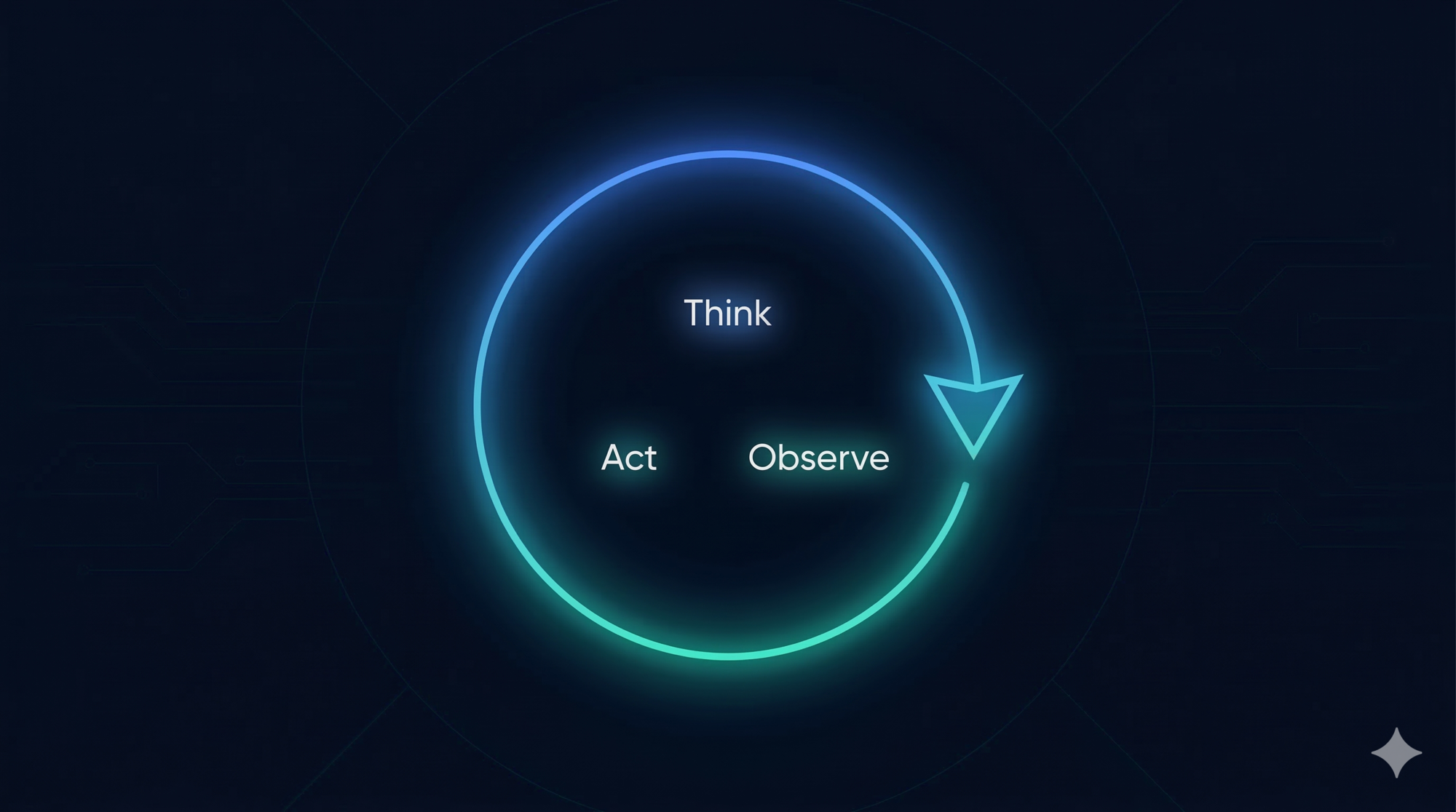
In Part 1, we mapped the five layers of Claude Code’s architecture and introduced the ReAct pattern — the reason-act-observe cycle that powers every autonomous agent. Now we go deeper on the most important layer: the agent loop itself.
The central claim of this post is a counterintuitive one:
A while-loop, done right, outperforms complex orchestration graphs in production.
We’ll look at why most frameworks pull you toward complexity, why Claude Code resisted that pull, and what you can steal from the design.
The Common Pull Toward Complexity
When engineers start building AI agents, the first instinct is often to reach for a framework. And most popular frameworks offer architectures that look like this:
LangGraph — your agent is a directed acyclic graph (DAG). Nodes are tasks. Edges define flow. Branching, parallel execution, conditional routing. Powerful, but you need to define every possible transition upfront.
CrewAI — your agent is a team. Different roles (Researcher, Writer, Reviewer) are modeled as separate agents. Each has its own tools, its own context, and communicates with others. Clean conceptually, but coordination adds significant overhead.
AutoGen — agents as conversational participants. Multiple LLM instances talk to each other, delegating and responding. Flexible, but debugging a conversation between 4 agents who have each misunderstood something is painful.
There are good reasons these designs exist. Complex workflows do sometimes need branching and parallelism. But there’s a cost:
- Debugging is hard. When something goes wrong in a graph with 8 nodes and 12 edges, where did it go wrong? You need to trace state through every transition.
- Failures cascade. If one node in a multi-agent conversation misinterprets its context, the error propagates through every downstream agent before you notice.
- Upfront design is required. You must model every possible path before you start. The real world rarely cooperates with that assumption.
Claude Code made a different bet: start with the simplest loop that can possibly work, and only add complexity when you can prove you need it.
The Loop: What It Actually Looks Like
Claude Code’s master loop is internally codenamed nO. Here’s what it does, expressed as clearly as possible:
function run_agent(user_message):
    messages = [system_prompt, user_message]

    while true:
        response = call_model(messages)

        if response has NO tool calls:
            return response.text   # done

        for each tool_call in response:
            result = execute_tool(tool_call)
            messages.append(tool_call)
            messages.append(tool_result)

        messages.append(response)
That’s the whole engine. The loop continues as long as the model responds with tool calls. The moment it produces a plain text response with no tool calls attached, the loop ends and control returns to the user.
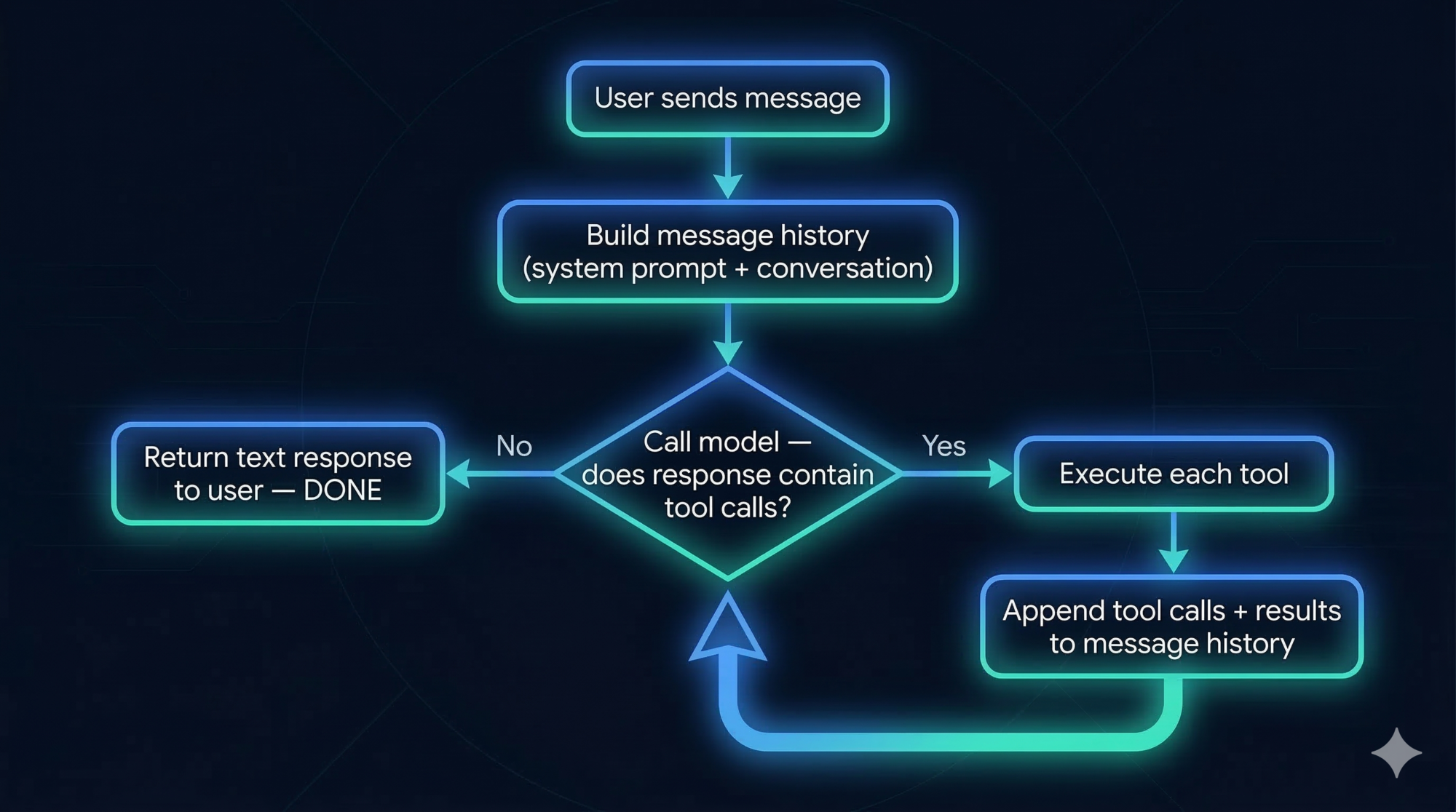
This is genuinely the complete picture. No hidden complexity. The messages list is the entire state of the agent. Everything — your original request, every tool call, every result, every model response — accumulates in that single flat list.
What Happens Inside “Call Model”?
The model receives the full message history and produces a response. That response is either:
- Text only → the model decided the task is done
- One or more tool calls → the model needs to take action before it can answer
The model’s “thinking” happens inside this call — invisible to the loop itself. The loop doesn’t need to understand why the model chose a tool. It just needs to run it and feed back the result.
How Streaming Works
The loop above might suggest: user sends message → wait → wait → wait → receive response. In practice, that would feel broken. Long tasks can take minutes. Nobody stares at a blank terminal for two minutes.
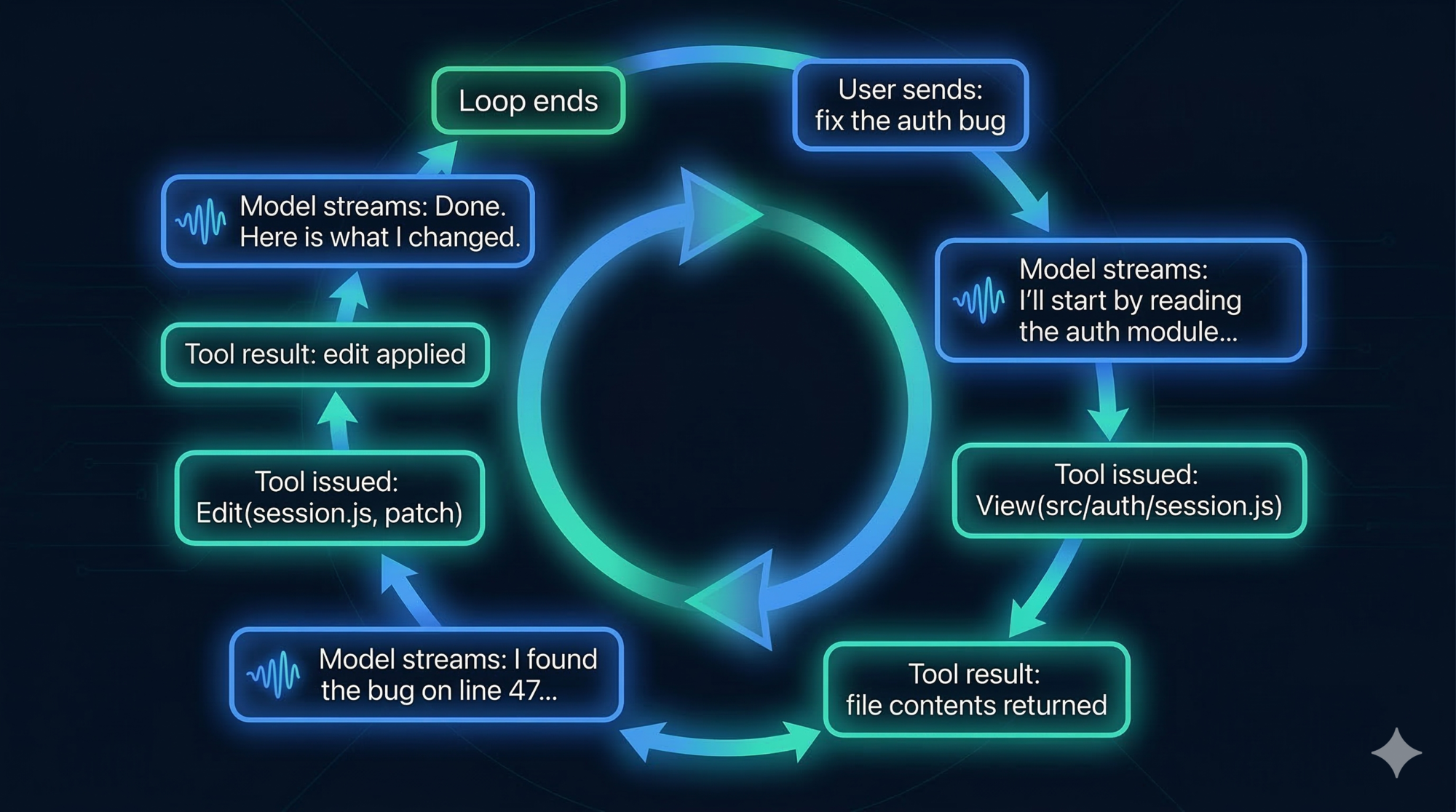
Streaming solves this. Instead of waiting for the entire loop to complete before showing anything, the system emits output as it happens:
- When the model starts reasoning and produces text, it streams token by token in real time
- When a tool call is issued, the UI shows which tool is running (“Running GrepTool…”)
- When a tool result comes back, the UI shows it immediately
- When the next model response starts, it streams token by token again
This is managed by a component called StreamGen. It wraps the model API call and converts the raw token stream into structured events that the UI can render progressively.
The effect is that you feel like you’re watching Claude work — not waiting for it to finish.
Design lesson: If your agent does anything that takes more than a few seconds, you need streaming. The difference between “streaming tokens as they arrive” and “return everything at the end” is the difference between a tool people use and a tool people abandon. Design streaming in from the start — it’s much harder to bolt on later.
Real-Time Steering: The Async Queue
Here’s a problem the basic loop doesn’t handle: what if the user wants to redirect Claude while it’s working?
Say Claude is 8 steps into a large refactor. You realize you forgot to mention an important constraint. In a naive loop, your only option is to kill the process and start over, losing all the progress.
Claude Code solves this with an async dual-buffer queue internally called h2A. Here’s how it works conceptually:
# Two separate channels run in parallel:

Channel 1 (execution):
    The main loop is running — executing tools, calling the model

Channel 2 (input):
    The user can type a new message at any time
    This gets pushed into the h2A queue

# When the loop finishes the current tool call:
    It checks the queue before calling the model again
    If there's a new message from the user, it's injected into the message history
    The model sees the interjection and adjusts its approach
This is called mid-task steering. You can:
- Add a constraint you forgot: “Actually, don’t modify the middleware.js file”
- Redirect the approach: “Stop. Use the existing logger module instead of creating a new one”
- Ask a question mid-task: “Before you continue — is this change backwards-compatible?”
The queue is non-blocking. It doesn’t pause the loop. It just makes user messages available at the next natural decision point (when the loop is about to call the model again).
Design lesson: For any long-running agent, user interjection is not an edge case. It’s a core requirement. Design your loop with an input queue from day one. A loop that can’t be steered mid-task is a batch job wearing a chat interface.
How the Loop Terminates
There are three ways the loop ends:
1. Natural completion — the model produces a text response with no tool calls. The task is done. This is the happy path.
2. User interruption — the user presses Escape. The current tool call is cancelled, the loop exits, and control returns. Any partial changes that were already applied to disk remain — only the current in-flight operation is stopped.
3. Safety block — a tool call is classified as too risky, or the user denies a permission prompt. The loop exits cleanly with an explanation.
There’s also a safety mechanism to prevent infinite loops: a maximum iteration limit acts as a circuit breaker. If the loop runs more than N times without returning to the user, it stops and reports the situation. In practice this rarely triggers — the model is quite good at knowing when it’s done — but the guardrail exists.
Sub-Agents: When One Loop Spawns Another
Some tasks benefit from parallelism — searching a large codebase in multiple directions at once, or trying two solution approaches simultaneously.
Claude Code supports this through sub-agents, invoked with a tool called dispatch_agent (internally called I2A). When Claude calls this tool, it spawns a second, isolated loop that runs independently, then returns its result as a tool output to the main loop.
This is the full topology:
Main loop (nO)
│
├── calls dispatch_agent("search all files for auth references")
│   │
│   └── Sub-agent loop (I2A)
│       ├── calls GrepTool
│       ├── calls View
│       └── returns: plain text summary
│
└── receives sub-agent result as a tool output
    └── continues main loop with new information
The depth limit: Sub-agents cannot spawn their own sub-agents. The depth is hard-capped at 1 level. This is not a limitation — it’s a deliberate safety design. Without the depth cap, a model that decides to “be helpful” by spawning more agents could create an unbounded tree of running processes, each consuming tokens and potentially making file changes. The depth limit makes the system predictable. At most: one main loop + one sub-agent per task.
Design lesson: Subagents are powerful but need hard constraints. Depth limits, tool restrictions per agent, and scoped permissions all matter. The question isn’t whether to allow delegation — it’s how to make delegation safe.
The Flat Message History: A Feature, Not a Limitation
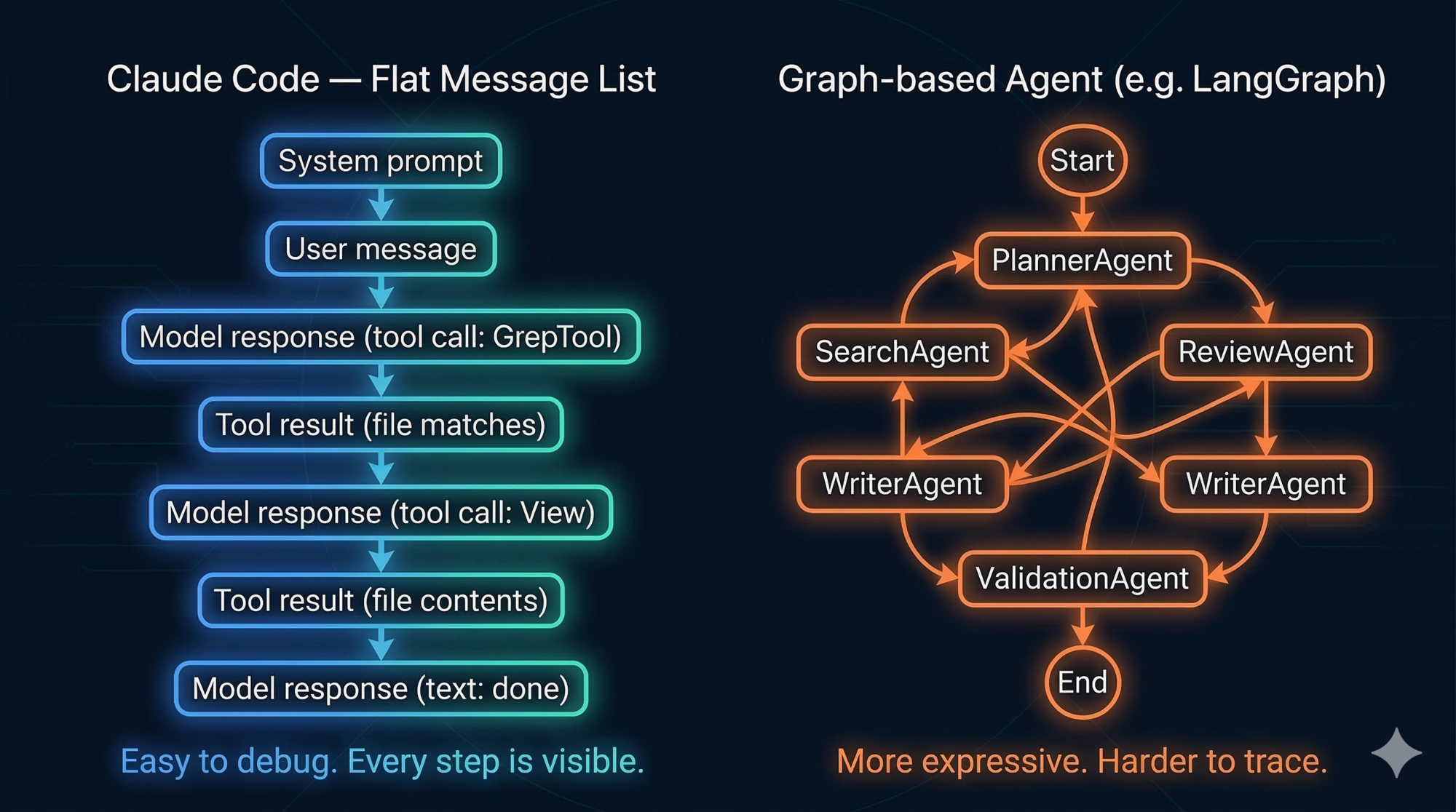
Most multi-agent frameworks maintain separate state for each agent — its own context, its own history, its own “view” of the world. When you debug, you have to reconstruct what each agent saw and why it made each decision.
Claude Code’s single flat message list is the opposite. Everything that happened is in one place, in order, with no hidden state. You can read it like a log.
Key Insight: The message history IS the state. Unlike traditional applications with separate state management, the flat message list is the single source of truth. This elegant simplification eliminates entire classes of synchronization bugs and makes debugging trivial.
This has two practical consequences:
1. Debugging is linear. When Claude does something unexpected, you look at the message history and trace backwards. You’ll find the exact tool result that caused the wrong conclusion, or the step where context got misinterpreted. There’s only one history to read.
2. The model has full context. Every sub-agent result, every tool output, every prior reasoning step is available to the model when it decides what to do next. There’s no “agent A doesn’t know what agent B found” problem, because there’s only one agent.
The cost is that the flat list grows over time, consuming the context window. But that’s a solvable problem (we covered the Compressor in Part 1). The upside — a single, auditable, debuggable history — is harder to replicate in graph architectures.
| Flat message history | Graph-based agents | |
|---|---|---|
| Debugging | Read one list, trace linearly | Reconstruct state across multiple agents |
| Model context | Everything visible to the model | Each agent only sees its own slice |
| Complexity | Simple — one loop, one history | Complex — multiple loops, multiple states |
| Parallelism | Limited (one sub-agent at a time) | Strong (true parallel execution) |
| Failure modes | Visible and traceable | Can cascade across agents silently |
Design lesson: A flat, linear audit trail is worth more in production than elegant architecture diagrams. Complex graph systems are genuinely useful for certain problems, but the debugging overhead is real. Start simple. Move to graphs when you have a specific, measured reason.
A Worked Example: “Add a Login Timeout”
Let’s trace a real task through exactly 6 loop iterations to make the loop concrete.
Task: “Add a 30-minute login timeout to the session management system.”
Iteration 1 — Understand the codebase
Model thinks: I need to find where sessions are managed before I write any code.
Tool call:    GrepTool("session", "src/")
Tool result:  Matches in src/auth/session.js, src/middleware/auth.js
Message list: [system, user_request, model_response, tool_call, tool_result]
Iteration 2 — Read the session file
Model thinks: I should read session.js to understand the current implementation.
Tool call:    View("src/auth/session.js")
Tool result:  File contents — sees createSession(), validateSession() functions
Message list: [...previous 5, model_response, tool_call, tool_result]
Iteration 3 — Read the middleware
Model thinks: The middleware probably calls validateSession. I should check it too.
Tool call:    View("src/middleware/auth.js")
Tool result:  File contents — sees it calls validateSession on every request
Message list: [...previous 8, model_response, tool_call, tool_result]
Iteration 4 — Write the TODO list
Model thinks: I understand the system. Let me plan the changes before writing code.
Tool call:    TodoWrite([
                "Add expiresAt field to session schema",
                "Update createSession to set 30-min expiry",
                "Update validateSession to check expiry",
                "Write tests"
              ])
Tool result:  TODO list saved
Message list: [...previous 11, model_response, tool_call, tool_result]
Iteration 5 — Apply the code changes
Model thinks: I have a clear plan. Apply the three code changes.
Tool call:    Edit("src/auth/session.js", patch adding expiresAt and timeout check)
Tool result:  Edit applied, diff shown
Message list: [...previous 14, model_response, tool_call, tool_result]
Iteration 6 — Run tests
Model thinks: Change is applied. Run the tests to verify.
Tool call:    Bash("npm test -- auth")
Tool result:  4 tests passed, 0 failed
Message list: [...previous 17, model_response, tool_call, tool_result]

Next model response: plain text — "Done. I added a 30-minute session timeout by..."
Loop ends. Control returns to user.
Notice the progression:
- Iterations 1–3: pure observation, building context
- Iteration 4: explicit planning before acting
- Iteration 5: action, informed by everything observed
- Iteration 6: verification, closing the loop
Each iteration adds 3 entries to the message list (model response + tool call + tool result). After 6 iterations, the message list has the system prompt, the original user message, and 18 more entries — 20 total. All visible. All traceable.
Key Takeaways
- The master loop is genuinely a
whileloop. Its simplicity is a design choice, not a constraint. - The flat message history is the complete state of the agent. Everything is in one place and readable in sequence.
- Streaming makes long-running loops feel responsive. Stream at the tool level, not just the final response.
- The async queue (h2A) enables mid-task steering without restarting — a requirement for any interactive agent.
- Sub-agents provide delegation and limited parallelism but with a hard depth limit of 1. This keeps the system predictable.
- The loop terminates naturally when the model produces text with no tool calls. No explicit “done” signal needed.
- Start with a single-threaded loop. Move to graphs only when you have a specific problem that the loop cannot solve.
What’s Next
The loop we just explored is powerful, but useless without the ability to act. Tools are what make an AI agent an agent.
Part 3: Tools and MCP — Designing the Agent’s Hands (coming soon) covers:
- The tool interface contract: why JSON-in/text-out uniformity matters
- Each built-in tool category explained:
- Reading and discovery (View, Glob)
- Search (Grep with ripgrep — and why not embeddings)
- Editing (Edit vs Write — patch vs replace)
- Execution (Bash — and how command injection is filtered)
- Sandboxing: how risky commands are classified and blocked
- MCP: extending the tool layer to any external service (GitHub, Slack, Notion)
- How to design your own tool layer using these principles
The key insight: design your tools as a protocol. The loop shouldn’t care what the tool does — only how to call it and read the result.
References
Claude Code loop internals
- How the agent loop works — Anthropic Agent SDK docs
- How Claude Code works — official docs
- Claude Code: Behind-the-scenes of the master agent loop — PromptLayer
- Claude Code Internals, Part 2: The Agent Loop — Marco Kotrotsos, Medium
- Message Queue and Real-time Steering (h2A) — DeepWiki reverse-engineering analysis
- Inside Claude Code: A Deep-Dive Reverse Engineering Report — BrightCoding
ReAct pattern
- ReAct: Synergizing Reasoning and Acting in Language Models — original paper, Yao et al. 2022
- What is a ReAct Agent? — IBM Think
Agent framework comparisons
- LangGraph vs CrewAI — ZenML Blog
- Comparing Open-Source AI Agent Frameworks — Langfuse
- OpenAI Agents SDK vs LangGraph vs AutoGen vs CrewAI — Composio
Directed Acyclic Graphs (DAGs)
- Directed acyclic graph — Wikipedia
Have thoughts on this?
I read every email. If something resonated, felt wrong, or made you think — I'd love to hear from you.
Comments