
How Claude Code's Architecture Works (Part 1) — 5 Layers You Can Steal for AI Agents
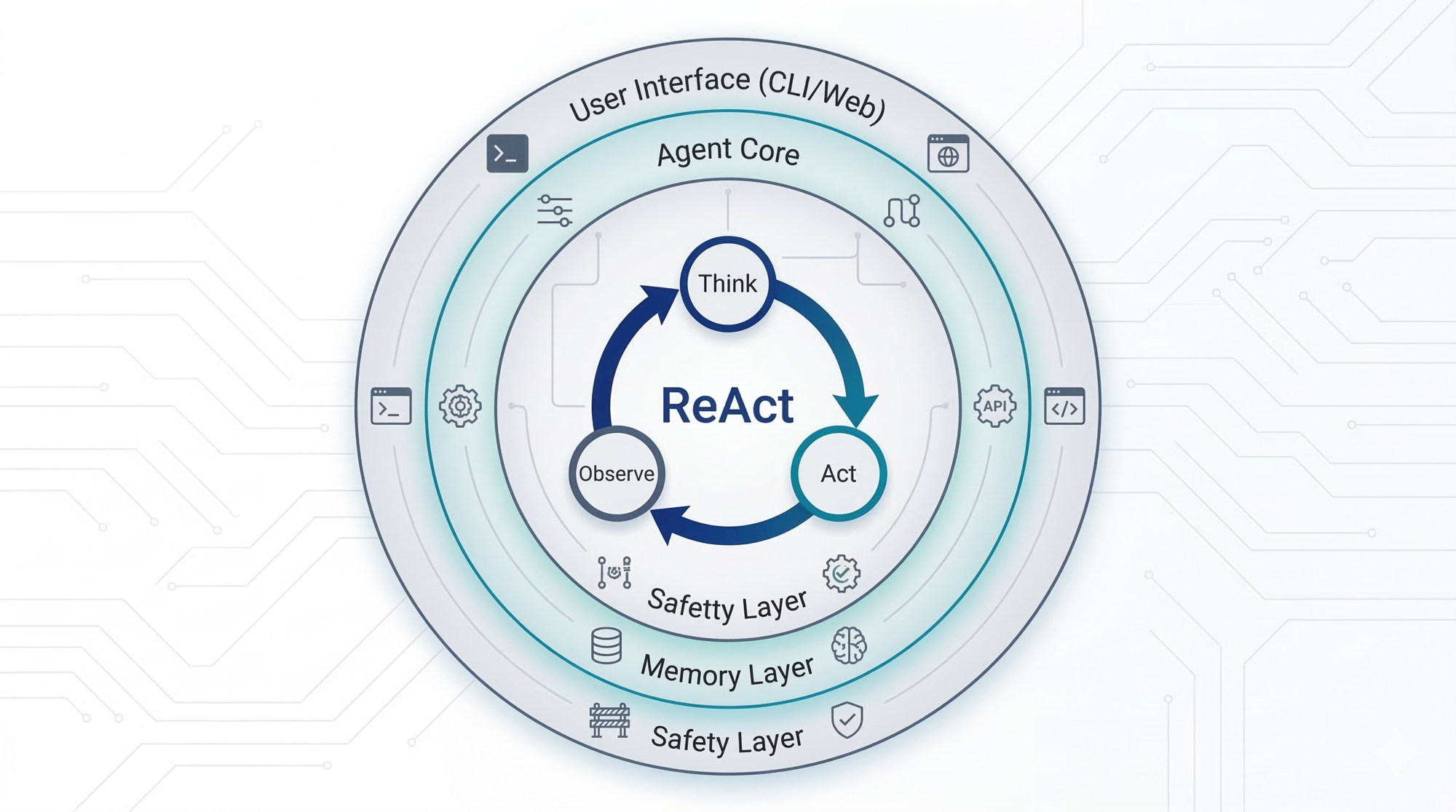
Series: Agentic System Design, Learned from Claude Code — Part 1 of 6
If you’ve used Claude Code, you know it feels different from chatbots. It explores codebases, writes files, runs tests — autonomously. But this series is not a user guide. It’s a design study.
Claude Code is one of the most production-hardened agentic systems publicly available today. Under the hood, it makes a set of surprisingly deliberate architectural choices — choices that teach you something real about how to build autonomous AI systems.
This first post gives you the full picture from high altitude. No prior knowledge of Claude Code needed. We’ll cover:
- What any AI agent needs (in general)
- How Claude Code answers each of those needs
- A worked example tracing one task through the whole system
- The ReAct pattern — and how Claude Code implements it
- Extensions: MCP, Skills, Slash Commands, Subagents
- The three operating modes and what they mean architecturally
Let’s start from first principles.
What You’ll Learn: This post maps Claude Code’s five-layer architecture — from the ReAct loop at its core to the tool layer, context management, and extension systems. You’ll understand how each layer solves a fundamental problem in agent design, backed by concrete examples you can apply to your own systems.
What Does Any AI Agent Actually Need?
Before looking at Claude Code, let’s ask: if you were designing any autonomous AI agent from scratch, what problems would you need to solve?
| Problem | Question to answer |
|---|---|
| Perception | How does the agent observe the world? |
| Action | How does it do things beyond generating text? |
| Planning | How does it break a big task into steps? |
| Memory | How does it remember what it’s done and what it knows? |
| Context management | How does it handle limited working memory? |
| Safety | How do you stop it from doing something catastrophic? |
| Extensibility | How do you add new capabilities without rebuilding everything? |
| User control | How much autonomy do you give it, and when? |
Every agentic system — whether it’s a coding assistant, a customer support bot, or a document processor — has to answer all eight of these. The difference between systems is how they answer them. Let’s see how Claude Code does it.
Claude Code’s Architecture: The Five Layers
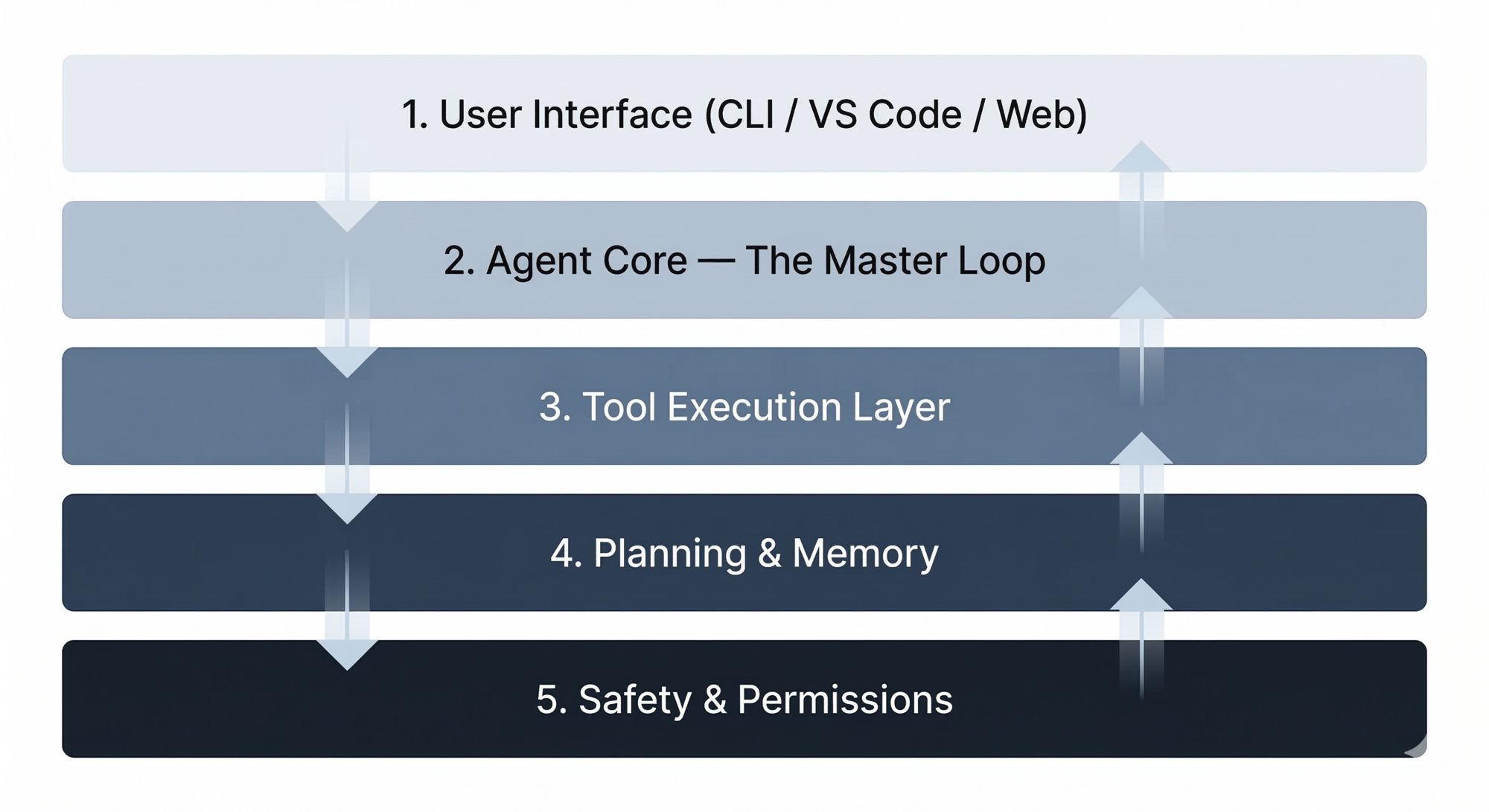
Layer 1 — User Interface
The CLI, VS Code extension, and web UI are all thin frontends to the same engine. Their job is to accept your input and display output — nothing more.
What this answers: Perception. Claude sees your project files, your git state, your CLAUDE.md instructions, and your natural language prompt.
Design lesson: Keep your interface and your agent core separate. If they’re the same thing, you can never add a new interface without rewriting the brain.
Layer 2 — The Agent Core: The ReAct Loop
This is the most important design decision in the whole system — and it comes from a well-known pattern in AI agent research called ReAct (short for Reasoning + Acting).
What Is the ReAct Pattern?
ReAct is a design pattern where an agent alternates between three things in a loop:
- Think — the model reasons about the current situation and what to do next
- Act — it calls a tool or takes an action
- Observe — it reads the result and adds it to its understanding
Then it repeats. This continues until the task is done.
The key insight of ReAct is that thinking and acting are interleaved, not sequential. The agent doesn’t make a big plan upfront then execute it blindly. It reasons a little, acts, sees what happens, and reasons again. Each observation informs the next thought.
Here’s a simple example. Say you ask: “How many users signed up last week?”
Think:   The user wants signup counts. I should look at the database query layer.
Act:     GrepTool("signup", "src/")
Observe: Found src/users/queries.js — it has a getUsersByDate function.

Think:   I'll read that file to understand the query.
Act:     View("src/users/queries.js")
Observe: The function filters by created_at. I can now write the query.

Think:   I have enough to answer.
→ Return: "Here's the query to get last week's signups..."
Each step builds on the previous observation. The model never had to know the full solution upfront.
How the Loop Is Implemented
The code-level implementation is a simple while-loop:
while (model responds with a tool call):
    run the tool
    feed the result back to the model
    get next response

→ when model responds with plain text: done, return to user
The “Think” step happens inside the model — it’s the reasoning the model does before it decides which tool to call, or whether to stop. This is invisible unless you enable extended thinking mode.
The “Act” step is the tool call itself. The “Observe” step is the tool result being appended to the message history.
So the loop is the ReAct cycle — just implemented as a message history that grows with each iteration.
This is paired with an async message queue that lets you interrupt mid-task. If Claude is 10 steps into a task and you need to redirect it, you inject a new message into the queue, and the loop picks it up without restarting from scratch.
Design lesson: ReAct is the most battle-tested pattern for building general-purpose AI agents. The while-loop implementation is simpler than it sounds, and simpler than most frameworks make it look. One flat message list. No competing threads. No complex graph.
Layer 3 — The Tool Layer
Without tools, the model can only produce text. Tools are what make it an agent that can act.
Claude Code’s built-in tools fall into four categories:
Read / Explore
View— read a file (defaults to ~2,000 lines)LS— list a directoryGlob— wildcard search across a whole repo
Search
GrepTool— full regex search, backed by ripgrep (a fast native binary bundled inside the app)
One notable choice: Anthropic uses regex, not vector embeddings, for search. Why? The model already writes great regex patterns, embeddings add infrastructure overhead (vector DB, preprocessing, sync), and exact search is often what you want in code (“find where this function is called” not “find similar functions”). No embedding infrastructure needed, and search stays fast and deterministic.
Edit / Write
Edit— targeted patch (shows a diff before applying)Write— whole-file creation or replacement
Execute
Bash— persistent shell sessions, risk-classified, injection-filtered (backticks and$()are blocked)
Specialized
WebFetch— fetch a URL (restricted to user-mentioned or in-project URLs)BatchTool— run multiple tool calls in one go
All tools share the same interface: JSON in, plain text out. The loop doesn’t care what the tool does — only how to call it and read the result.
MCP: Extending the Tool Layer
Beyond built-in tools, Claude Code supports MCP (Model Context Protocol) — an open standard for connecting external services as tools.
With MCP, Claude can call Slack, Notion, GitHub, databases, or any custom service you build — using the same JSON-in, text-out pattern as the built-in tools. The loop doesn’t change at all. You just register a new tool endpoint.
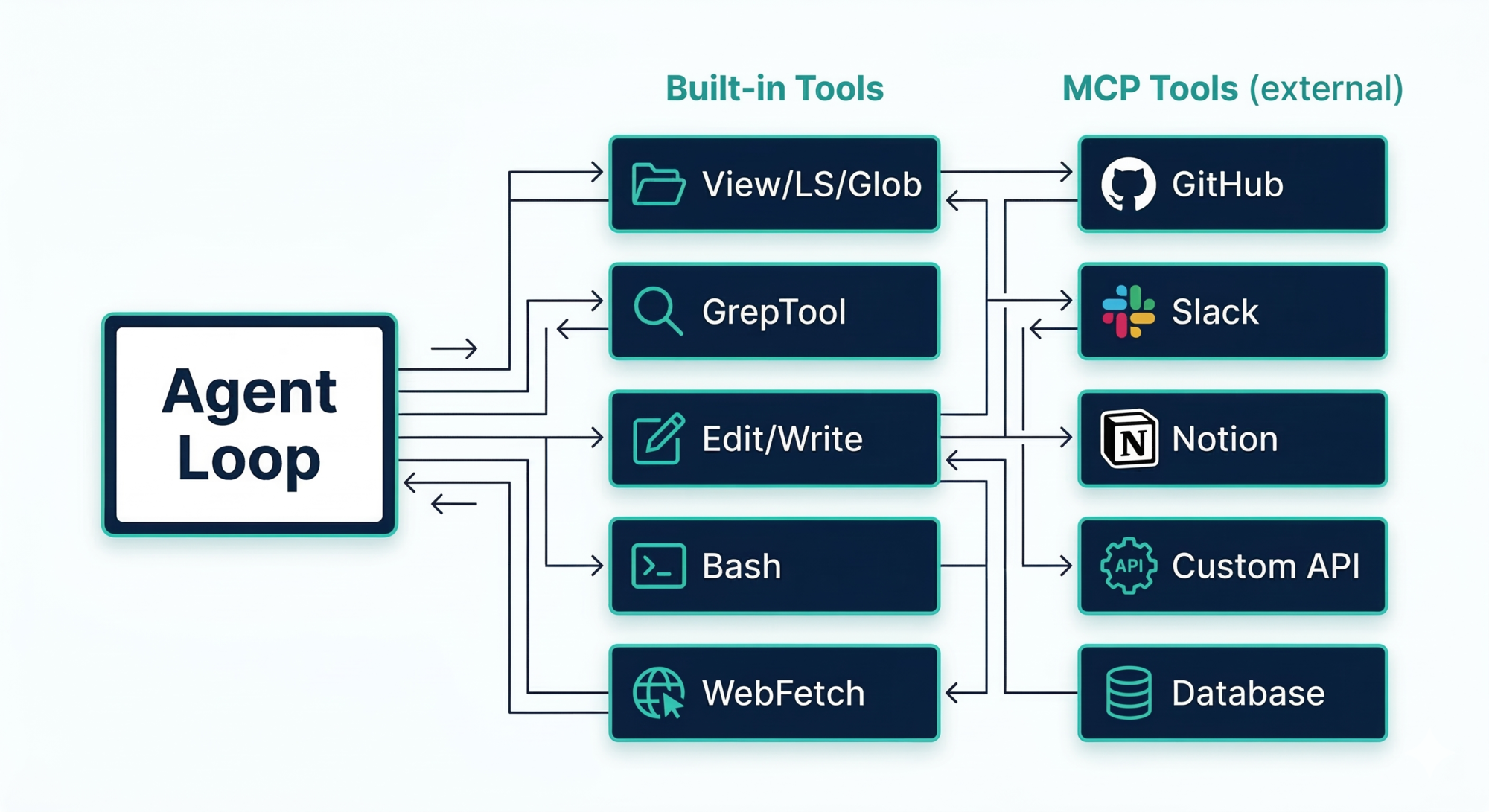
Design lesson: Design your tool interface as a protocol, not an implementation. If every tool shares the same contract, adding a new tool never touches the core loop. MCP proves this scales to external services too.
Layer 4 — Planning and Memory
This layer solves two separate problems: what to do next (short-term planning) and what to remember across sessions (long-term memory). It also solves a third, harder problem: what happens when the working memory runs out.
Short-Term Planning: TODO Lists
For any non-trivial task, Claude’s first move is usually to call TodoWrite — creating a structured task list stored in working memory (the active context window, in RAM, not on disk):
[
  { "id": "1", "content": "Read auth module", "status": "completed", "priority": "high" },
  { "id": "2", "content": "Find session handling code", "status": "in_progress", "priority": "high" },
  { "id": "3", "content": "Add OAuth endpoints", "status": "pending", "priority": "medium" },
  { "id": "4", "content": "Run tests", "status": "pending", "priority": "low" }
]
This list lives in the active session — it’s not saved to disk. After every tool call, the system injects the current TODO state back into context as a reminder message, so the model doesn’t lose track of where it was.
Long-Term Memory: CLAUDE.md and MEMORY.md
Long-term memory is just files stored on your local machine. There are two types:
CLAUDE.md — you write it, Claude reads it
This is where project conventions, coding standards, and context live. Claude loads it at session start. Think of it as the briefing document for a new team member who has amnesia between every session.
Where to find it:
./CLAUDE.md— in your project root (shared with team, committed to git)~/.claude/CLAUDE.md— your global file, applies to all projects on your machine./CLAUDE.local.md— personal overrides for this project (not committed to git)
Claude walks up your directory tree on startup and loads every CLAUDE.md it finds — so a monorepo can have root-level conventions plus component-level ones.
MEMORY.md — Claude writes it, you can review it
This is Claude’s own notepad. When it discovers something useful (“this project uses a custom ORM wrapper”), it saves that to ~/.claude/projects/<your-project-path>/memory/MEMORY.md. The first 200 lines load automatically each session.
Key difference: You write CLAUDE.md. Claude writes MEMORY.md.
You can run /memory at any time to browse, edit, or delete what Claude has saved.
Context Window Management: The Compressor
This is where we need to pause and explain a fundamental constraint.
What is a context window?
Large language models (LLMs) don’t have unlimited memory. They work by reading a long list of text — your conversation, the files they’ve read, the tool results — all at once, and generating the next response based on everything they’ve seen. This list of text is called the context window.
The context window has a hard size limit. Why? It’s a fundamental property of how transformer-based models work — processing longer contexts requires quadratically more compute. Making it larger is technically possible but increasingly expensive. Claude Code’s default is 200,000 tokens (roughly 150,000 words, or about 500 pages of text). That sounds like a lot, but in a real session — reading multiple files, running commands, accumulating tool outputs — it fills up faster than you’d think.
What happens if you don’t manage it?
Two things, both bad:
-
Performance degrades gradually. As the window fills, the model has more and more text to attend to. Earlier instructions and observations get effectively “diluted” — the model starts to ignore things it saw earlier because there’s too much noise. You’ll notice Claude losing track of earlier decisions or repeating work it already did.
-
The session crashes. Eventually the window is completely full and the session terminates. Any work that wasn’t explicitly saved to disk is gone.
How Claude Code handles it: the Compressor
A component called the Compressor triggers automatically when the context reaches ~92% full. It:
- Summarizes the conversation so far into a compact narrative
- Preserves the most important decisions and context
- Writes discovered facts to
MEMORY.mdon disk for the next session - Clears the old history and starts fresh with the compressed version
CLAUDE.md is always re-read from disk after compaction — it fully survives the reset.
You can also trigger this manually with /compact if you want to reset proactively before hitting the limit.
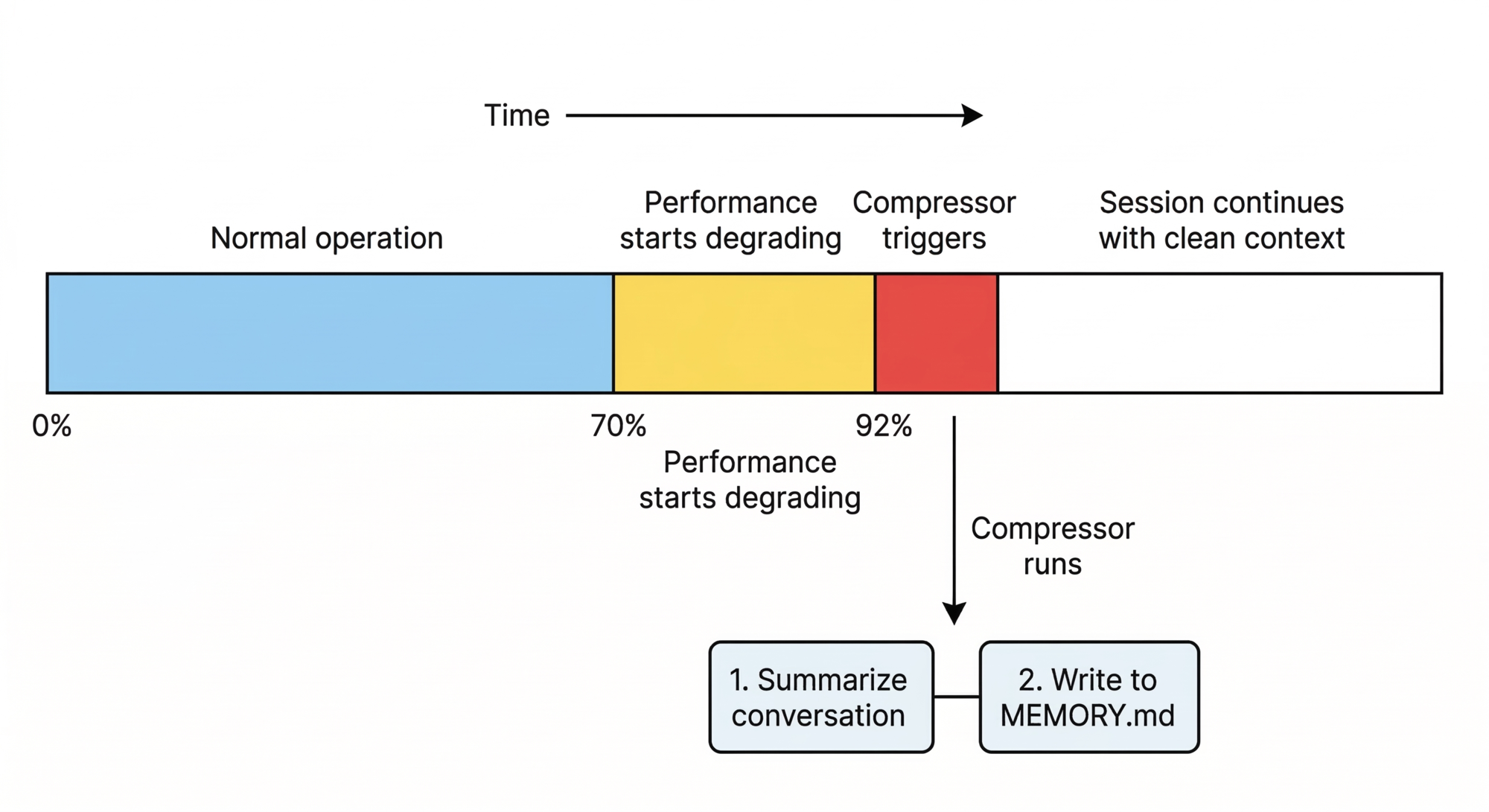
Design lesson: Every AI application hits the context window limit eventually. Design your compression and memory strategy before you ship — not after your users start complaining that the agent “forgot” what it was doing.
Layer 5 — Safety and Permissions
Claude Code uses a three-mode system (explained in the next section) as the primary user-facing control surface, plus several hardcoded safety rules:
- Write operations require confirmation (unless you’ve switched modes)
- Risky Bash commands are classified and flagged before running
- Shell injection is filtered at the tool level (backticks,
$()are blocked) - Web access is restricted to user-mentioned URLs
- Sub-agent depth is capped — sub-agents cannot spawn their own sub-agents
Design lesson: Safety constraints are architecture, not a feature you bolt on later. Model your permission system before you ship.
The Three Operating Modes
Claude Code gives you three modes that control how much autonomy the agent has. You cycle through them with Shift+Tab.
| Mode | What Claude can do | When to use it |
|---|---|---|
| Plan Mode | Read-only. Explore, analyze, produce a plan. No changes made. | Starting something complex, unfamiliar codebase, want to review the approach first |
| Default Mode | Can edit and run commands, but asks confirmation each time | Normal work, want oversight on every change |
| Auto-Accept Mode | Edits files automatically without asking | Repetitive tasks, you trust the direction, want speed |
These modes have a real architectural difference, not just a UI difference:
- In Plan Mode, Claude uses only read tools. Under the hood, it also spins up a lightweight sub-agent (powered by a smaller model) specifically for codebase exploration — this keeps the main context window clean while gathering information. You get thorough research without burning your token budget.
- In Default Mode, the full tool set is available but each write or execute action pauses for your approval.
- In Auto-Accept Mode, the loop runs uninterrupted. Write tools proceed without confirmation. This is what makes it feel like Claude is “just doing it.”
The recommended workflow (as shared by Claude Code’s creator): start in Plan Mode, refine the plan through conversation, then switch to Auto-Accept to execute.
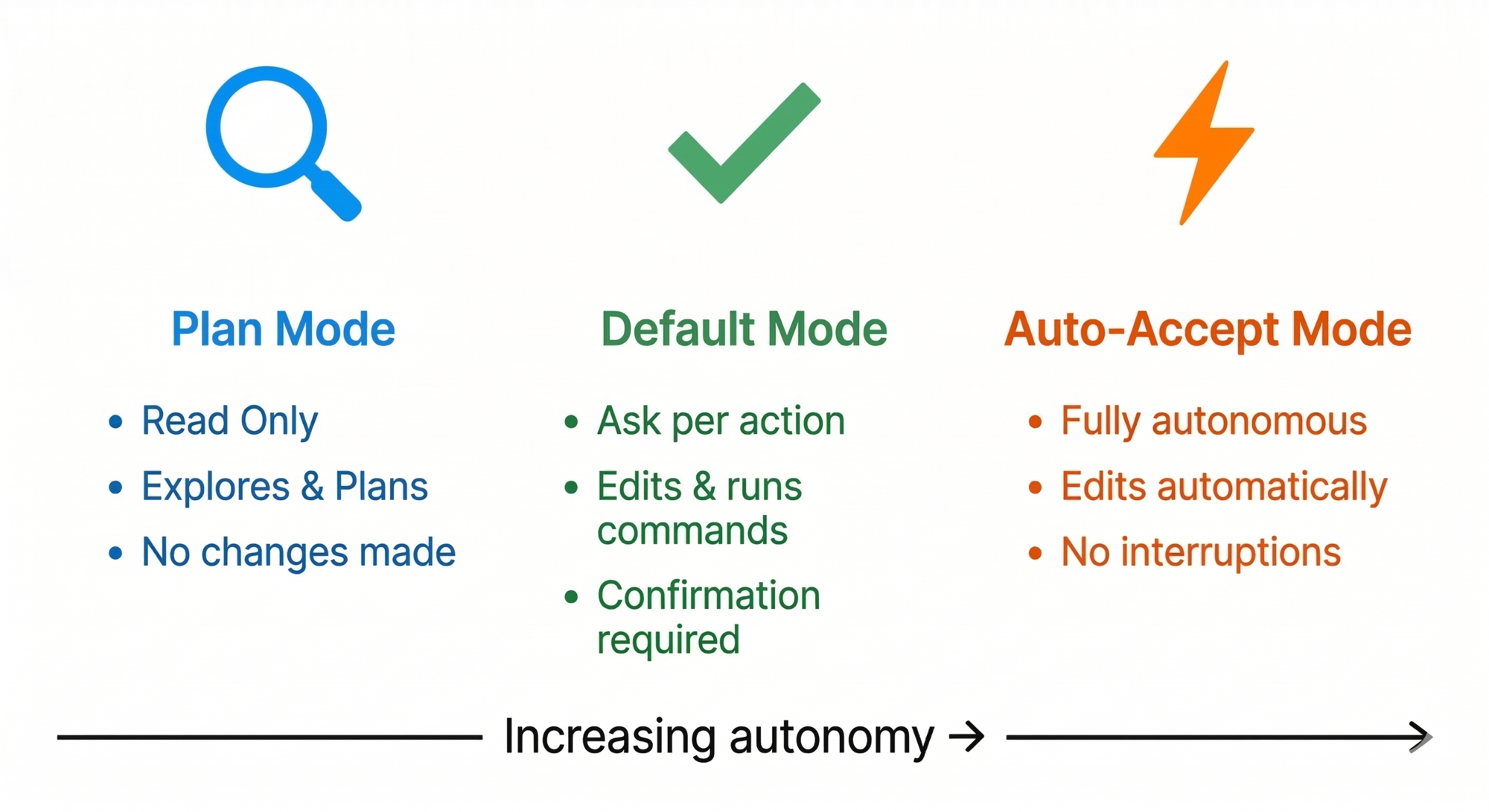
Design lesson: Giving users an explicit autonomy dial is a powerful UX pattern for any agentic system. Not every action needs the same level of oversight.
Extending the System: Skills, Commands, and Subagents
Beyond the five core layers, Claude Code has an extensibility system. These three mechanisms are different in a meaningful way — don’t confuse them.
Skills — auto-loaded context. You define a file describing a workflow or convention. Claude automatically loads it when the task description matches. No user action needed. Think: “whenever someone does X, automatically know Y.”
Slash Commands (/command-name) — user-triggered macros. You type /review-pr and a saved prompt workflow runs. You can chain commands with subagents and pipe output from one step to the next. Explicit, not automatic.
Subagents — Claude can delegate a bounded task to a parallel agent. The sub-agent does its work and returns results as a regular tool output — fitting perfectly into the main loop. Crucially: subagents cannot spawn their own subagents (depth capped at 1). This keeps the system predictable and prevents runaway recursion.
MCP Servers — extends the tool layer, as covered above.
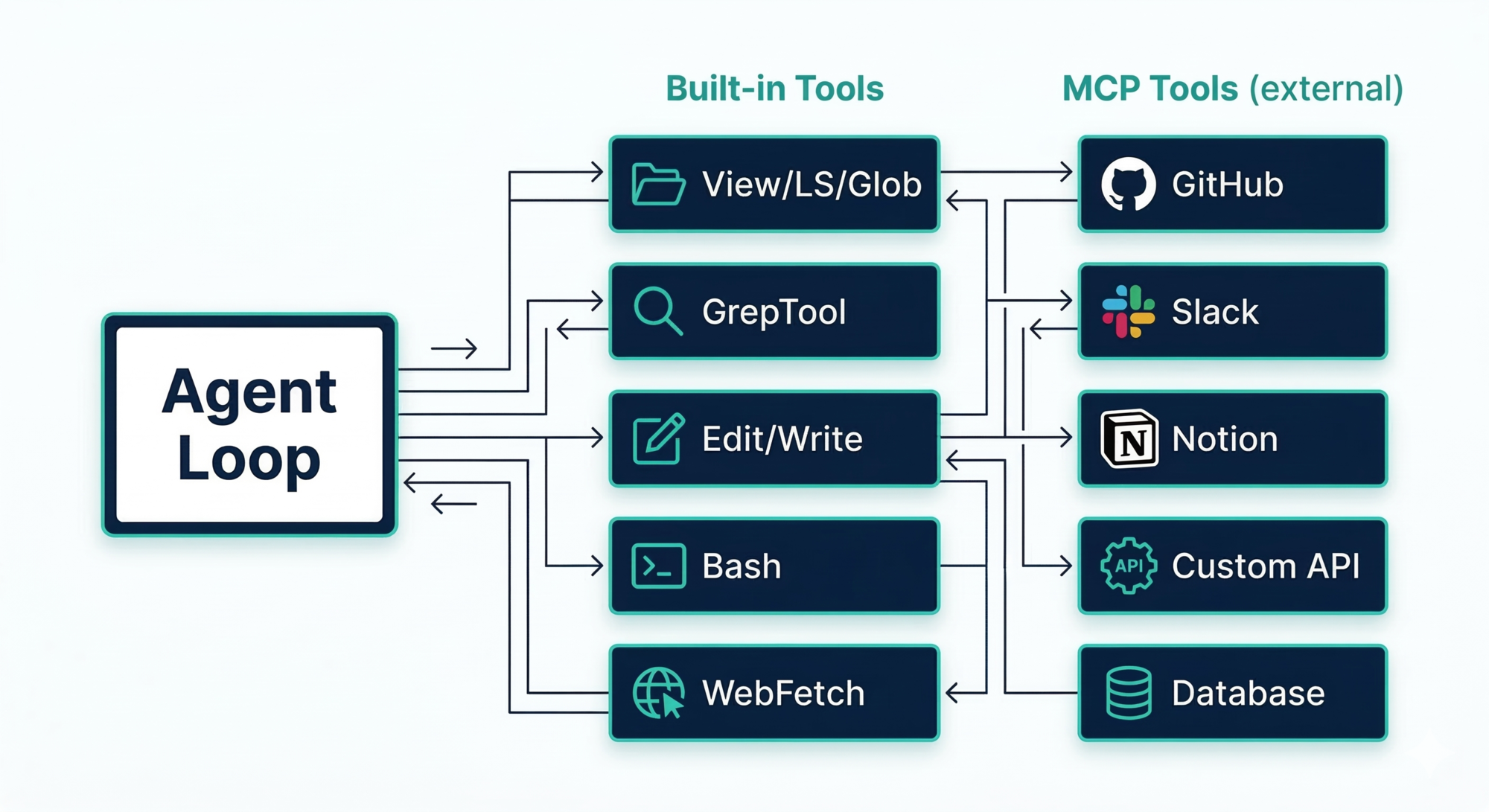
Design lesson: Separate your extension mechanisms by who triggers them and what they add. Skills add context automatically. Commands add explicit workflows. Subagents add delegation. MCP adds external reach. A single “plugin” abstraction tries to do all four and ends up doing none well.
A Worked Example: Fix the Login Bug
Let’s trace “fix the login bug in src/auth/” through every layer to make this concrete.
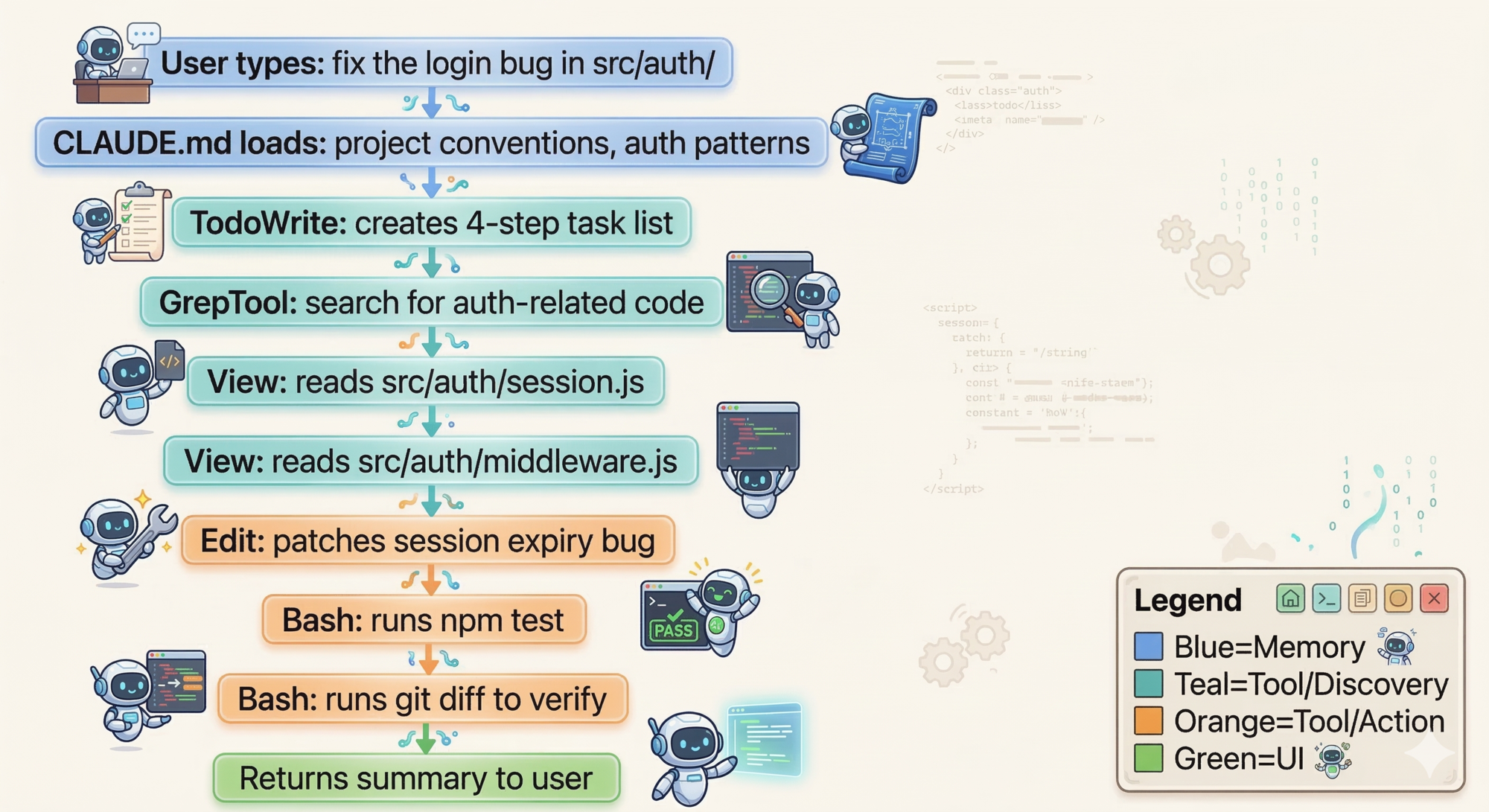
Here’s what happens step by step:
Session setup
- You type your request. The UI passes it to the agent loop.
CLAUDE.mdis already in context from session start — Claude knows this project’s conventions.
ReAct loop begins
- Think: Claude reasons it needs to understand the auth module first.
- Act: Calls
GrepTool, searching forsession,auth,middleware. - Observe: Found
src/auth/session.jsandsrc/auth/middleware.js. - Think: Should read those files to understand the current implementation.
- Act: Calls
Viewon both files. - Observe: Spots a session expiry bug on line 47 of
session.js. - Think: Knows the fix. Ready to apply it.
- Act: Calls
Editwith a targeted patch — you see a diff before anything is written. - Act: Calls
Bash— runsnpm test. - Observe: Tests pass.
Loop ends
- Claude produces a plain text response summarizing what it did. No more tool calls → loop terminates.
Notice the ReAct cycle in steps 3–12: Think → Act → Observe → Think → Act → Observe. Each observation changes what Claude thinks next. This is what makes it adaptive rather than scripted.
If the context window had been near-full when you started, the Compressor would have run first — summarizing the previous session and writing important context to MEMORY.md before starting fresh.
How Claude Code’s Choices Compare to Common Alternatives
| Problem | Common first instinct | Claude Code’s choice | Why |
|---|---|---|---|
| Agent loop design | DAG or agent graph | Single-threaded ReAct loop | Simpler to debug; flat message history is an audit trail |
| Search | Vector embeddings | Regex + ripgrep | Model understands code; no embedding infra needed |
| Memory | Vector database | Markdown files on disk | Simpler, version-controllable, human-readable |
| Multi-agent | Unrestricted spawning | Depth-capped subagents (max 1 level) | Prevents runaway recursion; results return to main loop |
| Tool interface | Custom per-tool handling | Uniform JSON in / text out | Generic loop; tools are independently testable |
| Context overflow | Truncate the old messages | Summarize + write to MEMORY.md | Preserves important information rather than silently losing it |
| Extensibility | Single “plugin” system | Skills + Commands + Subagents + MCP | Each adds a different kind of capability |
Key Takeaways
- Every AI agent needs to solve the same eight problems: perception, action, planning, memory, context management, safety, extensibility, and user control.
- Claude Code uses the ReAct pattern: Think → Act → Observe, repeated in a loop until done. The while-loop is the implementation; the model’s internal reasoning is the “think” step.
- The context window is your agent’s working memory. It has a hard limit. Design your overflow strategy before you hit production.
- Long-term memory is just files on disk.
CLAUDE.mdis what you write.MEMORY.mdis what Claude writes. Both are plain Markdown. - MCP extends the tool layer to any external service without touching the core loop.
- Three modes (Plan / Default / Auto-Accept) give users an explicit autonomy dial.
- The most powerful design choice in Claude Code might be what it didn’t build: no vector database, no multi-agent swarm, no complex threading. Simplicity is a feature.
What’s Next
Now that you understand the five layers and the ReAct pattern, we can go deeper on the most critical piece: the loop itself.
In Part 2: The Master Loop That Powers Everything, you’ll see:
- Why Claude Code’s simple while-loop beats complex orchestration graphs like LangGraph and CrewAI
- How streaming makes long-running loops feel responsive (the difference between a tool people use vs abandon)
- The async queue that enables mid-task steering without restarting
- Why the flat message history is a feature, not a limitation
- A worked example tracing a real task through exactly 6 loop iterations
The insight: a while-loop is surprisingly powerful when everything around it is well-designed.
References
Claude Code official documentation
- How Claude Code works — Anthropic official docs
- How Claude remembers your project — CLAUDE.md and memory system
- Claude Code permissions — Anthropic engineering blog
Architecture deep dives
- Claude Code: Behind-the-scenes of the master agent loop — PromptLayer
- Claude Code Internals, Part 1: High-Level Architecture — Marco Kotrotsos, Medium
- Inside Claude Code: The Architecture Nobody Explains — Medium
Operating modes
- Claude Code Mode Guide: Plan Mode, Auto-Accept, and Default Mode — Skill Gallery
- Plan Mode in Claude Code — codewithmukesh
- Claude Code Plan Mode & Workflow Tips from Creator — Hannah Stulberg
Memory and CLAUDE.md
- Writing a good CLAUDE.md — HumanLayer Blog
- You (probably) don’t understand Claude Code memory — Jose Parra
- Claude Code’s Hidden Memory Directory — Michael Livs
Extensibility
ReAct pattern
- ReAct: Synergizing Reasoning and Acting in Language Models — original paper, Yao et al.
- What is a ReAct Agent? — IBM Think
- Implementing ReAct from Scratch — Daily Dose of Data Science
MCP
- Model Context Protocol — official site
Have thoughts on this?
I read every email. If something resonated, felt wrong, or made you think — I'd love to hear from you.


Comments