
DeepSeek Harness: Agent Presets as Data, Not Code (Part 16)
Series: Inside the DeepSeek Harness — Part 16 of 16
In the week after DeepSeek Harness (dsh) shipped, two numbers told the same story from different angles. The repo crossed 80,000 GitHub stars in under a day. And under the dsh-plugin topic tag, more than 300 community plugins appeared in that same first day — skins, sidebar rewrites, a file-attachment helper, and modlens, the first plugin to give the agent eyes on a screenshot. Most of the coverage that followed was a tour of that surface: install it, try four demo tasks, marvel at the plugin count.
This post is about the design decision that made the plugin count possible, and it’s a decision most of that coverage skipped: an agent mode in dsh is not a hardcoded class, it’s a directory on disk. That single choice is also the sharpest point of contrast with this blog’s own Agent Harness series on Claude Code, where the four built-in agent types — Explore, Plan, General Purpose, Verification — are exactly that: built in, compiled, not something a user or a plugin author can add a fifth of without forking the harness itself.
The shape: a preset is a directory, not a class
Claude Code’s four agent types are TypeScript functions selecting from a closed set — as Part 9 of the Agent Harness series covers, Explore and Plan share a read-only toolset enforced by a dual lock (the prompt says no and the tool list physically excludes Edit/Write), General Purpose gets the full toolset, Verification is adversarial-by-construction. All four ship in the binary. Adding a fifth means shipping a new Claude Code release.
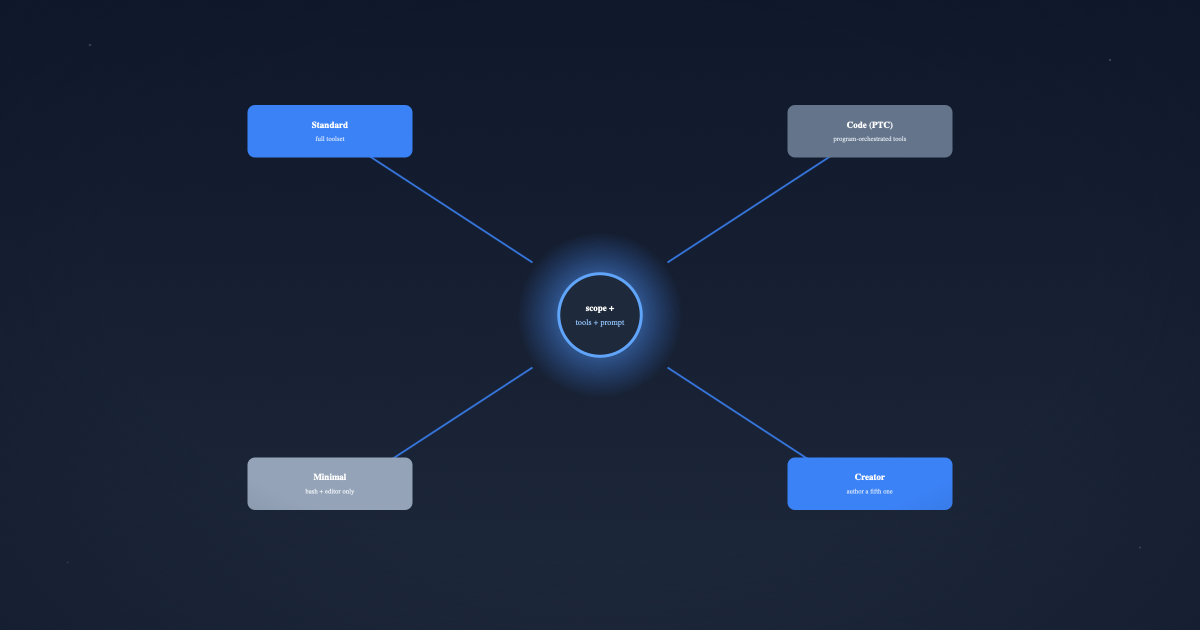
dsh took the same “what tools, what prompt, what capabilities does this agent get” question and answered it with a filesystem entry instead of a class. The design note that shipped this (.agents/notes/implemented/architecture/2026-08-03-per-session-agent-presets.md) states the mechanism plainly:
“A preset is a directory holding one
agent.cordis.yml. The agent factory’ssetup(agentCtx)mounts it as a Cordisincludesubtree plugged into that agent’s scope context.”
That’s Part 3’s “the agent is a registration scope” idea, reused rather than reinvented: a preset doesn’t get a new runtime concept, it gets plugged into the scope layer that already existed for exactly this purpose. No registry gained a tier. No session already running is touched. The whole feature is “point a cordis.yml at one agent’s scope” — a one-sentence idea sitting on three prior posts’ worth of infrastructure.
Two sessions in the same dsh process can be running genuinely different agents — different tools, different system prompt, different delegation backends — because “what the agent is” was demoted from a process-wide compile-time fact to a per-session mount. Measured cost for a twelve-row composition: ~3ms and ~600KB per session for the isolated default; a shared preset opts into a named Cordis realm only when it genuinely owns an expensive singleton. Isolation is the cheap default, not an optimization applied later — which matters for the next section, because it’s also what makes a preset authored by an untrusted plugin author safe to mount at all: its blast radius is one session.
The four shipped presets, as data
Every shipped preset lives at apps/cli/config/agent-presets/<id>/, each with a preset.yml (display metadata) and an agent.cordis.yml (the actual composition). Here’s the entire display layer of the Code preset — not a summary, the real file:
# apps/cli/config/agent-presets/code/preset.yml
name: PTC 模式
description: 具备标准模式的全部能力,并通过 Code Mode SDK 呈现工具,让模型用一个 TypeScript 程序组合多步操作。
order: 2
And its English string, from packages/client/ui-agent-preset/src/client/locales.ts:
| Preset id | Display name (EN / ZH) | What changes vs. Standard |
|---|---|---|
standard |
Standard mode / 标准模式 | Baseline: file editing, shell, search, skills, planning, goals, subagents, workflows |
code |
Code mode / PTC 模式 | Same toolset, exposed through the Code Mode SDK instead of one call per action |
minimal |
Minimal mode / 极简模式 | Two tools only: persistent bash + str_replace_editor — built for benchmarking, not use |
cordis |
Creator mode / 创造模式 | Standard’s toolset plus runtime inspection, plugin experiments, preset-authoring guidance |
Notice what’s not in that table: no branching logic, no if (mode === 'code') { ... } anywhere in the agent loop. The code preset’s agent.cordis.yml is a code comment away from admitting it — its own header reads:
“Everything in
standardis here unchanged. What is added is thetool-presentationrow: instead of one tool call per action, the model writes a TypeScript program against a generated SDK andrun_codeexecutes it.”
The entire behavioral difference between “Standard mode” and “PTC mode” is one row at the bottom of the file:
- id: tool-presentation
  name: '@deepseek-ai/dsh-agent-tool-presentation'
  config:
    mode: code
That’s the whole feature, from the composition’s point of view. Everything upstream of it — the shell tool, the filesystem tools, delegation, planning, compaction — is identical to Standard. Presenting them differently to the model is a presentation-layer decision, made in one config value, on one row, in one YAML file.
Code Mode / PTC: what that one row actually does
“PTC” is Programmatic Tool Calling — DeepSeek’s name for what other harnesses call Code Mode. The underlying seam is ctx.codeRuntime, documented in docs/subsystems/code-runtime.md:
“The code-execution seam — a capability seam whose Service Definition (
ctx.codeRuntime) runs one model-written program against host-provided async bindings and reports what it printed and returned. Code execution is one optional capability, not part of the agent-loop spine.”
That last sentence is the design decision worth sitting with. PTC isn’t a different agent loop, a different turn lifecycle, or a different tool-execution pipeline from Part 4 — Part 4’s eight-stage pipeline still runs, tools/pre-execute and the guards still see every call. What PTC changes is upstream of the pipeline: instead of the model emitting one tool/call per action and waiting for each tool/result, it writes a single TypeScript program against a generated SDK, and run_code — itself just a tool, subject to the same pipeline as everything else — executes the whole thing and reports what it printed and returned:
interface CodeRunRequest {
  program: string                    // runs as an async function body
  bindings: CodeBindingNamespace[]   // host functions, one global per namespace
  signal?: AbortSignal                // hard-stops the program, even mid-loop
}
A sequence that used to be five model round trips — read a file, grep for a pattern, edit three call sites, run the test — becomes one program the model writes once and the runtime executes straight through. The savings are real for anything with predictable multi-step shape: batch renames, parallel fan-out reads, orchestrating several tool calls whose outputs feed each other.
The tradeoff nobody’s tutorial mentioned: PTC’s savings assume the model can reliably write correct TypeScript against a generated SDK it’s never seen documentation for beyond its own type signatures. Reports on the project’s GitHub Discussions describe exactly the failure mode you’d predict — strong models (V4 Pro-class) handle PTC well, but a lighter model like V4 Flash starts making structural errors inside the generated program itself: wrong argument shapes, mishandled async bindings, control flow that doesn’t match what the SDK expects. The fix isn’t a runtime change, it’s an operational one: reserve PTC for models strong enough to write correct throwaway programs, and leave weaker routes on Standard mode’s one-call-at-a-time shape, where a single bad call fails loud instead of silently corrupting a five-step script.
That’s a genuinely different risk profile from Claude Code’s Streaming architecture (Part 10), which gets its multi-step speed from a different lever entirely — execute-on-arrival concurrency scheduling across ordinary one-call-per-action tool use, never asking the model to write a program. Two harnesses, two answers to “how do we make five-step tool sequences fast,” and the answers carry different failure modes: dsh’s is a code-correctness problem that scales with model strength; Claude Code’s is a concurrency-safety problem (Part 3’s binary safe/unsafe partitioning) that scales with how conservatively tools declare themselves.
Creator mode and the mechanics of 300+ plugins in a day
The plugin explosion wasn’t an accident of popularity — it was engineered into the authoring path. authoring.ts states the constraint that makes it safe to expose at all:
“The only authoring write is a whole-directory copy of an existing preset. No caller supplies composition text: the inputs are ids the host resolves against its own roots plus an optional display name, so authoring grants no capability the copied preset did not already carry.”
Creator mode doesn’t hand the model — or the user — a blank text box to write arbitrary Cordis YAML into a live process. It hands them duplicate: copy the standard preset (or any other) into a new directory under a writable user root, distinct from the shipped, read-only .system root. The new preset can only ever be as powerful as what it was copied from. This is the same “authorization can’t exceed what’s already true” instinct as Part 5’s capability seams — a preset author gets tools, not new capabilities. When “程序员鱼皮”’s tutorial walks through building a custom plugin live in Creator mode, what’s actually happening under the hood is: duplicate a known-safe composition into a directory the agent can read, edit, and iterate on, running as a fully isolated per-session mount that costs the host ~3ms to try and ~0ms to discard if it’s broken.
That combination — cheap isolated mounting, copy-only authoring, a preset that’s just a directory a git clone can carry — is what let a plugin ecosystem happen this fast. modlens, the vision-parsing plugin that solves “V4 Pro is text-only and can’t self-check a UI screenshot,” isn’t a fork of dsh. It’s a directory under the dsh-plugin GitHub topic tag that anyone’s dsh install can point a PresetRoot at. The mount registry’s broken-preset handling — a preset with an invalid composition stays on the roster with a recorded broken reason rather than silently vanishing — means a bad community plugin fails loud with a name attached, not as a mysterious missing agent.
Compare: Claude Code — presets-as-data vs. agent-types-as-code
This is the comparison the practice-focused tutorials skipped, and it’s the one with real design-pattern weight.
| Claude Code | DeepSeek Harness | |
|---|---|---|
| What defines an agent mode | A TypeScript function in the binary (Explore, Plan, General, Verify) | A directory: preset.yml + agent.cordis.yml |
| Adding a new mode | Requires a Claude Code release | duplicate an existing preset, edit the copy — no fork, no release |
| Enforcement mechanism | Dual lock: prompt instruction + physical tool-list exclusion (Part 9) | Composition-level: the tool simply isn’t a row in that preset’s YAML |
| Isolation between concurrent modes | N/A — agent types are stateless selectors, not standing sessions | Per-session Cordis subtree, ~600KB, unwinds with the agent |
| Who can create a new mode | Anthropic | Any user, any plugin author, or the agent itself in Creator mode |
| Blast radius of a bad mode | N/A (can’t happen outside a Claude Code release) | One session; broken presets are flagged, not silently hidden |
| Multi-step tool orchestration | Concurrency scheduling over one-call-per-action (Part 10) | PTC: model writes a TypeScript program, one seam (ctx.codeRuntime), model-strength-dependent |
Neither answer is strictly better — they’re optimizing for different things. Claude Code’s four hardcoded types get a real advantage from being closed: Anthropic can guarantee Explore genuinely cannot write a file, because the guarantee is load-bearing enough to ship as a security property, verified once, centrally. dsh’s presets-as-data model trades that centralized guarantee for something Claude Code structurally can’t offer — a plugin ecosystem. You cannot duplicate one of Claude Code’s four agent types into a fifth without Anthropic shipping it; you can duplicate any dsh preset in the time it takes to run one RPC call. The 300-plugins-in-a-day number isn’t a popularity fact. It’s the direct, measurable consequence of moving “what is an agent” from compiled code to a filesystem entry with a cheap, isolated, copy-only authoring path.
If you’re designing a harness and expect users to want new agent behaviors your own team didn’t anticipate, this is the pattern to steal: don’t add a config flag per mode, make the mode itself the unit a user can copy.
Where this leaves the series
Part 15 closed the series’ original arc by asking what a second production harness teaches when read against Claude Code’s. This post is the piece that arc was missing: the newest, most consequential design decision in dsh — and the one every tutorial-style writeup covered as a feature list rather than as a pattern. Presets as directories, PTC as one optional presentation row, and copy-only authoring as the mechanism behind a same-day plugin ecosystem: three decisions, one underlying move — demote what used to be compiled into the harness down to data the harness merely mounts.
This series runs all 16 parts today. If you’re arriving here first: Part 1 starts from the plugin foundation everything above — including this post’s include subtree mounting — is built on.
References
- DeepSeek AI,
deepseek-ai/deepseek-harness, pinned to commit47f9438—packages/preset/agent-presets/,packages/client/ui-agent-preset/src/client/locales.ts,packages/code-runtime/code-runtime/,apps/cli/config/agent-presets/ docs/subsystems/code-runtime.md— thectx.codeRuntimeseam and the Code Mode/PTC contract.agents/notes/implemented/architecture/2026-08-03-per-session-agent-presets.md— the design note this post is built from- This series’ Part 3, Part 4, and Part 15
- This blog’s Agent Harness series, Part 9 and Part 10 specifically
Have thoughts on this?
I read every email. If something resonated, felt wrong, or made you think — I'd love to hear from you.
Comments